183
To configure VoIP traffic settings:
1. Click Configuration, Voice VLAN, Configuration.
2. Configure any required changes to the VoIP settings for the switch or for a specific port.
3. Click Save.
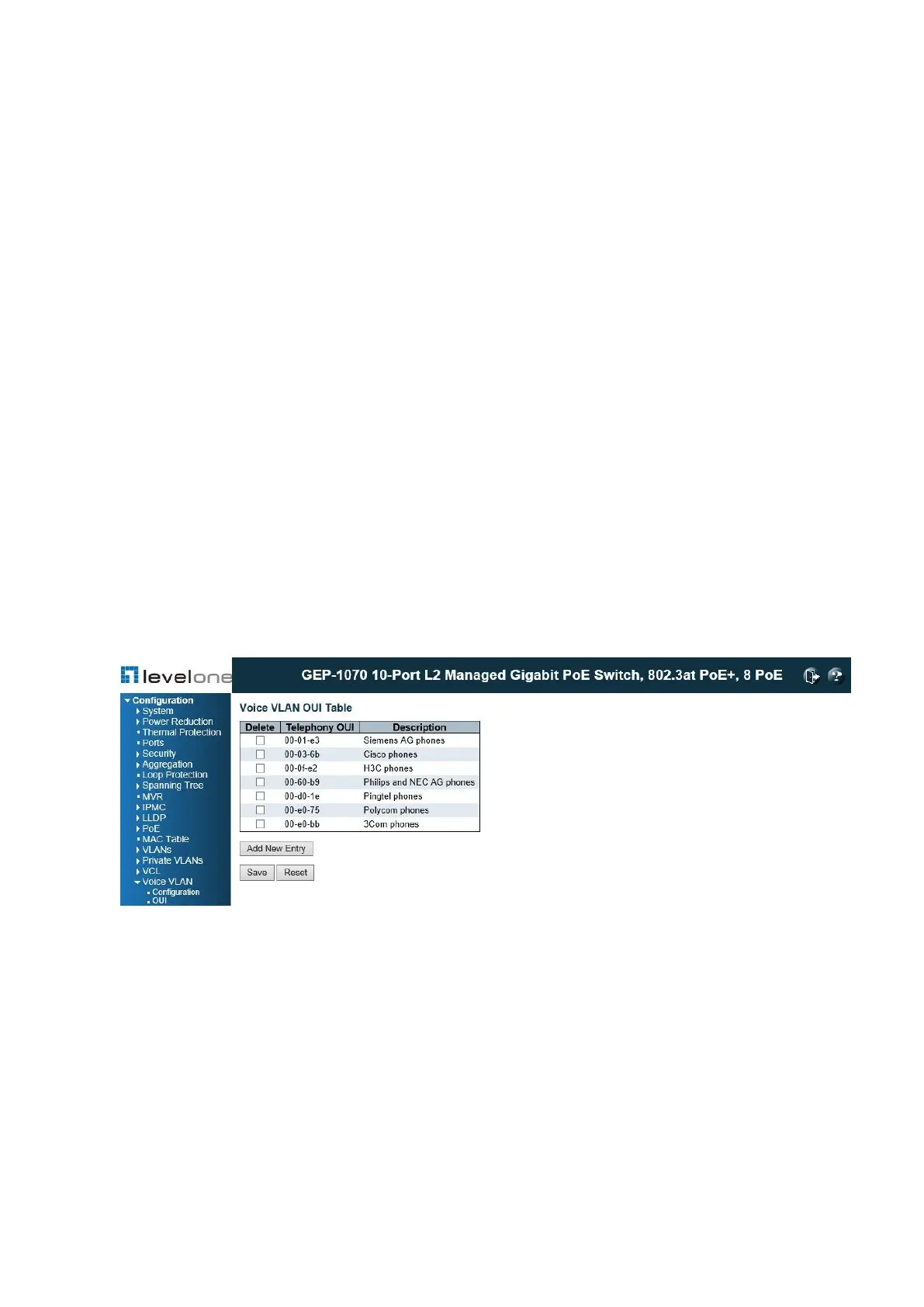
Configuring Telephony OUI
Use the Voice VLAN OUI Table to identify VoIP devices attached to the switch. VoIP devices
can be identified by the manufacturer’s Organizational Unique Identifier (OUI) in the source
MAC address of received packets. OUI numbers are assigned to manufacturers and form the
first three octets of device MAC addresses. The MAC OUI numbers for VoIP equipment can
be configured on the switch so that traffic from these devices is recognized as VoIP.
Note: Making any changes to the OUI table will restart the auto-detection process for
attached VoIP devices.
PATH
Configuration \ Voice VLAN \ OUI
Figure 75: Configuring an OUI Telephony List
PARAMETERS
These parameters are displayed:
◆ Telephony OUI – Specifies a globally unique identifier assigned to a vendor by IEEE to
identify VoIP equipment. The OUI must be 6 characters long and the input format “xx-xx-
xx” (where x is a hexadecimal digit).
◆ Description – User-defined text that identifies the VoIP devices.
WEB INTERFACE














 To Next Page