69
5. Enter a group name. Note that the views assigned to a group must be specified on the
SNMP Accesses Configuration menu.
6. Click Save.
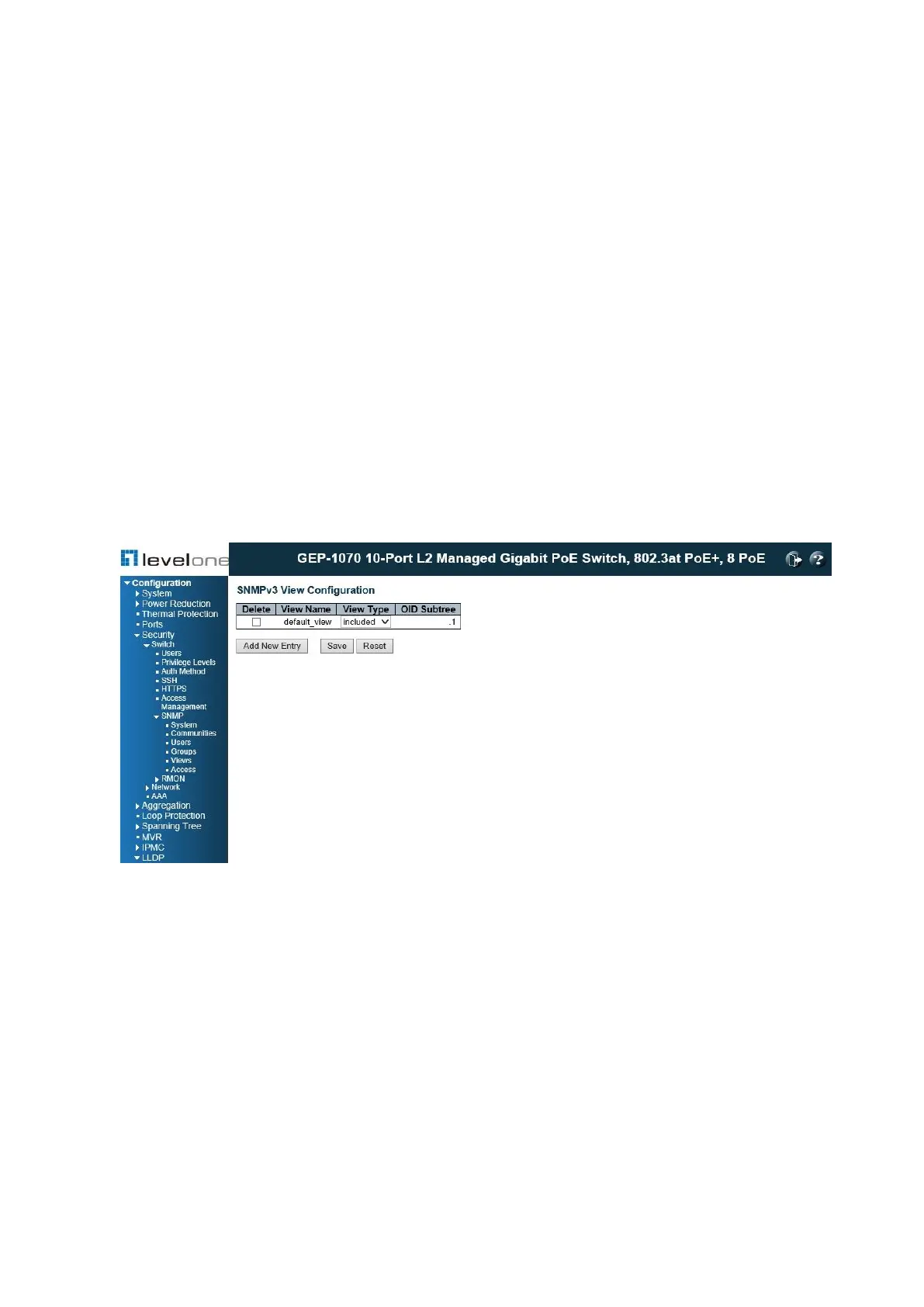
Configuring SNMPV3 Views
Use the SNMPv3 View Configuration page to define views which restrict user access to
specified portions of the MIB tree. The predefined view “default_view” includes access to the
entire MIB tree.
PATH
Configuration \ Security \ Switch \ SNMP \ Views
Figure 23: SNMPv3 View Configuration
PARAMETERS
These parameters are displayed:
◆ View Name – The name of the SNMP view. (Range: 1-32 characters, ASCII characters
33-126 only)
◆ View Type – Indicates if the object identifier of a branch within the MIB tree is included or
excluded from the SNMP view. Generally, if the view type of an entry is “excluded,”
another entry of view type “included” should exist and its OID subtree should overlap the
“excluded” view entry.
◆ OID Subtree – Object identifiers of branches within the MIB tree. Note that the first
character must be a period (.). Wild cards can be used to mask a specific portion of the





 To Next Page