1.PressthePOWERbuttononce.
TheShortcutsmenuisdisplayed.
2.Adjustthebrightnesstotherequiredlevelusing
theon-screenbrightnesssliderbarcontrol,or
3.TouchtheSunicontoincreasethebrightness
levelortheMoonicontodecreasethebrightness
level.
Note:Thebrightnesslevelcanalsobeincreased
bypressingthePowerbuttonmultipletimes.
Adjustingthedisplaybrightness
1.PressthePOWERbuttononce.
TheShortcutsmenuisdisplayed.
2.Adjustthebrightnesstotherequiredlevelusing
theRotarycontrol.
Note:Thebrightnesslevelcanalsobeincreased
bypressingthePowerbuttonmultipletimes.
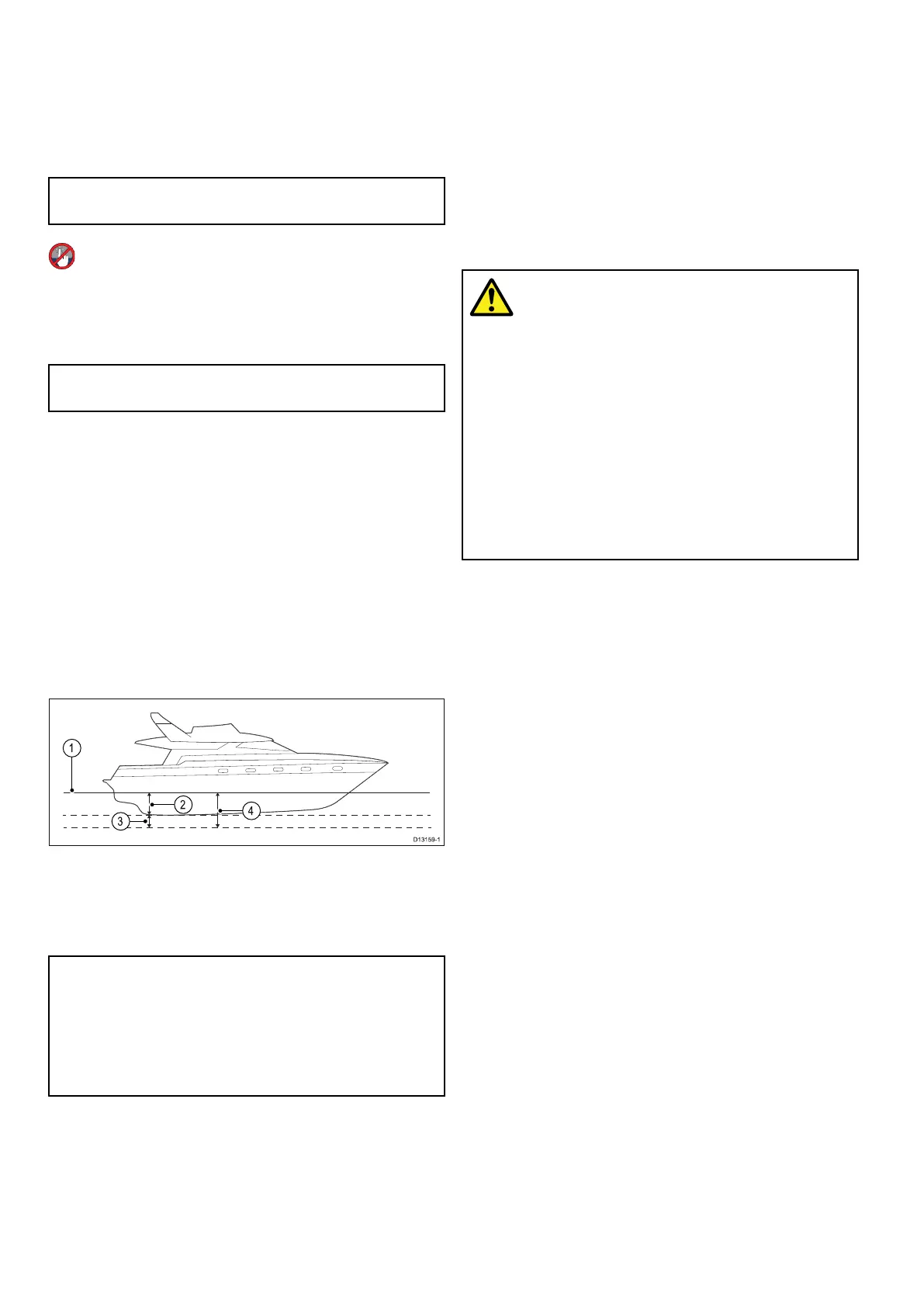
Minimumsafevesseldepth
AspartoftheInitialstartupwizardtheMinimum
SafeDepthvaluecanbeset.
MinimumSafeDepthcanbeestablishedbyadding
together:
•MaximumVesselDraft(i.e.thedistancefromthe
waterlinetothelowestpointofavessel’skeel.)
•SafetyMargin(anadequateclearancebelowthe
keeltoallowfordraftvariationandchangesin
waterorbottomconditions.)
i.e.:MinimumSafeDepth=MaximumVesselDraft
+SafetyMargin.
1.Waterline
2.MaximumVesselDraft
3.SafetyMargin
4.MinimumSafeDepth
Important:Theinformationbelowisprovided
forguidanceonlyandisnotexhaustive.Some
inuencingfactorscanbeuniquetocertainvessels
and/orareasofwaterandmaynotbelisted
below.YoushouldensureyouaccountforALL
factorsthatapplytoyourcurrentsituationwhen
makingcalculations.
Someofthefactorsthatcaninuencehowmucha
vesseldrawsareshownbelow:
•Vesseldisplacement(weight)—Avessel’sdraft
willincreasewhenitisfullyladenwhencompared
withitsunladendisplacement.
•Watertype—Avessel’sdraftwillincreaseby
approximately2%to3%infreshwatercompared
toseawater.
Someofthefactorsthatshouldbetakenintoaccount
whencalculatingaSafetyMarginare:
•Vesselmaneuveringcharacteristics—A
vessel’sdraftincreasesduetosquat,trim,roll,
pitchandheave.
•Chartaccuracy—Theelectronicchartdepth
maynotbeaccurateorthetruedepthmayhave
changedsincethelastsurvey.
•Weatherconditions—Highairpressure,and
prevailingwindstrengthanddirectioncanaffect
waveheight.
Warning:MinimumSafeDepth
TheMinimumSafeDepthsettingis
usedduringAutoroutingtorestrictthe
createdroutefromenteringwaterthatis
toshallowforthevessel.
Bottomdepthistakenfromcompatible
electronicnavigationalchartsand
MinimumSafeDepthisauser
calculation.Asbothofthesefactors
areoutsideofRaymarine’scontrol,
Raymarinewillnotbeheldliableforany
damage,physicalorotherwise,resulting
fromtheuseoftheAutoroutingfeature
ortheMinimumSafeDepthsetting.
SettingthevesselMinimumSafeDepth
Followthestepsbelowtoenteryourvessel’s
MinimumSafeDepth.
FromtheHomescreen:
1.SelectCustomize.
2.SelectBoatDetails.
3.SelectMin.SafeDepth.
4.EnteryourcalculatedMinimumSafeDepth.
Settingtimeanddatepreferences
Withthehomescreendisplayed:
1.SelectCustomize.
2.SelectTimeandDateSet-up.
3.UsetheDateFormat,TimeFormat,andLocal
Time:UTCmenuitemstosetyourtimeanddate
preferences.
Datamaster
Anysystemcontainingmorethanonenetworked
multifunctiondisplaymusthaveadesignateddata
master.
Thedatamasteristhedisplaywhichservesasa
primarysourceofdataforalldisplays,italsohandles
allexternalsourcesofinformation.Forexample
thedisplaysmayrequireheadinginformationfrom
theautopilotandGPSsystems,usuallyreceived
throughaSeaTalk
ng
orNMEAconnection.Thedata
masteristhedisplaytowhichtheSeaTalk,NMEA
andanyotherdataconnectionsaremade,itthen
bridgesthedatatotheSeaT alk
hs
networkandany
compatiblerepeatdisplays.Informationsharedby
thedatamasterincludes:
•Cartography
104aSeries/cSeries/eSeries



 To Next Page