18.10Chartdisplay
TheChartDisplaymenuoptiondeterminesthelevel
ofdetailthatisdisplayedon-screen.
TheChartdisplaymenuoptionisonlyavailable
whenusingvectorbasedcartography.
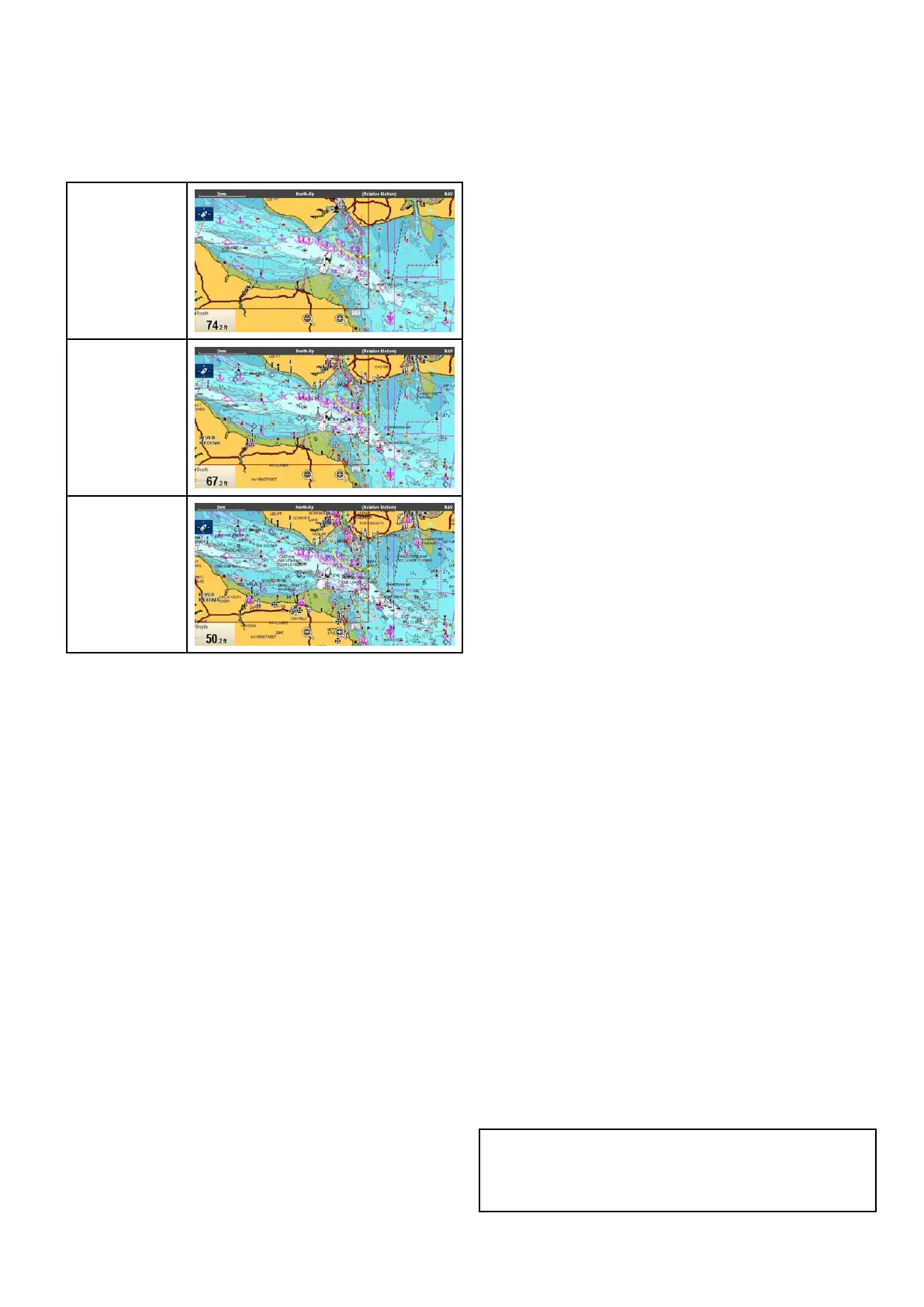
TheChartdisplayoptionsareshownbelow.
Simple
Detailed
ExtraDetailed
Thelevelofdetailshownon-screenisalsoaffected
bythecartographyChartdetailsettings.Referto
Chartdetailforinformation.
Changingthechartdisplaydetail
FromtheChartapplicationmenu:
1.SelectPresentation.
2.SelectChartDetail.
Thefollowingoptionsareavailable:
•Simple
•Detailed
•ExtraDetailed
3.Selecttherequiredoption.
18.11Overlays
Thecharthasanumberofoverlaysthatdisplay
differentviewsandinformation.Theoverlaysrequire
electronicchartswiththeappropriatefeaturesupport
andmayalsorequireadditionalhardwareand
servicesubscriptions.
Youcanoverlaythefollowingdataontoa2Dchart
togivegreaterdepthofinformation.Theoverlays
availableare:
•*AIS—ViewandtrackAIStargets.Thisoverlay
isnotavailablein3Dview.
•*Radar—Overlayradarontothechart.This
overlayisnotavailablein3Dview.
•**Aerial—Providesanaerial/satellite
photographyoverlay.
•**AerialOverlay:—Determinesthecoverageof
theaerialoverlay.
•*NOWRad—ProvidestheNOWRadweather
radaroverlay.Thisoverlayisnotavailablein3D
view.
•Databoxes—Selectwhetherdataboxesare
displayedon-screenandwhatdataisdisplayed.
•ChartGrid—Determineswhethergridlines
representinglongitudeandlatitudearedisplayed
onthechart.
•**2DShading—Determineswhetherterrain
shadingisdisplayedin2Dview.
•**CommunityEdits—Determineswhetherthe
communitylayerisenabledordisabled.
•**ChartText—Determineswhethercharttextis
displayed(placenamesandsoon).
•ChartBoundaries—Determineswhetheraline
indicatingthechartboundaryisdisplayed.
•RangeRings—ViewrangeringsintheChart
application.Thisoverlayisnotavailablein3D
view.
•SafeZoneRing—Viewsafezonering.This
overlayisnotavailablein3Dview.
•FuelRangeRing—Viewthefuelrangering.This
overlayisnotavailablein3Dview.
•BoatSize—Determinesthesizeoftheboaticon
on-screen.
•WaypointName—Determineswhetherthe
Waypointnamesaredisplayednexttowaypoints.
•RouteWidth—Determinethewidthofroutelines
on-screen.
•TrackWidth—Determinethewidthoftracklines
on-screen.
Note:
*Additionalhardwarerequired.
**Ifsupportedbyyourcartographytype.
Chartapplication
245



 To Next Page