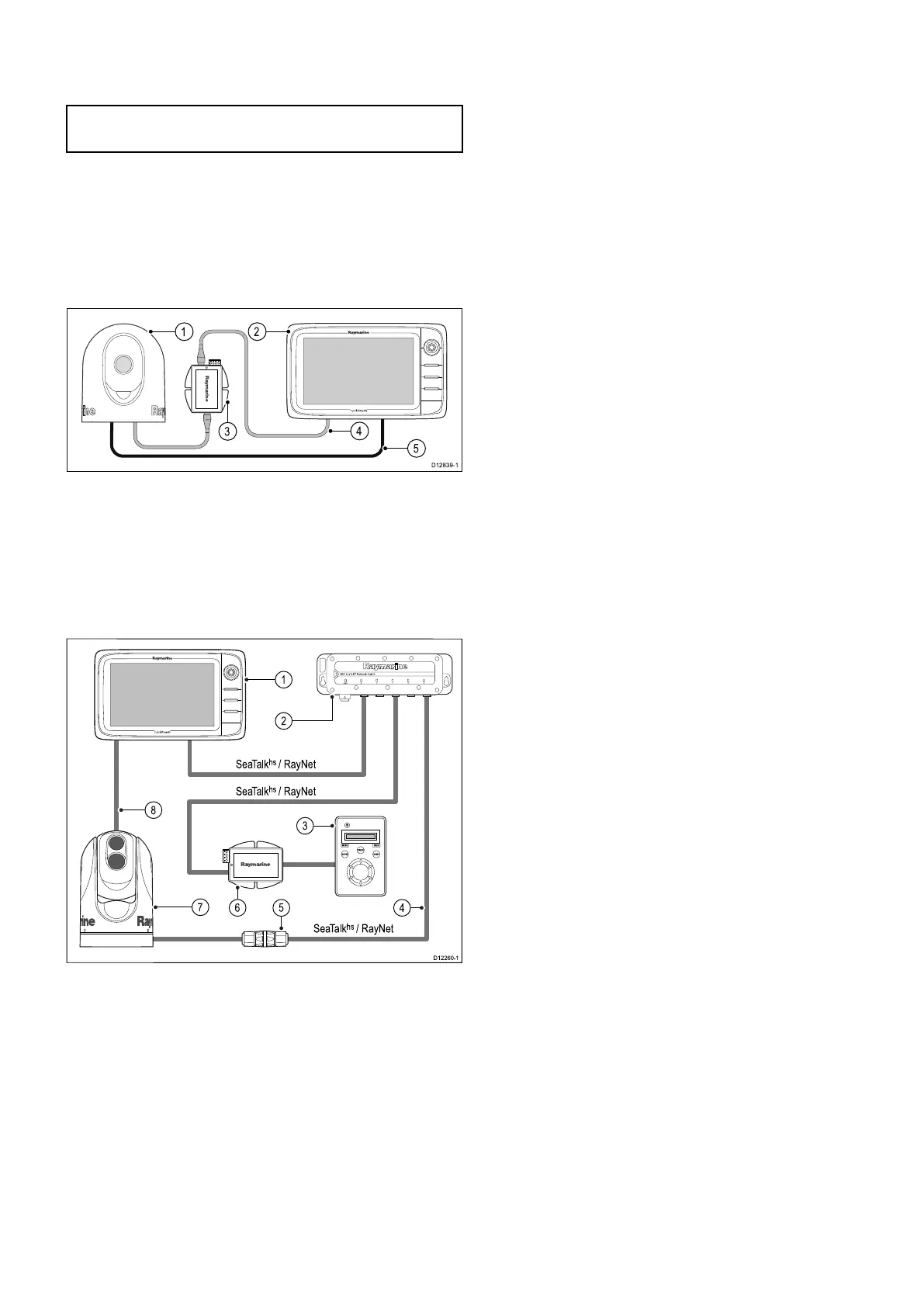
4.10Thermalcameraconnection
YoucanconnectathermalcameratoyourNewc
SeriesorNeweSeriesmultifunctiondisplays.
Note:NewaSeriesdoesnotsupportthermal
cameras.
ThecameraisusuallyconnectedviaaRaymarine
networkswitch.Ifyouwanttousetheoptional
JoystickControlUnit(JCU)withthecamerathis
mustalsobeconnectedtothenetworkswitch.A
compositevideoconnectionisrequiredbetweenthe
cameraandthemultifunctiondisplay.
T200Seriesthermalcameraconnection
1.T200Seriesxedmountthermalcamera.
2.Multifunctiondisplay.
3.PoweroverEthernet(PoE)Injector.
4.RayNettoRJ45SeaTalk
hs
adaptorcable.
5.Videocable.
T300/T400Seriesthermalcameraconnection.
2
3
4
56
D12260-1
1
8
7
SeaTalk
hs
/ RayNet
SeaTalk
hs
/ RayNet
SeaTalk
hs
/ RayNet
1.Multifunctiondisplay
2.Raymarinenetworkswitch
3.JoystickControlUnit(JCU),optional
4.SeaT alk
hs
toRayNetcable
5.Ethernetcablecoupler.
6.PoE(PoweroverEthernet)injector(only
requiredifusingtheoptionalJCU).
7.Thermalcamera
8.Videoconnection
Importantnotes
•Youcancontrolthethermalcamerausingyour
multifunctionaldisplay.TheJoystickControlUnit
(JCU)isoptional,butcanbeusedinconjunction
withthemultifunctionaldisplaytocontrolthe
thermalcameraifrequired.
•“Dualpayload”thermalcamerasinclude2
independentlenses;1forthermal(infrared)and
1forvisiblelight.Ifyouonlyhave1displayyou
shouldonlyconnectthevideocablelabelled“VIS
/IR”(visiblelight/infrared)tothedisplay.Ifyou
have2ormoredisplaysyoushouldconnect1
cabletoeachdisplay.
•Youcanonlyviewthethermalcameraimageon
themultifunctiondisplaytowhichthecamerais
physicallyconnected.Ifyouwanttoviewthe
thermalcameraimageonmorethan1displayyou
mustobtainasuitablethird-partyvideodistribution
unit.
•Forfurtherinformationregardingthecamera's
installation(includingconnectionsandmounting),
refertotheinstallationinstructionsthataccompany
thecamera.
Thermalcameracables
Cablingrequirementsforthermalcameras.
Cameratonetworkswitch
Anetworkpatchcableisrequiredtoconnectthe
cameratothenetworkswitch.Theconnectionis
madebetweenthecameracabletailandthenetwork
switchviathecoupler(suppliedwiththecamera).
Networkpatchcablesareavailableinavarietyof
lengths.
JoystickControlUnit(JCU)
AnEthernet(withpower)cableisusedtoconnect
theJCU.TheJCUissuppliedwitha7.62m(25ft)
Ethernetcableforthisconnection.Ifyourequire
adifferentlengthcontactyourdealerforsuitable
cables.
PoweroverEthernet(PoE)injectortonetwork
switch
Anetworkpatchcableisrequiredforconnectingthe
PoEinjectortothenetworkswitch.Networkpatch
cablesareavailableinavarietyoflengths.
Videocables
Videocablesarenotsuppliedwiththeproduct.
Pleasecontactyourdealerforsuitablecablesand
adaptors.
RaymarinerecommendstheuseofaBNC
terminatedRG5975ohm(orbetter)coaxialcable.
Cablesandconnections65



 To Next Page