4.11IPCameraconnections
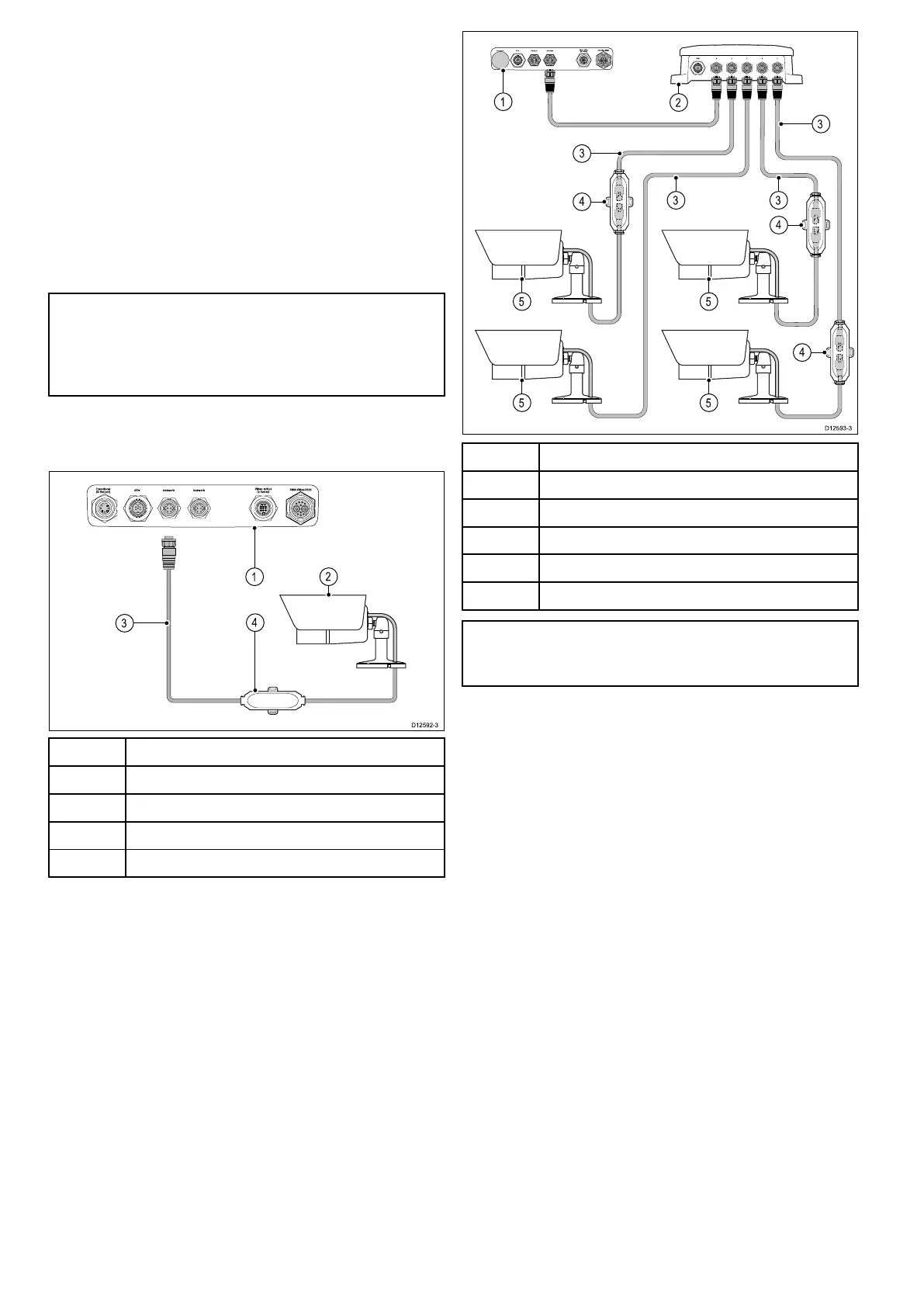
YoucanconnectIPcamerastoyourmultifunction
display.
CompatibleIPcamerasmustbeabletobe
conguredto:
•automaticallyassignanIPaddressviaDHCP
priortoconnectingtoyourmultifunctiondisplay
ornetwork.
•allowunauthenticated,anonymousONVIFaccess.
PleaserefertotheinstructionssuppliedwithyourIP
cameraforcongurationdetails.
Note:Theconnectionpanelonyourproductmay
lookslightlydifferentfromthatshown,depending
onvariant.Thenetworkconnectionmethod
remainsthesameforallproductsfeaturingRayNet
connectors.
IPcamera(s)canbeconnecteddirectlytothe
SeaTalk
hs
RayNetconnectoronyourmultifunction
display.
ItemDescription
1
Multifunctiondisplayrearconnectorpanel
2IPcamera
3RayNettoRJ45cable
4
SeaTalk
hs
crossovercoupler
YoucanalsoconnectmultipleIPcamerasviathe
SeaTalk
hs
network
ItemDescription
1
Multifunctiondisplay
2Raymarinenetworkswitch
3RayNettoRJ45adaptorcable
4
SeaTalk
hs
crossovercouplers
5
IPCameras
Note:a,candeSeriesmultifunctiondisplaysdo
notprovidepoweroverethernet(PoE);Connected
camerasmusthavetheirownpowersupply.
TipIfyourIPcamera(s)arenotdetectedbyyour
multifunctiondisplay,trypowercyclingtheIP
camera(s)whilstleavingyourmultifunctiondisplay
poweredup.
66aSeries/cSeries/eSeries



 To Next Page