24.1Cameraapplicationoverview
Youcanviewacameraoravideofeedwhichis
connecteddirectlytoyourmultifunctiondisplayusing
thevideoinput(s),orIPcamerafeedswhichare
availableonyournetwork.
TheCameraapplicationcanbeusedto:
•Displaylivecamerafeeds.
•Automaticallycyclethroughavailablecamera
feeds.
•Ifsupportedbythecamera,adjustthebrightness,
contrast,colorandaspectratioofthevideoimage.
•RecordaliveIPcamerafeed.
•PlaybackrecordedIPcamerafootage.
•View1camerafeedwhilstrecordingasecondIP
camerafeed.
•OpenadifferentapplicationwhilstrecordinganIP
camerafeed.
•TakephotosofanIPcamerafeed.
•Viewimages.
Note:Recordingandpicturetakingfunctionsare
onlyavailableonIPcamerafeeds.
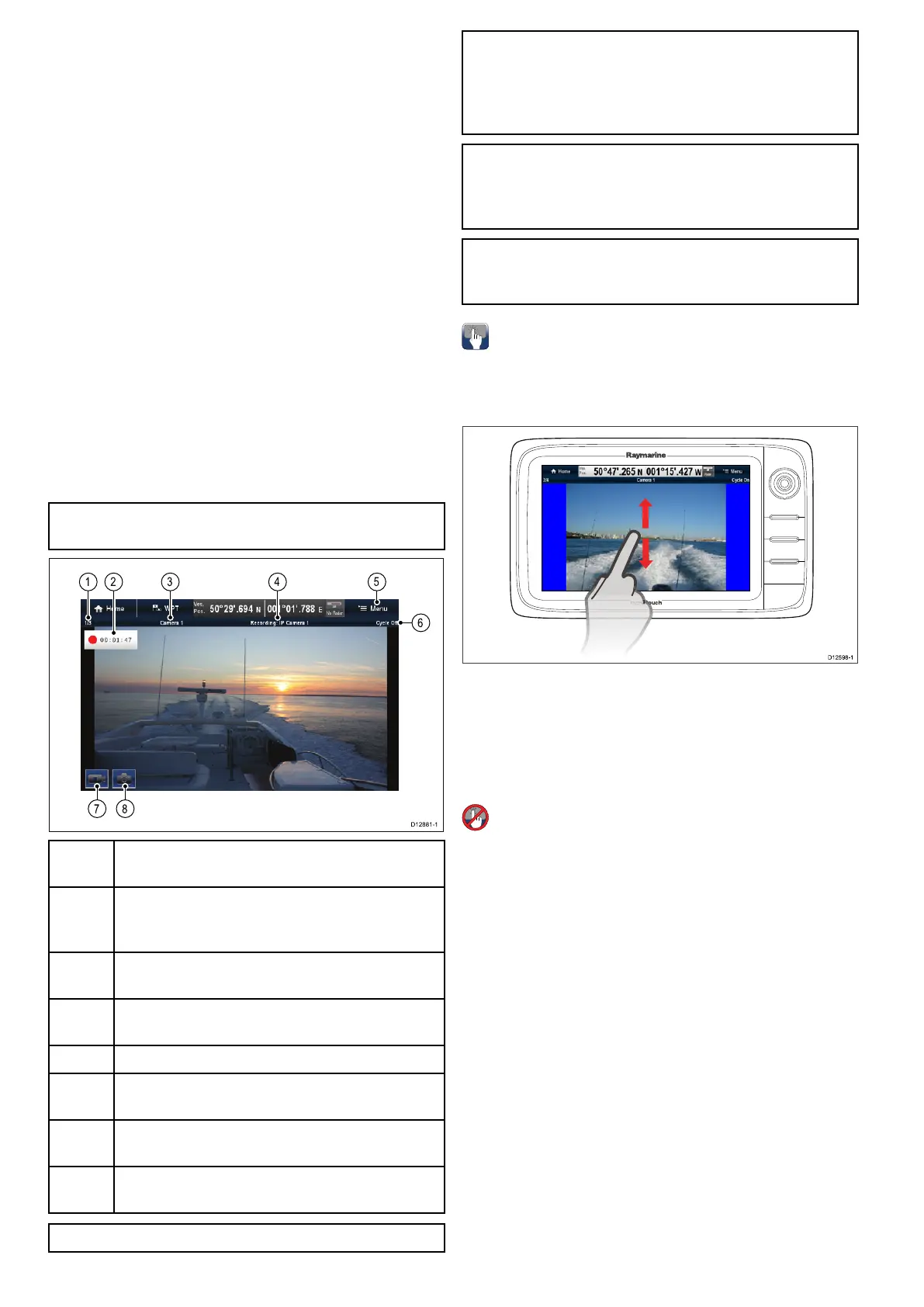
1
Camerafeednumber–indicatesthecurrentfeed
andnumberofavailablefeeds.
2Recordingstatus–indicatesthatthecamera
applicationisrecordingandthecurrentelapsed
time.
3
Cameraname–indicatesthenameofthecamera
thatiscurrentlydisplayed.
4
Recording–indicatesifthecameraapplicationis
recordingandwhichfeedisbeingrecorded.
5
Menu–OpenstheCameraapplicationmainmenu.
6
Cycle–indicatesifthefeedcyclingisturnedon
oroff.
7
*Recordvideo–temporaryonscreeniconto
Start/stoprecording.
8
*TakePhoto–temporaryonscreenicontotakea
photo.
Note:*Onlyavailableontouchscreendisplays.
Note:Yourmultifunctiondisplaymustbepowered
upbeforepowerisappliedtoanynetworked
IPcameras,thisistoenableyourmultifunction
displaytoassigntheIPcamera(s)avalidIP
address.
Note:IfyourIPcamera(s)arenotdetectedby
yourmultifunctiondisplay,trypowercyclingtheIP
camera(s)whilstleavingyourmultifunctiondisplay
poweredup.
Note:Forinformationonconnectingthecamera/
videosourceandcompatiblevideoformats,refer
totheChapter4Cablesandconnectionssection.
Changingthecamera/videofeed
OnaNewaSeriesorNeweSeriesdisplay,ifmore
than1feedisavailableyoucanchangewhichfeed
isdisplayedonthescreenusingtouch.
FromtheCameraapplication.
1.Touchandswipeyourngeruptomovetothe
nextvideofeed.
2.Touchandswipeyourngerdowntodisplaythe
previousvideofeed.
Changingthecamera/videofeed
OnaNewcSeriesorNeweSeriesdisplay,ifmore
than1feedisavailableyoucanchangewhichfeed
isdisplayedonthescreenusingtheJoystick.
FromtheCameraapplication
1.MovetheJoystickDowntodisplaythenext
videofeed.
2.MovetheJoystickUptodisplaytheprevious
videofeed.
Changingthecamera/videofeedusingthe
menu
Onalldisplayvariants,whenmorethan1feedis
available,youcanchangewhichfeedisdisplayed
onthescreenusingthemenu.
FromtheCameraapplicationwithacamera/video
feeddisplayed:
1.SelectMenu.
2.SelectCamera.
3.Selectthecamerafeedyouwanttodisplayon
thescreen.
366aSeries/cSeries/eSeries



 To Next Page