16.1AISoverview
TheAISfeatureenablesyoutoreceiveinformation
broadcastbyothervessels,andtoaddthesevessels
astargetsinthechartandradarapplications.
WithanoptionalAISunitconnectedtoyoursystem
youcan:
•DisplaytargetsforanyotherAIS-equipped
vessels.
•Displayvoyageinformationbeingbroadcastby
thesetargets,suchastheirposition,course,
speedandrate-of-turn.
•Displaybasicordetailedinformationforeach
targetvessel,includingsafety-criticaltargetdata.
•Setupasafezonearoundyourvessel.
•ViewAISalarmandsafety-relatedmessages.
•AddAIS-equippedfriendsandregularcontactsto
a“BuddyList”
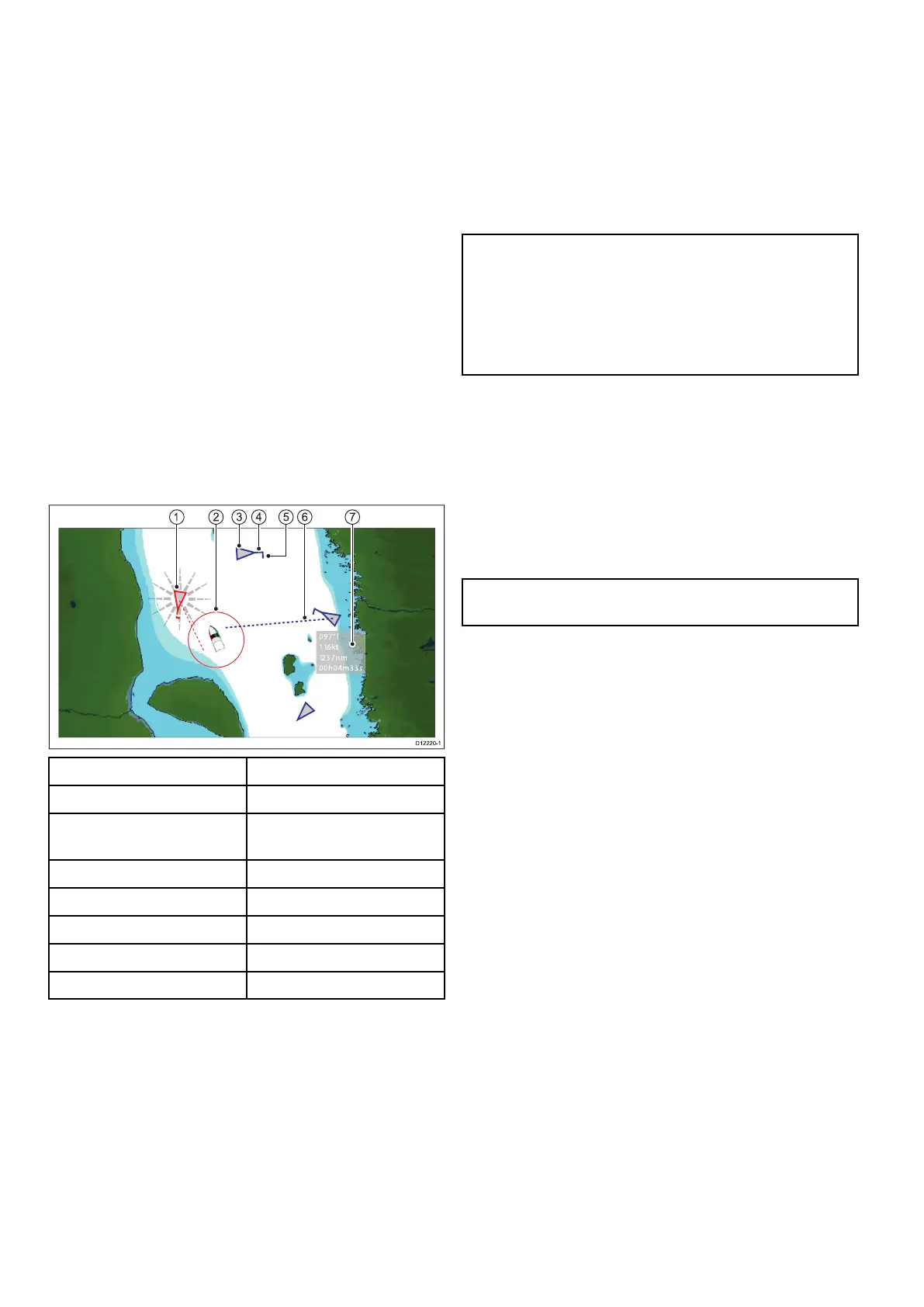
AISinformationisdisplayedintheformofanoverlay
inthechartandradarapplications.Additionaldatais
displayedinadialogbox,forexample:
97°T
11.6kt
1.237nm
00h04m33s
1
3
2 4 6 75
D12220-1
ItemDescription
1
Dangeroustarget(ashes).
2
Safezone(denedby
distanceand/ortime).
3
AIStargetvessel.
4Heading.
5
Directionofturn.
6
COG/SOGvector.
7
Safetycriticaldata.
AIS-equippedvesselsinthesurroundingarea
aredisplayedinthechartorradarapplicationas
triangulartargets.Upto100targetsaredisplayed.
Asthevessel’sstatuschanges,thesymbolforthe
targetchangesaccordingly.
Vectorscanbedisplayedforeachtarget.These
vectorsindicatethevesselsdirectionoftraveland
thedistanceitwilltraveloveraspeciedperiodof
time(COG/SOGvector).T argetsdisplayedwith
theirvectorsarereferredtoas‘activetargets’and
arescaledaccordingtothesizeofthevessel.The
largerthevessel,thelargerthetarget.Youcan
eitherdisplayalltargetsorjustdangeroustargets.
HowAISWorks
AISusesdigitalradiosignalstobroadcast‘real-time’
informationbetweenvesselsandshore-based
stationsviadedicatedVHFradiofrequencies.This
informationisusedtoidentifyandtrackvesselsin
thesurroundingareaandtoprovidefast,automatic
andaccuratecollisionavoidancedata.TheAIS
featurescomplementtheradarapplication,asAIS
canoperateinradarblindspotsandcandetect
smallervesselsequippedwithAIS.
Note:Itmaynotbemandatoryforvesselstobe
ttedwithoperationalAISequipment.Therefore,
youshouldnotassumethatyourmultifunction
displaywillshowALLvesselsinyourarea.Due
prudenceandjudgementshouldbeexercised.
AISshouldbeusedtocomplementradar,NOT
substituteit.
AISSimulatorMode
Raymarinerecommendsthatyouusethesimulator
functiontofamiliarizeyourselfwiththeAIS
features.Whenthesimulatorfunctionisenabled
(homescreen>Set-up>SystemSettings>
Simulator),itdisplays20AIStargetswithina25
nmrange.Thesetargetsaredisplayedusingthe
appropriateAIStarget'sstatussymbol,andmove
aroundthescreenasiftheywererealtargets.
Note:IncomingsafetymessagesareNOT
displayedwhilethesimulatorisenabled.
198aSeries/cSeries/eSeries



 To Next Page