8.1Memorycardsandchartcards
MicroSDmemorycardscanbeusedtobackup/
archivedata(e.g.Waypoint,andTracks).Once
dataisbackeduptoamemorycardolddatacan
bedeletedfromthesystem,creatingcapacityfor
newdata.Thearchiveddatacanberetrievedatany
time.Chartcardsprovideadditionalorupgraded
cartography.
Itisrecommendedthatyourdataisbackeduptoa
memorycardonaregularbasis.DoNOTsavedata
toamemorycardcontainingcartography.
Compatiblecards
ThefollowingtypesofMicroSDcardsarecompatible
withyourdisplay:
•MicroSecureDigitalStandard-Capacity
(MicroSDSC)
•MicroSecureDigitalHigh-Capacity(MicroSDHC)
Note:
•Themaximumsupportedmemorycardcapacity
is32GB.
•MicroSDcardsmustbeformattedtouseeither
theFATorFAT32lesystemformattoenable
usewithyourMFD.
Speedclassrating
Forbestperformanceitisrecommendedthatyou
useClass10orUHS(UltraHighSpeed)class
memorycards.
Chartcards
Yourproductispre-loadedwithelectroniccharts
(worldwidebasemap).Ifyouwishtousedifferent
chartdata,youcaninsertcompatiblechartcardsinto
theunit'smemorycardreader.
Usebrandedchartcardsandmemorycards
Whenarchivingdataorcreatinganelectronicchart
card,Raymarinerecommendstheuseofquality
brandedmemorycards.Somebrandsofmemory
cardmaynotworkinyourunit.Pleasecontact
customersupportforalistofrecommendedcards.
8.2a6xanda7x
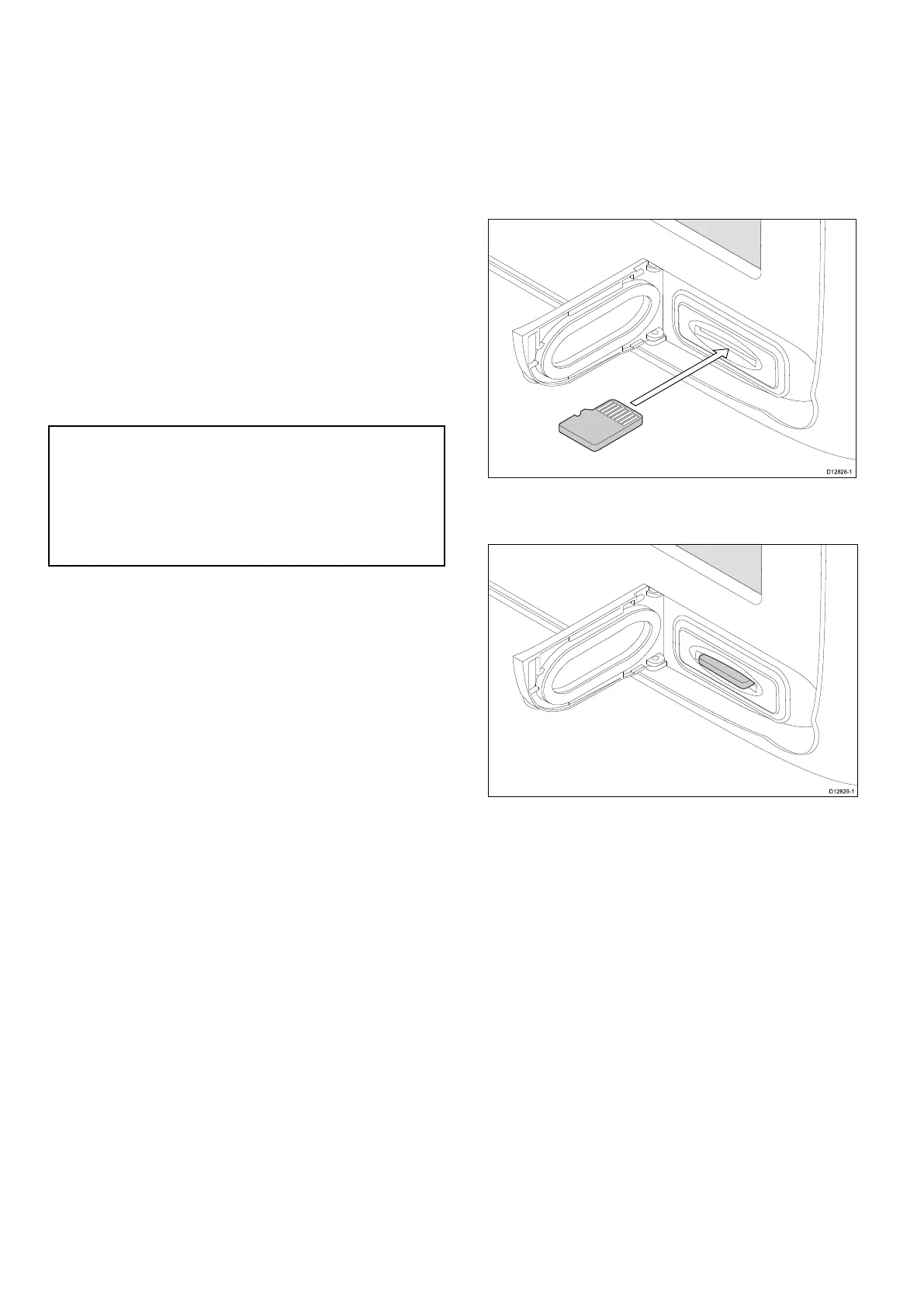
Insertingamemorycardorchartcard
1.Openthecardreaderdoor,locatedonthefront
rightofthedisplay.
2.Insertthecard,asshowninthediagrambelow,
thecardcontactsshouldbefacingUP .DoNOT
forcethecard.Ifthecarddoesnotteasilyinto
theslot,checktheorientation.
3.Gentlypressthecardallthewayintothecard
slot,asshowninthediagrambelow.Thecardis
securewhenanaudibleclickisheard.
4.Topreventtheingressofwaterandconsequent
damage,closethecardreaderdoor.
Removingamemorycardorchartcard
Fromthehomescreen:
1.SelectMyData.
2.SelectEjectCard.
3.Openthecardreaderdoor,locatedonthefront
rightofthedisplay.
4.Pushtheedgeofthecardtowardstheunit,until
anaudibleclickisheard.
Thecardisreleasedfromthecardslot
mechanism,asshowninthefollowingdiagram:
122
aSeries/cSeries/eSeries



 To Next Page