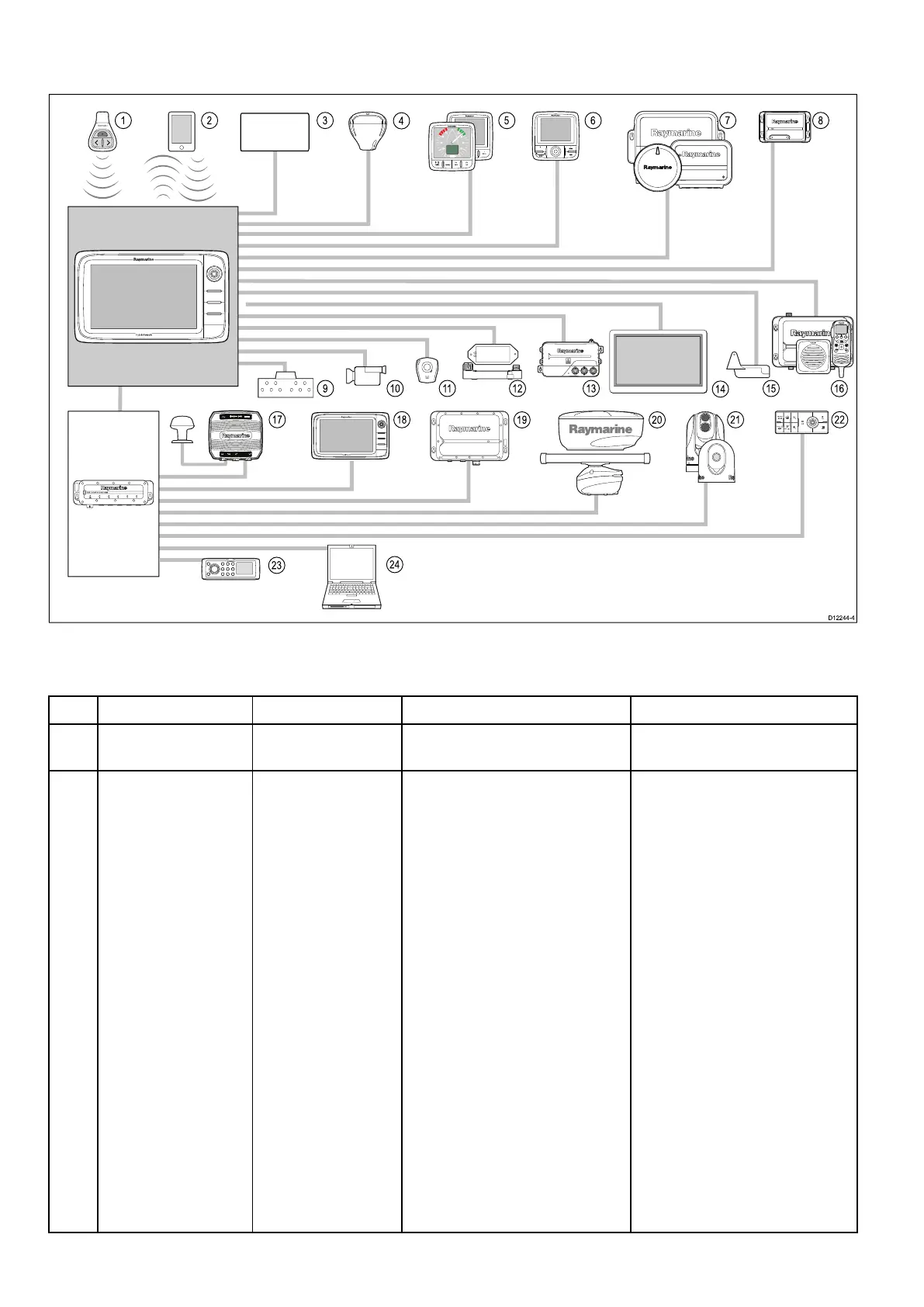
3.1Systemintegration
Yourmultifunctiondisplayiscompatiblewithawiderangeofmarineelectronicsdevices.
1 2 8
5 6
73
16
109 11 12 13 15
4
1817
19
20
21 22
23
24
D12244-4
14
0
POWER
0
0
00
TackTrue/AppDisplay VMG
00
INTCM
Thedisplayusesanumberofprotocolstotransferdatabetweenthevariousdevicesinyoursystem.The
followingtabledetailswhichdevicesmaybeconnectedtoyourdisplay,andthetypeofconnections(in
termsofprotocolsandphysicalinterfaces):
ItemDeviceTypeMaximumquantitySuitableDevicesConnections
1Remotecontrol
1permultifunction
display.
RaymarineRCU-3
Bluetooth
2
Smartphone/Tablet
device
1permultifunction
display.
ForRaymarinewirelessvideo
streamingandremotecontrol
apps:
•AppleiPhone4(orlater)oriPad
2(orlater)
•Androiddevicewithminimum
1GHzprocessorandrunning
android2.2.2(orlater)
•AmazonKindleFire
Forchartplottersyncwith
NavionicsMarineapp:
•AppleiPhoneoriPad
•Android-compatiblesmartphone
ortablet
Formediaplayercontrol(a,eand
gSSeriesonly):
•AnyBluetooth-enableddevice
thatsupportsBluetooth2.1+
EDRpowerclass1.5(supported
prole:AVRCP1.0)
•Chartplottersyncwith
NavionicsMarineapp:Wi-Fi
•Videostreamingandremote
control:Wi-Fi
•Mediaplayercontrol:Bluetooth
2.1+EDRpowerclass1.5
(supportedprole:AVRCP1.0)
orlater
32aSeries/cSeries/eSeries



 To Next Page