18.8Chartmotionmode
Themotionmodecontrolstherelationshipbetween
thechartandyourvessel.
Whilstmotionmodeisactive,asyourvesselmoves,
thechartisredrawntokeepthevesselon-screen.
The3motionmodesare:
•RelativeMotion(default)
•TrueMotion
•AutoRange.
Note:Inthe3Dchartview,onlyRelativeMotion
modeisavailable.
Thecurrentmotionmodeappliestotheactive
instanceofthechartapplication.
Whenyoupanthechartthemotionmodeisno
longeractive.Thisisindicatedinthestatusbarby
bracketsaroundthemotionmode—forexample,
(RelativeMotion).Thisenablesyoutoviewanother
areaofthechartwhilstnavigating.T oresetthe
motionmodeandreturnyourvesseltothescreen,
selecttheFindShipiconorselectFindShipfrom
themenu.Manuallychangingtherangeorpanning
thechartinautorangealsosuspendsmotionmode.
Thedefaultsettingisrelativemotionwiththeboat
iconpositionedinthecenterofthescreen.The
modethatyouselectisrestoredatpowerup.
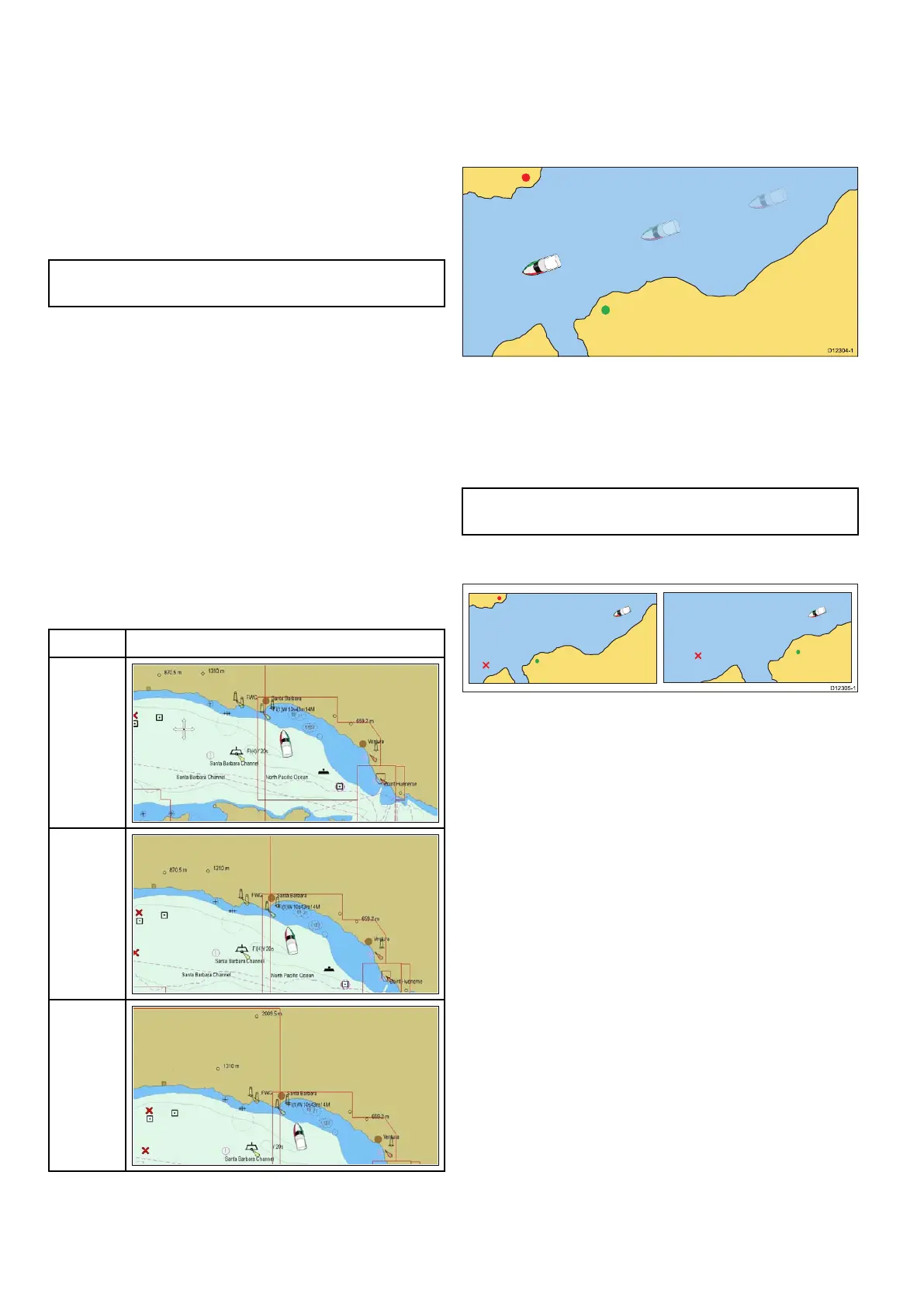
Boatpositions(RelativeMotiononly)
PositionExample
Center
Partial
Offset
Full
Offset
WhenthemotionmodeissettoRelativeMotion,the
positionofyourvesselisxedon-screenandthe
chartpicturemovesrelativetoyourvessel.Youcan
usetheMenu>Presentation>View&Motion>
BoatPosition:menuoptionstodeterminewhether
thevesselisxedinthecenterofthewindowor
offset.IfyouchangethepositiontoPartialOffset
orFullOffset,theviewaheadofyourvesselwillbe
increased.
TrueMotion
WhenthemotionmodeissettoTrueMotion,
thechartisxedandthevesselmovesintrue
perspectivetoxedlandmasseson-screen.Asthe
vessel’spositionapproachestheedgeofthescreen,
thechartpictureisautomaticallyresettorevealthe
areaaheadofthevessel.
Note:ItisnotpossibletoselectTrueMotionwhen
theorientationissettoHeadUp.
AutoRange
AutoRangeselectsandmaintainsthelargest
possiblescaleofchartthatwilldisplayboththe
vesselandthetargetwaypoint.Autorangeisnot
availableifradar-chartsynchronizationison.
Settingthemotionmode
Tochangethemotionmodefollowthestepsbelow.
Fromthechartapplicationmenu:
1.SelectPresentation.
2.SelectView&Motion.
3.SelectMotionMode:.
4.SelectTrueMotion,RelativeMotion,orAuto
Rangeoptionasappropriate.
Onceselectedthescreenwillupdatetoreectthe
newmode.
Changingthepositionoftheboaticon
Fromthechartapplicationmenu:
1.SelectPresentation.
2.SelectView&Motion.
3.SelectBoatPosition.
4.SelectCenter,PartialOffset,orFullOffsetas
appropriate.
242
aSeries/cSeries/eSeries



 To Next Page