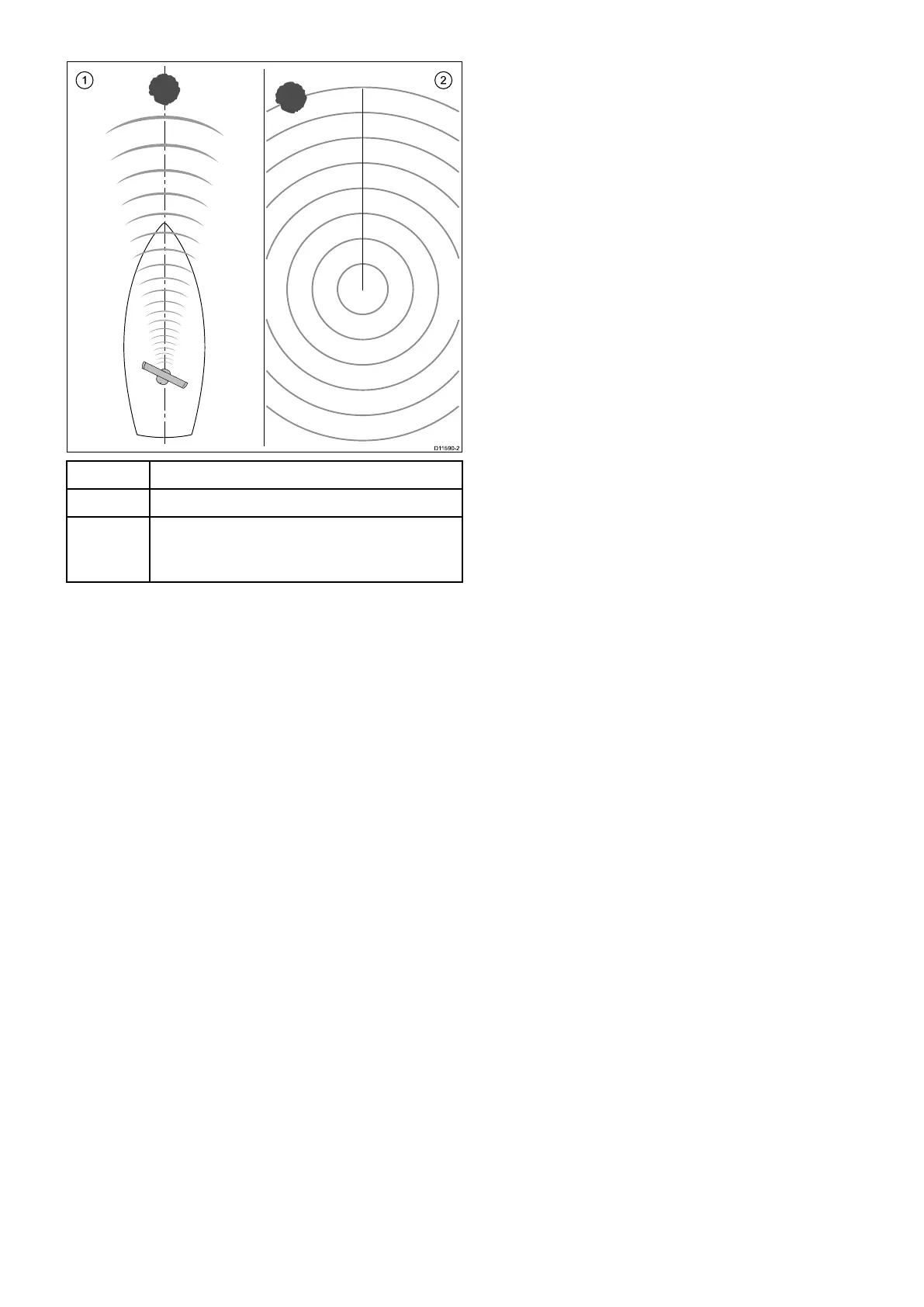
Examplemisalignedradar
ItemDescription
1
Targetobject(suchasabuoy)deadahead.
2Targetdisplayedontheradardisplayisnot
alignedwiththeShip'sHeadingMarker(SHM).
Bearingalignmentisrequired.
Checkingthebearingalignment
1.Withyourvesselunderway:Alignthebowwith
astationaryobjectidentiedontheradardisplay
Anobjectbetween1&2NMdistantisideal.
2.Notethepositionoftheobjectontheradar
display.Ifthetargetisnotundertheships
headingmarker(SHM),thereisanalignment
errorandyouwillneedtocarryoutbearing
alignmentadjustment.
Adjustingthebearingalignment
Onceyouhavecheckedthebearingalignmentyou
canproceedandmakeanyrequiredadjustments.
Withtheradarapplicationdisplayed:
1.SelectMenu.
2.SelectRadarSet-up.
3.SelectAdvanced.
4.SelectBearingAlignment.
SelectingBearingAlignmentdisplaysthenumeric
adjustcontrol.
5.Adjustthesettingsothattheselectedtargetis
undertheShip’sHeadingMarker.
6.SelectBackorOkwhencomplete.
7.3Sonarcheck
Sonartransducerandsonarmodule
selection
YoumustselectthesonartransducerandSonar
modulethatyouwanttouseinthedisplayed
Fishnderapplicationpane.
Sonarmoduleselection
•SonarandDownVision
TM
variantdisplaysare
ttedwithaninternalsonarmodule.
•Allvariantsallowyoutoconnectacompatible
externalsonarmoduleoruseaninternalsonar
modulefromanetworkeddisplay.
•Thesonarchannelyouwanttousemustbe
selectedfromtheFishndermenu.
Transducerselection
•Sonarvariantdisplaysallowdirectconnectionofa
RaymarineORaMinnKotasonartransducer.
•DownVision
TM
variantdisplaysallowdirect
connectionofRaymarineDownVision
TM
transducers.
•AllvariantsallowtheconnectionofaRaymarine
sonartransducerviaacompatibleexternalsonar
module.
•ForallvariantsusetheTransducerSet-Up
menuintheFishnderapplicationtospecifythe
transduceryouwanttouse.
Selectingthesonarchannel
Toselectthechannelyouwanttodisplayfollowthe
stepsbelow.
FromtheFishnderapplication:
1.SelectMenu.
2.SelectChannel.
TheChannelselectionpageisdisplayed.
3.Selectthetabforthesonarmoduleyouwantto
use.
Alistofavailablechannelsfortheselectedsonar
moduleisdisplayed.
4.Selectachannelfromthelist.
TheChannelselectionpagewillcloseandthe
Fishnderapplicationwillnowshowtheselected
channel.
Selectingthesonartransducer
Withtheshnderapplicationdisplayed:
1.SelectMenu.
2.SelectSet-Up.
3.SelectTransducerSet-Up.
4.SelectTransducer.
Alistoftransducersisdisplayed.
5.Selectthetransduceryouwanttouse.
Selectingthespeedtransducer
Withtheshnderapplicationdisplayed:
1.SelectMenu.
2.SelectSet-Up.
3.SelectTransducerSet-Up.
Systemchecks
117



 To Next Page