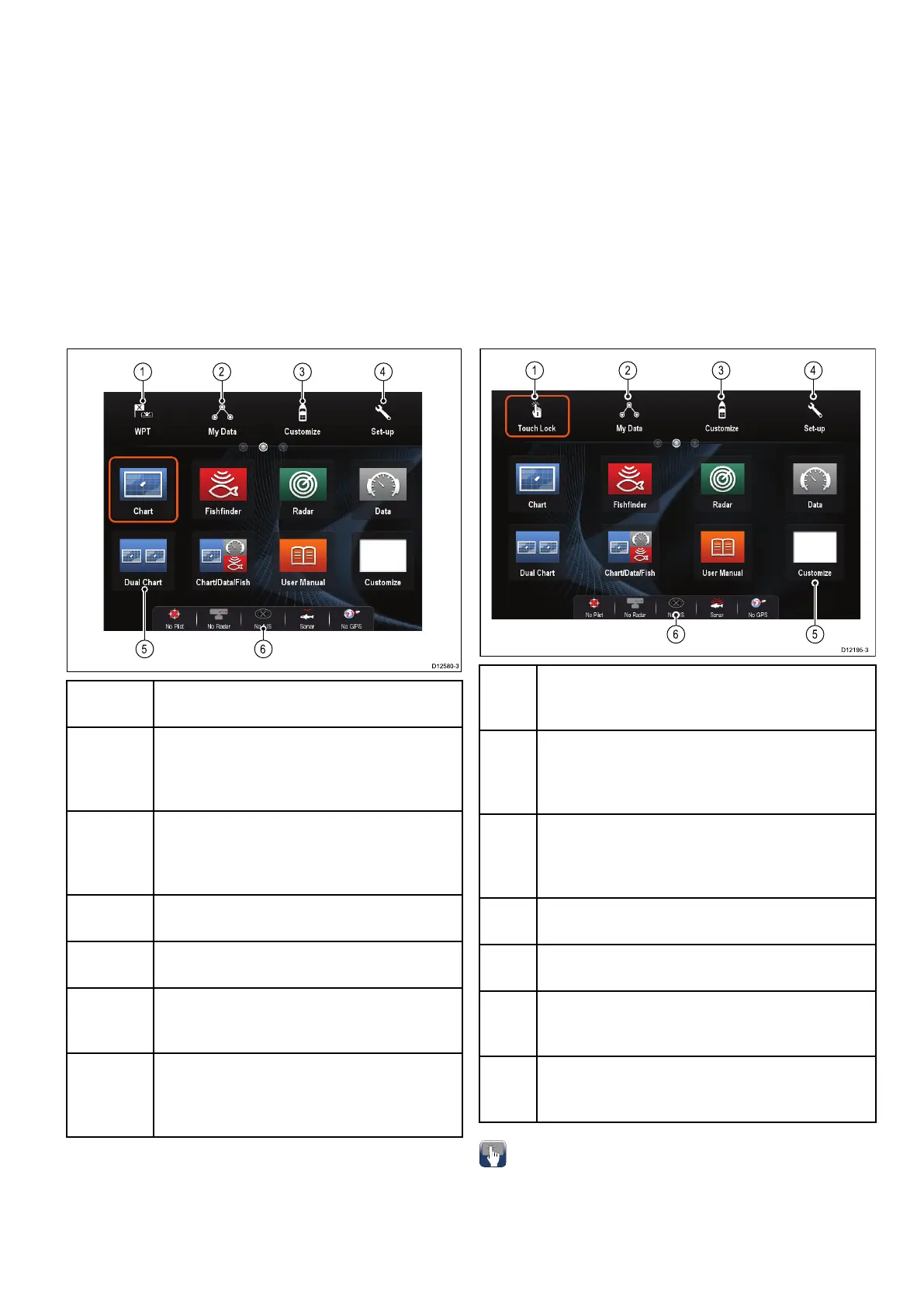
6.5Homescreenoverview—Touch
onlydisplays
TheHomescreenprovidesacentralpointofaccess
foryourdisplay'sapplications,dataandsettings.
•TheHomescreenprovidesquickaccesstoyour
data(waypoints,routes,tracks,imagesand
videos)andbackupsettings.
•TheHomescreenconsistsofanumberof
Homescreenpages.Swipethescreenleftorright
withyourngertoscrollthroughtheavailable
Homescreenpages.
•EachHomescreenpageconsistsofanumberof
icons.Applicationsarestartedbyselectingthe
relevanticon.
Screen
itemDescription
1Waypoint—selecttheicontoaccessthe
waypointlist.Selectandholdontheiconto
placeaManOverboard(MOB)markeratyour
vessel’scurrentposition.
2MyData—thisiconenablesyoutocentrally
manageyourdataincludingroute,track,and
waypointlists.Youcanalsoaccesssaved
picturesandvideosandbackupsettings.
3
Customize—selectthisicontocongure
applicationpagesanddisplaypreferences.
4
Set-up—selectthisicontoaccessthesystem
set-upmenus.
5
Icon—eachiconrepresentsanapplication
page.Apagecandisplaymultipleapplications
simultaneously.
6
Statusbar—thestatusiconsconrmthe
statusofexternally-connectedequipment,
includingGPS,AIS,radar,sonarandautopilot
units.
6.6Homescreenoverview—cSeries/
eSeries
TheHomescreenprovidesacentralpointofaccess
foryourdisplay'sapplications,dataandsettings.
•TheHomescreenprovidesquickaccesstoyour
data(waypoints,routes,tracks,imagesand
videos)andbackupsettings.
•TheHomescreenconsistsofanumberof
Homescreenpages.Swipethescreenleftorright
withyourngertoscrollthroughtheavailable
Homescreenpages.
•EachHomescreenpageconsistsofanumberof
icons.Applicationsarestartedbyselectingthe
relevanticon.
Scr-
een
itemDescription
1
TouchLock—(HybridTouchdisplaysonly)select
thisicontolockthetouchscreen,preventing
accidentaluse.Tounlock,usetheUniControlto
deselecttheTouchLockicon.
2MyData—thisiconenablesyoutocentrally
manageyourdataincludingroute,track,and
waypointlists.Youcanalsoaccesssavedpictures
andvideosandbackupsettings.
3
Customize—selectthisicontocongure
applicationpagesanddisplaypreferences.
4
Set-up—selectthisicontoaccessthesystem
set-upmenus.
5
Icon—eachiconrepresentsanapplication
page.Apagecandisplaymultipleapplications
simultaneously.
6
Statusbar—thestatusiconsconrmthestatus
ofexternally-connectedequipment,includingGPS,
AIS,radar,sonarandautopilotunits.
Accessingthehomescreen
Thehomescreencanbeaccessedfromany
application.
Toaccessthehomescreenfollowthestepsbelow:
1.Selectthehomescreeniconon-screen.
Gettingstarted
93



 To Next Page