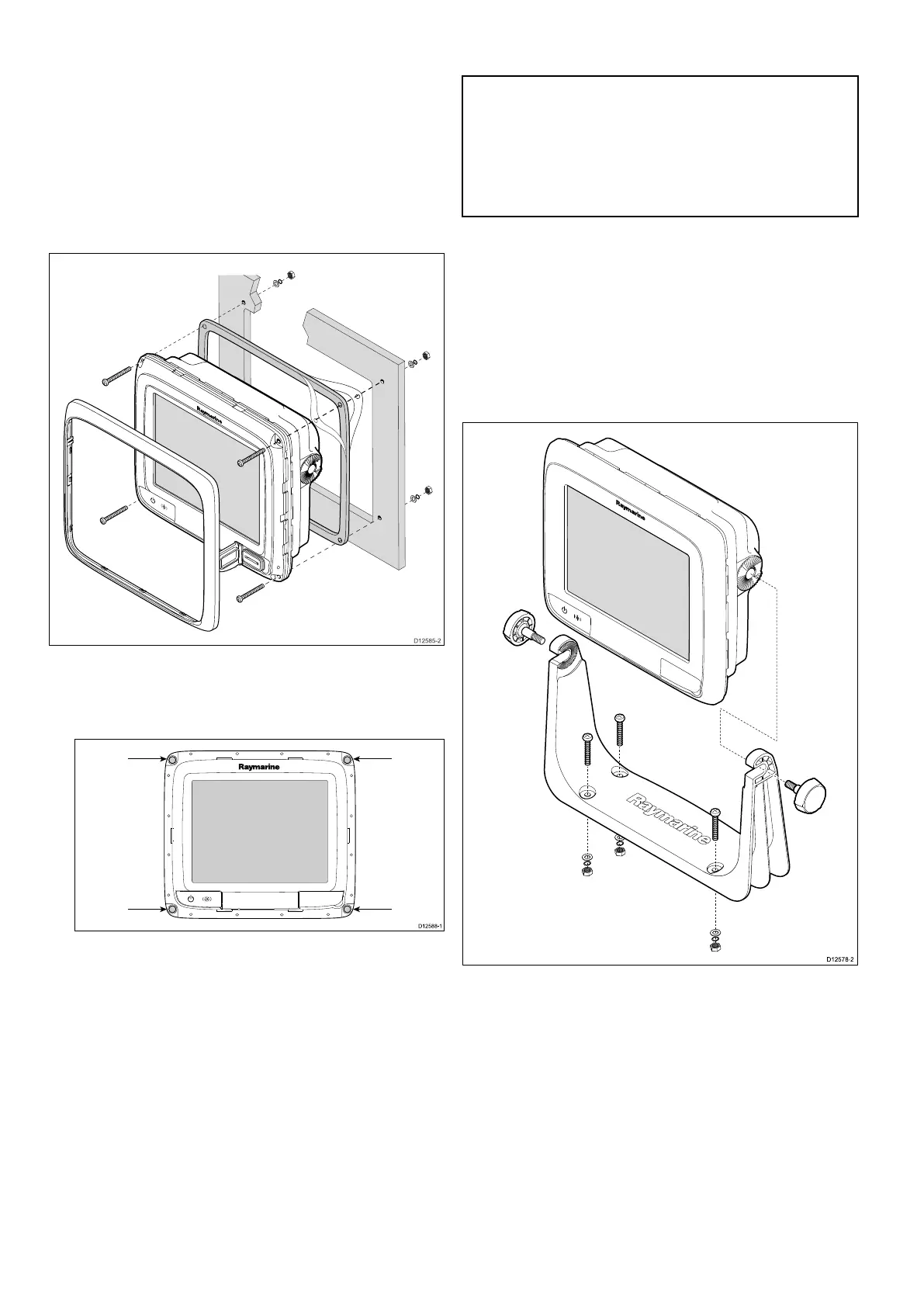
5.1Mounting-aSeries
Mounting
thedisplaycanbesurfacemounted.
Beforemountingtheunit,ensurethatyouhave:
•Selectedasuitablelocation.
•Identiedthecableconnectionsandroutethatthe
cableswilltake.
•Detachedthefrontbezel.
1.Checktheselectedlocationfortheunit.Aclear,
atareawithsuitableclearancebehindthepanel
isrequired.
2.Drillorknockoutthe4mountingholesontheunit
3.Fixtheappropriatecuttingtemplatesupplied
withtheproduct,totheselectedlocation,using
maskingorself-adhesivetape.
4.Usingasuitableholesaw(thesizeisindicated
onthetemplate),makeaholeineachcornerof
thecut-outarea.
5.Usingasuitablesaw,cutalongtheinsideedge
ofthecut-outline.
6.Ensurethattheunittsintotheremovedarea
andthenlearoundtheroughedgeuntilsmooth.
7.Drill4holesasindicatedonthetemplateto
acceptthesecuringscrews.
8.Placethegasketontothedisplayunitandpress
rmlyontotheange.
9.Connectthepower,dataandothercablestothe
unit.
10.Slidetheunitintoplaceandsecureusingthe
providedxings.
Note:Thesuppliedgasketprovidesaseal
betweentheunitandasuitablyatandstiff
mountingsurfaceorbinnacle.Thegasketshould
beusedinallinstallations.Itmayalsobe
necessarytouseamarine-gradesealantifthe
mountingsurfaceorbinnacleisnotentirelyatand
stifforhasaroughsurfacenish.
Bracket(trunnion)mounting
Thedisplaycanbemountedonatrunnionbracket.
Beforemountingtheunitensurethatyouhave:
•Selectedasuitablelocation.
•Identiedthecableconnectionsandroutethatthe
cableswilltake.
•Attachedthefrontbezel.
1.Markthelocationofthemountingbracketscrew
holesonthechosenmountingsurface.
2.Drillholesforthescrewsusingasuitabledrill,
ensuringthereisnothingbehindthesurfacethat
maybedamaged.
3.Usethexingssuppliedwiththemounting
brackettoattachsecurely.
4.Attachthedisplaytothemountingbracket.
Frontbezel
Attachingthefrontbezel
Thefollowingprocedureassumesthattheunithas
alreadybeenmountedinposition.
84aSeries/cSeries/eSeries



 To Next Page