4.28WiFiconnections
Raymarinemobileappconnection
Youcanusecompatibletabletandsmartphone
devicesasawirelessrepeatdisplayorremote
controlforyourmultifunctiondisplay.
Raymarineappsallowyoutostreamand/orcontrol,
remotelywhatyouseeonyourmultifunctiondisplay
toacompatibledevice,usingaWi-Ficonnection.
Tousethisfeatureyoumustrst:
•Ensureyourdeviceiscompatiblewiththeappyou
wishtouse.
•DownloadandinstalltherelevantRaymarineapp,
availablefromtherelevantmarketstore.
•EnableWi-FiintheSystemSettingsonthe
multifunctiondisplay.
•EnableWi-Fionyourcompatibledevice.
•SelecttheRaymarineWi-Ficonnectionfromthe
listofavailableWi-Finetworksonyourcompatible
device.
•EnabletherelevantMobileappintheSystem
Settingsmenuonthemultifunctiondisplay.
Note:ThemultifunctiondisplayactsasaWi-Fi
accesspoint.Ifyourdevicealreadyconnectsto
anaccesspointfore-mailandinternetyoumust
revertyouraccesspointbacktoregainaccessto
e-mailsandinternet.
Navionicsmobilemarineapp
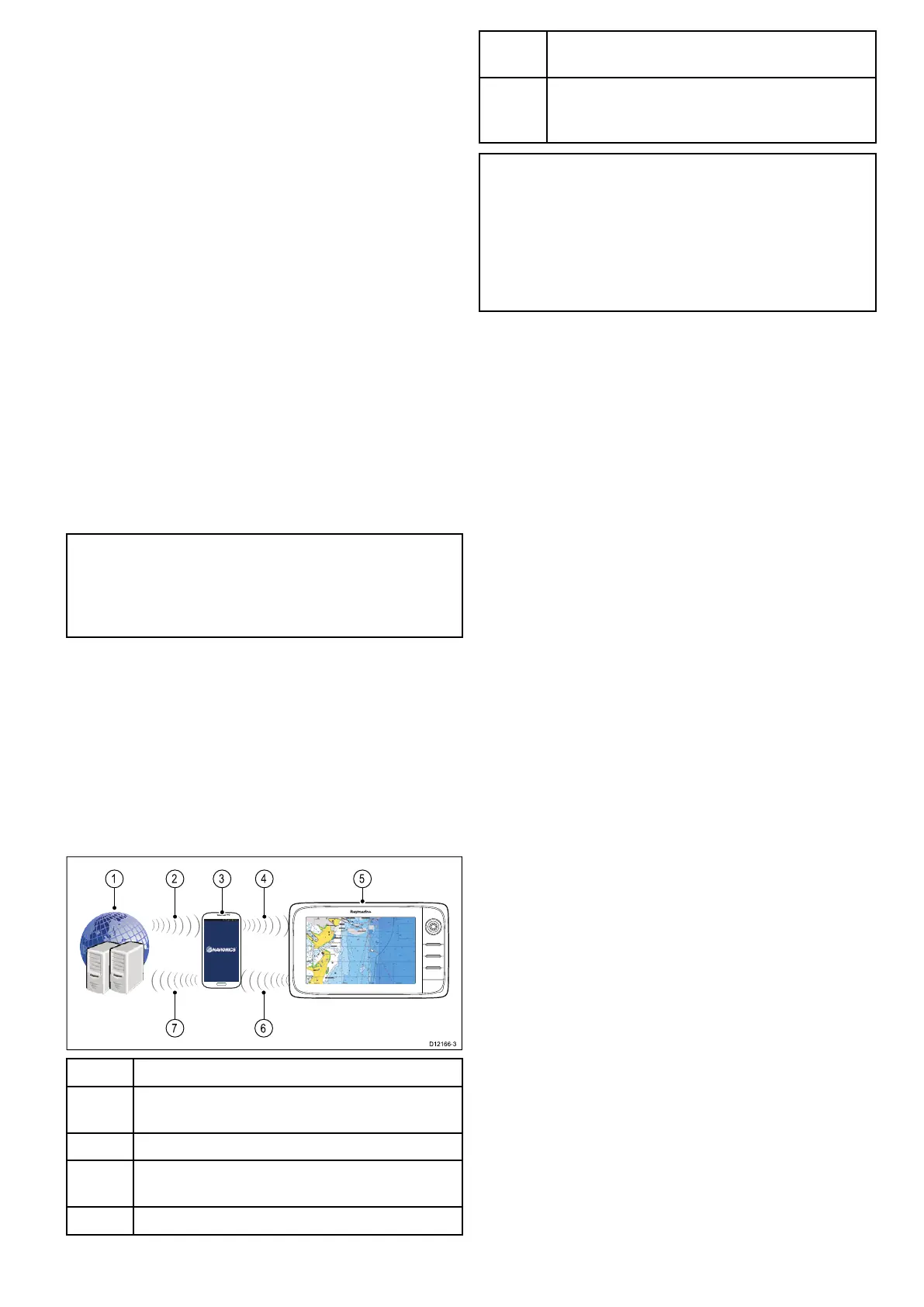
Youcanwirelesslysynchronizedatabetweenyour
multifunctiondisplay(MFD)andamobiledevicethat
isrunningtheNavionicsmobilemarineapp.
ThesynchronizationdownloadsNavionicsFreshest
DatafromyourmobiledevicetoyourMFD
anduploadssonarlogsfromyourMFDtoyour
mobiledevice.Waypointsandroutescanalsobe
synchronizedbetweenyourmobiledeviceandMFD.
1Navionicsservers
2DownloadNavionicsFreshestDatatomobile
device(internetconnectionrequired)
3MobiledevicerunningNavionicsmobileapp
4
DownloadNavionicsFreshestDatatoMFD(Wi-Fi
connectiontoMFDrequired)
5
MFD
6
*UploadSonarLogsandCommunityeditsto
mobiledevice(Wi-FiconnectiontoMFDrequired)
7
**UploadSonarLogsandCommunityedits
anonymouslytoNavionicsservers(internet
connectionrequired)
Note:
*ToparticipateinNavionicsSonarCharts,Sonar
loggingmustbeenabledonyourMFD.SonarLogs
canbeenabledfromtheChartapplicationmenu:
Menu>Depth&Contour>SonarLogs.
**TheSonarlogsshallbeuploadedtoNavionics
serversanonymously.
Tousethisfeatureyoumustrst:
1.DownloadandinstalltheNavionicsMobile
Marineapp,availablefromtherelevantapp
store.
2.SubscribetoNavionicsFreshestData.
3.DownloadFreshestdatatoyourmobiledevice.
4.EnableWi-FiintheSystemSettingsontheMFD.
5.EnableWi-Fionyourmobiledevice.
6.SelecttheMFDWi-Ficonnectionfromthelistof
availableWi-Finetworksonyourmobiledevice.
Cablesandconnections81



 To Next Page