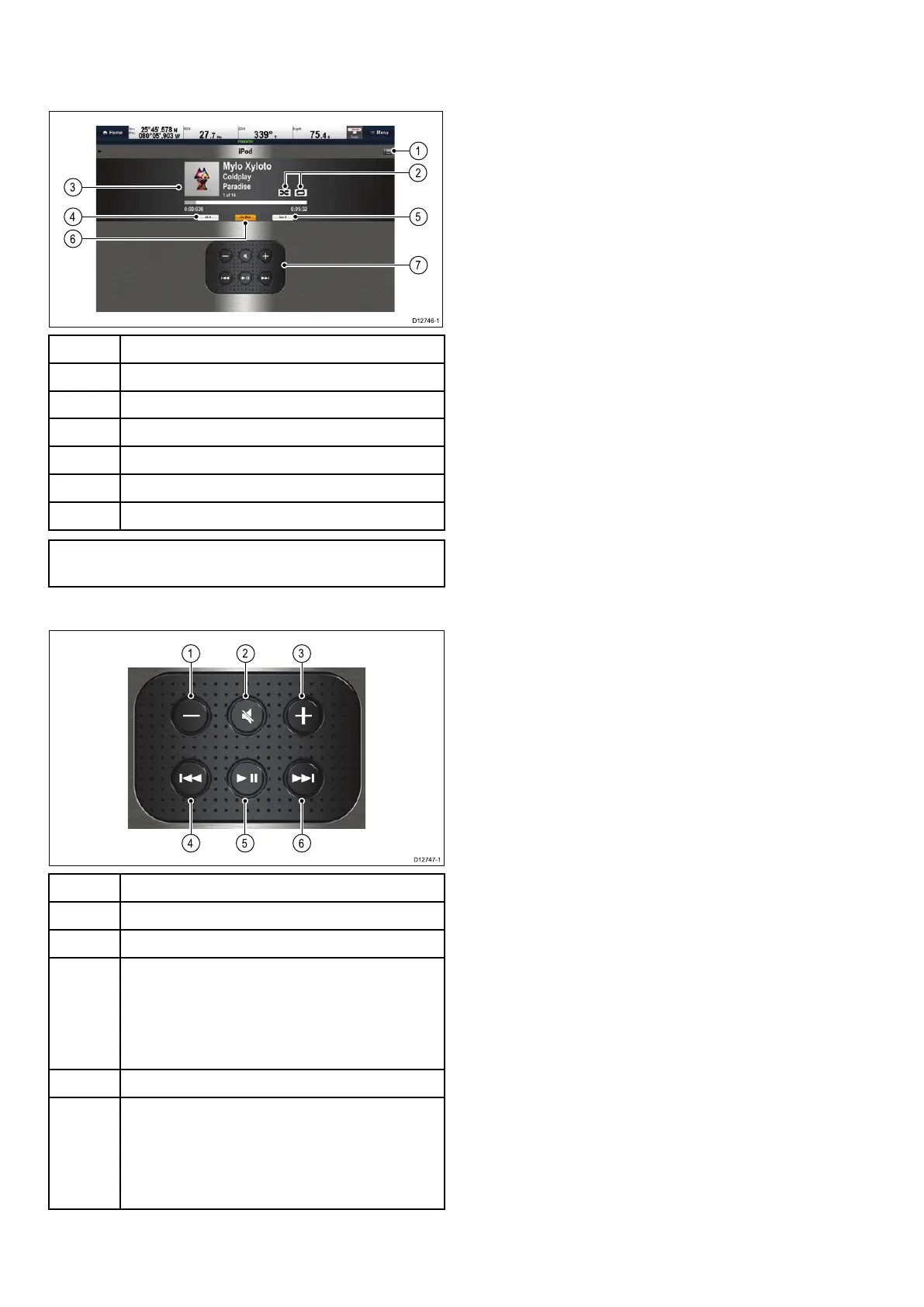
25.1Fusionlinkoverview
Themultifunctiondisplaycancontrolaconnected
700seriesFusionentertainmentsystem.
1Fusionmenuoptionsandtracklists.
2
ShufeandRepeaticons.
3
Track/mediaspecicdetailsandcontrols.
4Zonevolumecontrol.
5
Zoneselector.
6Mediasource.
7
Mediacontrols(Seebelow).
Note:Albumartworkisonlyavailablewhenusing
aniPod.
Mediacontrols
1VolumeDown.
2
Mute/Unmute.
3VolumeUp.
4
•Singlepress—Skipsbacktothebeginningof
thecurrenttrack,subsequentpresseswillskip
backwardsthroughtheavailabletracks.
•Pressandhold—Scansthecurrenttrack
backwardsin10secondsintervals.
5
Play/Pausecurrenttrack.
6
•Singlepress—Skipsforwardtothenexttrack,
subsequentpresseswillskipforwardsthrough
theavailabletracks.
•Pressandhold—Scansthecurrenttrack
forwardsin10secondsintervals.
TheFusionlinkapplicationcanbeusedto:
•Browseavailablemediasources.
•Adjustthevolumelevel.
•MuteandUnmutethevolume.
•Adjustthetonecontrols(Bass,Middle,and
Treble).
•Skipbackwardsandforwardsthroughtracks.
•Scanbackwardsandforwardsthroughthecurrent
track.
•Play/Pausethecurrenttrack.
•Selectthezonetobecontrolled.(Forinformation
onsettingupzonesrefertothemanualthat
accompaniedyourFusionentertainmentsystem.
•SetShufeandRepeatfunctions.
AccessingtheFusionlinkapplication
IfmorethanoneFusionentertainmentsystemis
connectedtoyoursystemthenyoucanchoose
whichsystemtheFusionlinkapplicationwillcontrol.
1.SelecttheFUSIONlinkpageiconfromthe
homescreen.
AlistofconnectedFusionentertainmentsystems
isdisplayed.
2.Selectthesystemyouwanttocontrol.
374aSeries/cSeries/eSeries



 To Next Page