ItemDescription
13Rangeout—useicontorangeout
(Touchscreendisplaysonly).
14
Rangein—useicontorangein(Touchscreen
displaysonly).
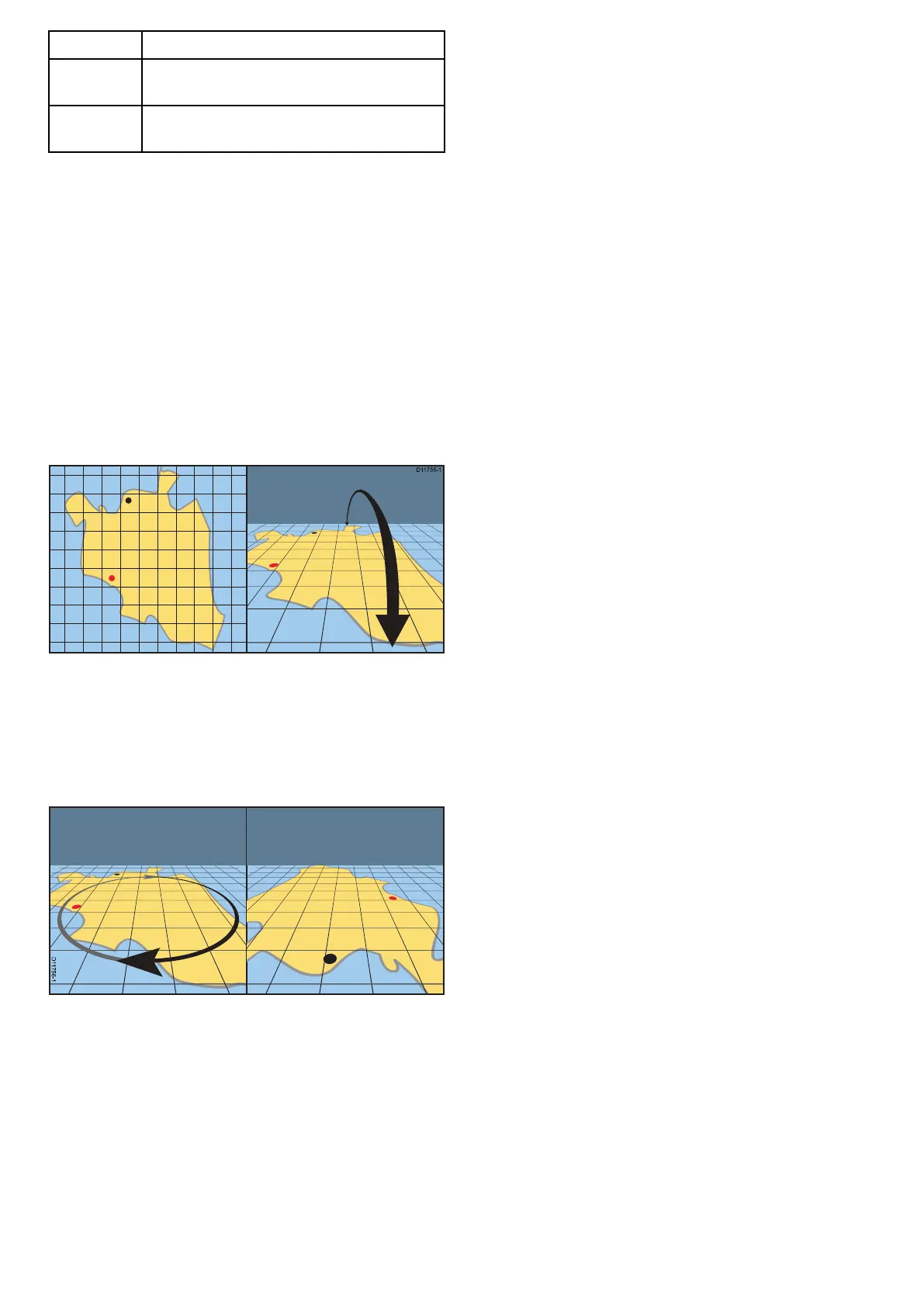
Manipulatingthe3Dchartview
Fromthechartapplication:
1.Withthechartin3Dmode,gototheAdjust
ViewingAnglemenu:Menu>AdjustViewing
Angle.
2.SelectAdjust:sothatPitchandrotateis
highlighted.
3.Toadjustthepitch:
i.Non-touchscreenorHybridTouchdisplays—
MovetheJoystickUporDowntoadjustthe
pitch
ii.HybridT ouchorTouchonlydisplays—Swipe
yourngerupordownacrossthescreento
adjustthepitch.
4.Toadjusttherotation:
i.Non-touchscreenorHybridTouchdisplays—
MovetheJoystickLeftorRighttoadjustthe
rotation
ii.HybridT ouchorTouchonlydisplays—Swipe
yourngerleftorrightacrossthescreento
adjusttherotation.
3DDisplayOptions
ThefollowingoptionsareavailablewiththeChart
applicationin3Dview:
•CenterOfView—Switchesacrosshaironand
offatthecenterofthescreenatsealevel.
•Exaggeration—Adjustingtheexaggerationhas
theeffectofverticallystretchingobjectsonthe
chart,makingiteasiertoseetheirshapeand
position.
•TransducerCone—Switchesonandoffa
transducerconeindicatingthecoverageofa
shndertransducer.
•DepthScale—Switchesonandoffadepthscale
atyourvesselposition.
Enablingcenterofview
In3Dview,toenablethecenterofviewcrosshairat
sealevelfollowthestepsbelow.
FromtheChartapplicationmenu:
1.SelectPresentation.
2.SelectView&Motion.
3.Select3DDisplayOptions.
4.SelectCenterofViewsothatOnishighlighted.
Selectingcentreofviewwillswitchthecrosshair
onandoff.
Adjustingthe3Dexaggeration
Inthe3Dchartview.
FromtheChartapplicationmenu:
1.SelectPresentation.
2.SelectView&Motion.
3.Select3DDisplayOptions.
4.SelectExaggeration:.
TheExaggerationnumericadjustcontrolis
displayed.
5.Adjustthenumericadjustcontroltotherequired
setting,between1.0and20.0
6.SelectOkorBacktoconrmthesettingand
closethenumericadjustcontrol.
Enablingtransducercone
In3Dview,toenablethetransducerconewhich
indicatesthecoverageofyourshndertransducer
followthestepsbelow.
FromtheChartapplicationmenu:
1.SelectPresentation.
2.SelectView&Motion.
3.Select3DDisplayOptions.
4.SelectTransducerConesothatOnis
highlighted.
SelectingTransducerconewillswitchthefunction
onandoff.
Enablingdepthscale
In3Dview,toenableadepthindicatoratyour
vessel’slocationfollowthestepsbelow.
FromtheChartapplicationmenu:
1.SelectPresentation.
2.SelectView&Motion.
3.Select3DDisplayOptions.
4.SelectDepthScale:sothatOnishighlighted.
Selectingdepthscalewillswitchdepthindicator
onandoff.
244
aSeries/cSeries/eSeries



 To Next Page