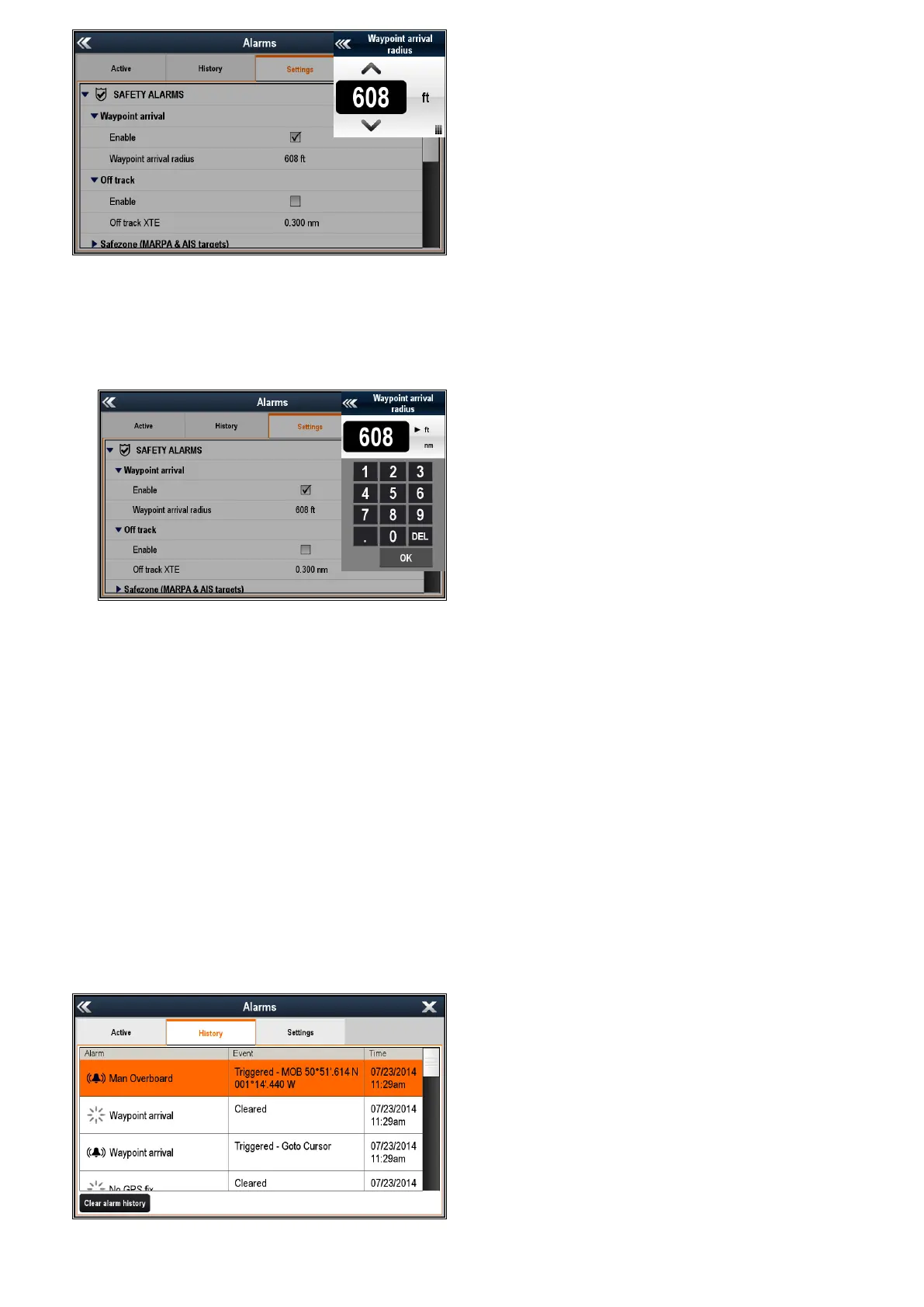
5.Withthenumericadjustcontroldisplayed,select
theon-screenUpandDownarrowstoadjustthe
alarmthresholdvalue,or
6.Tousethenumerickeypad:
i.Selectontheactualvalueorthekeypadicon.
Thenumerickeypadisdisplayed.
ii.Usetheon-screenkeypadtoenterthedesired
valueforthealarmthreshold.
iii.SelectOKtosavethenewvalueforthealarm
threshold.
iv.Youcanalsochangetheunitofmeasure
forthealarmthresholdyouarecurrently
changingbyselectingontherelevantunitof
measurefromthenumerickeypad.
Clearingthealarmhistory
Youcanviewthehistoryofalarmeventsfromthe
AlarmManager.
FromtheHomescreen:
1.SelectSet-up.
2.SelectAlarms.
TheAlarmManagerisdisplayed.
3.SelectHistory.
Thealarmhistoryisdisplayed.
4.SelectClearalarmhistory.
Aconrmationmessageisdisplayed.
5.SelectYes.
Thealarmhistoryisdeleted.
ThealarmhistoryisalsoclearedifaSystemsand
DataResetisperformed.
180aSeries/cSeries/eSeries



 To Next Page