4.Tosettheanimationdate,selectSetDateand
thenusingtheonscreenkeyboardenterthe
requireddate.
5.Tosettheanimationdatetothecurrentdate
selectToday.
6.Tosettheanimationdateto24hourspreviousto
thecurrentdateselectPreviousDay.
7.Tosettheanimationdateto24hoursaheadof
thecurrentdateselectNextDay.
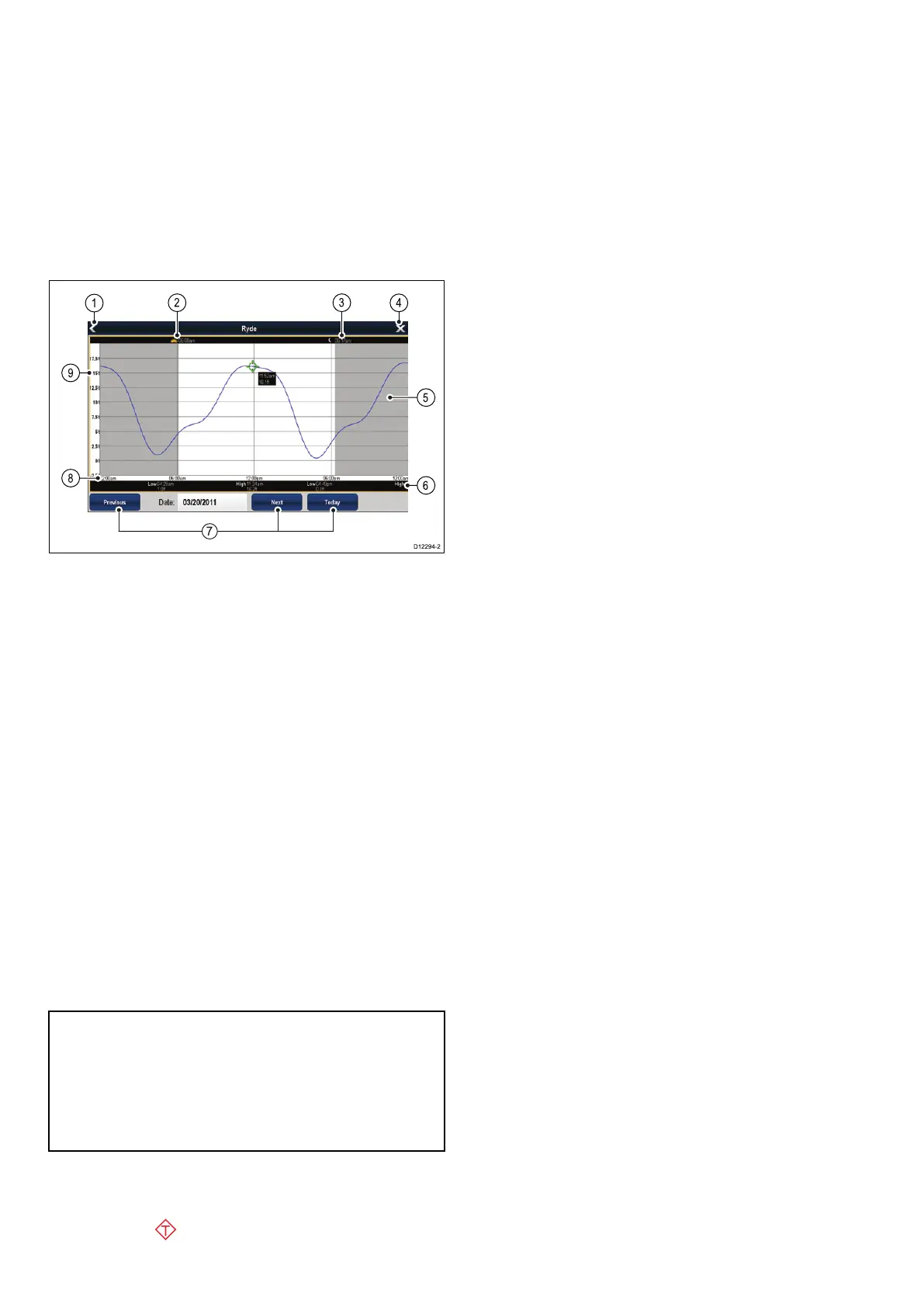
Tidegraphs
Tidegraphsprovideagraphicalviewoftidalactivity.
1.Back—returntothepreviousmenuorview.
2.Sunriseindicator—indicateswhenthesun
rises.
3.Sunsetindicator—indicateswhenthesun
sets.
4.Exit—closesthedialog.
5.Nightfallindicator—thegreyed-outsectionof
thegraphindicateswhennightfalloccurs.
6.Low/HighTide—Indicatesthetimeatwhich
loworhightideoccurs.
7.Datenavigation—Usetheiconstomoveto
thenextorpreviousday.
8.Time—Thehorizontalaxisofthegraph
indicatestime,inaccordancewiththetime
formatspeciedintheSystemSettings.
9.Depth—Theverticalaxisofthegraphindicates
tidalwaterdepth.Theunitsforthedepth
measurementarebasedonthosespeciedin
theHomescreen>Customize>UnitsSet-up
>DepthUnitsmenu.
Note:Thedataprovidedinthetidegraphsisfor
informationpurposesonlyandshouldNOTbe
relieduponasasubstituteforprudentnavigation.
Onlyofcialgovernmentchartsandnoticesto
marinerscontainallthecurrentinformationneeded
forsafenavigation.Alwaysmaintainapermanent
watch.
Displayingdetailsoftides
Fromthechartapplication:
1.Selectthe
diamond-shapedtideicon.
Thechartcontextmenuisdisplayed.
2.SelectTideStation.
Thegraphfortheselectedstationisdisplayed.
258aSeries/cSeries/eSeries



 To Next Page