•AdjustZone
•ZoneOff
Accessingthecontextmenu
Youcanaccessthecontextmenubyfollowingthe
stepsbelow.
1.Non-touchscreenandHybridT ouchdisplays:
i.Selectingalocation,objectortargeton-screen
andpressingtheOkbutton.
2.HybridTouchandTouchonlydisplays:
i.Selectinganobjectortargeton-screen.
ii.Selectingandholdingonalocationon-screen.
Adjustingguardzonesensitivity
Youcanadjustthethresholdatwhichthealarmis
triggeredbyatargetenteringtheguardzone.
FromtheRadarapplicationmenu:
1.SelectZones.
2.SelectSensitivity.
Thesensitivitynumericadjustcontrolisdisplayed.
3.Adjustthesensitivitytotherequiredvalue.
4.SelectOkorBacktoconrmsettingandclose
thenumericadjustcontrol.
Theguardzonesensitivitysettingcanalsobe
accessedfromtheAlarmsmenu:Homescreen>
Set-up>Alarms>GuardZone>Sensitivity.
MARPAoverview
MARPAisusedfortargettrackingandriskanalysis
intheradarapplication.
Withanaccurateheadingsensorconnectedto
yourmultifunctiondisplay,youcanusetheMini
AutomaticRadarPlottingAid(MARPA)functionsfor
targettrackingandriskanalysis.MARPAimproves
collisionavoidancebycalculatinginformationfor
trackedtargets,andprovidescontinuous,accurate,
andrapidsituationevaluation.Thenumberoftargets
thatyoucantrackatanyonetimeisdependenton
themodelofradarscannerthatyouareusing.
MARPAtracksacquiredtargets,andcalculatesthe
target'sspeedandcourse.
Eachtargettrackedcanbedisplayedwithagraphic
indicatingtheClosestPointofApproach(CPA),and
TimetoClosestPointofApproach(TCPA).The
calculatedtargetdatacanalsobeshownonyour
screen.Eachtargetiscontinuallyassessedand
anaudiblealarmissoundedifatargetbecomes
dangerous,orislost.
ForeffectiveMARPAoperation,yourmultifunction
displaymusthaveaccurateheadingandspeeddata
foryourvessel.Thebetterthequalityoftheheading
andspeeddata,thebetterMARPAwillperform.For
thebestheadingdata,aRaymarineSMARTheading
sensororagyro-stabilizedautopilotisrequired.
InTrueMotionmode,SpeedOverGround(SOG)
andCourseOverGround(COG)informationis
requiredtoshowtruetargetcourseandspeed.
InRelativeMotionmode,headingandspeed
informationisrequired.
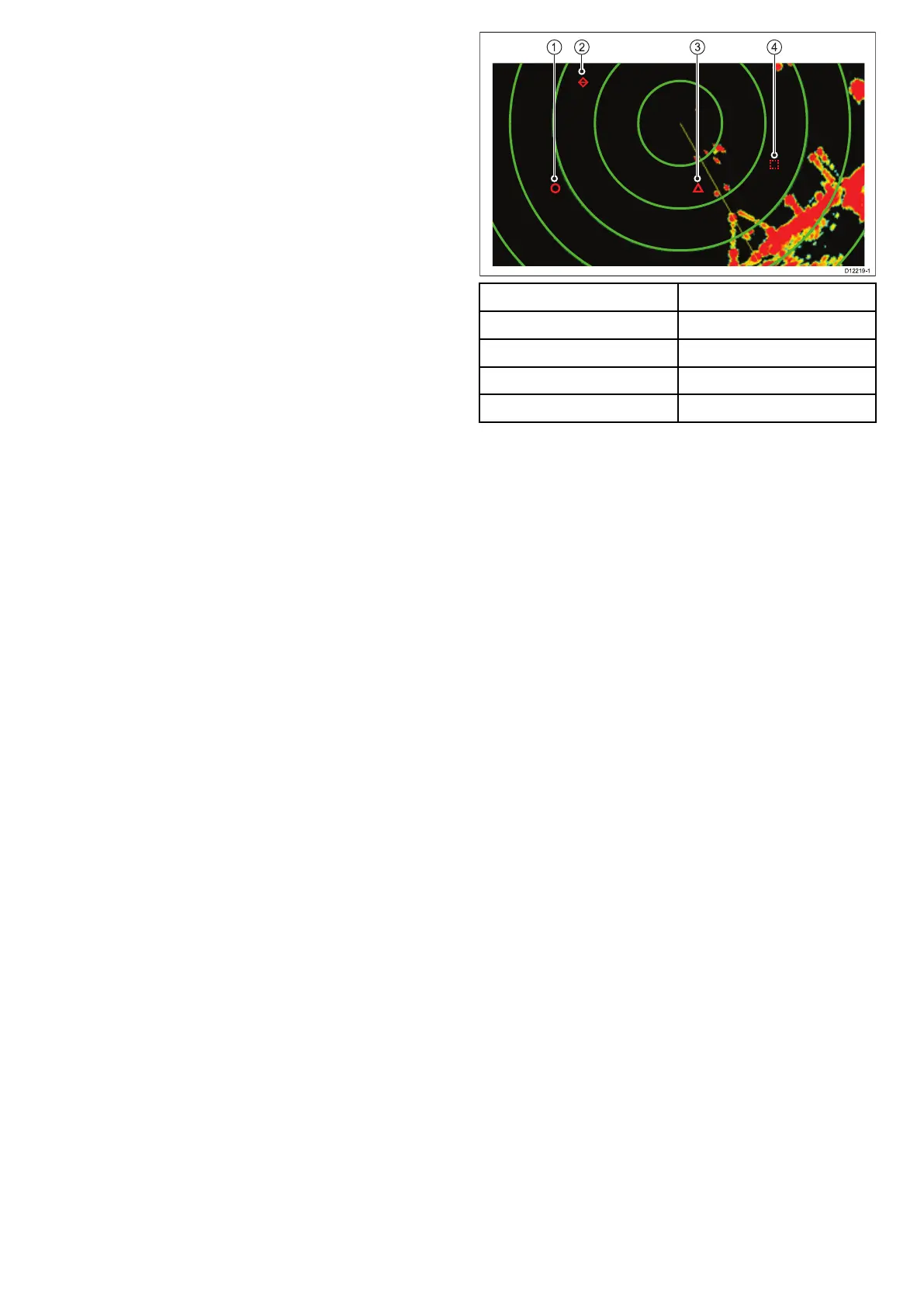
ItemDescription
1
Safetarget
2Losttarget
3Dangeroustarget
4Targetbeingacquired
Safetynotices
MARPAcanimprovecollisionavoidancewhenused
wisely.Itisyourresponsibilitytoexercisecommon
prudenceandnavigationaljudgement.
Thereareconditionswhereacquiringatargetmay
becomedifcult.Thesesameconditionsmaybea
factorinsuccessfullytrackingatarget.Someofthe
conditionsare:
•Thetargetechoisweak.Thetargetisveryclose
toland,buoysorotherlargetargets.
•Thetargetoryourownvesselismakingrapid
manoeuvres.
•Choppyseastateconditionsexistandthetargetis
buriedinexcessiveseaclutterorindeepswells.
•Choppyseastateconditionsexistyieldingpoor
stability;ownvessel’sheadingdataisvery
unstable.
•Inadequateheadingdata.
Symptomsofsuchconditionsinclude:
•targetacquisitionisdifcultandtheMARPA
vectorsareunstable;
•thesymbolwandersawayfromthetarget,locks-on
toanothertarget,orchangestoalostsymbol
target.
Inthesecircumstances,targetacquisitionand
trackingmayneedtobere-initiatedandinsome
casesmightbeimpossibletomaintain.Betterquality
headingdatamightimproveperformanceinthese
circumstances.
HowaMARPAriskisassessed
Eachtargetismonitoredtoascertainwhetheritwill
bewithinacertaindistancefromyourvesselwithin
acertaintime.Ifso,thetargetisdesignatedas
dangerous,andanaudiblewarningissoundedand
awarningdisplayed.Thetargetsymbolchangesto
thedangeroustargetsymbolandashestoindicate
thatitisadangeroustarget.Acknowledgingthe
alarmwillremovethewarning.
Radarapplication
299



 To Next Page