2
3
VRM/EBL
0.471nm
55°P
1
D12218-1
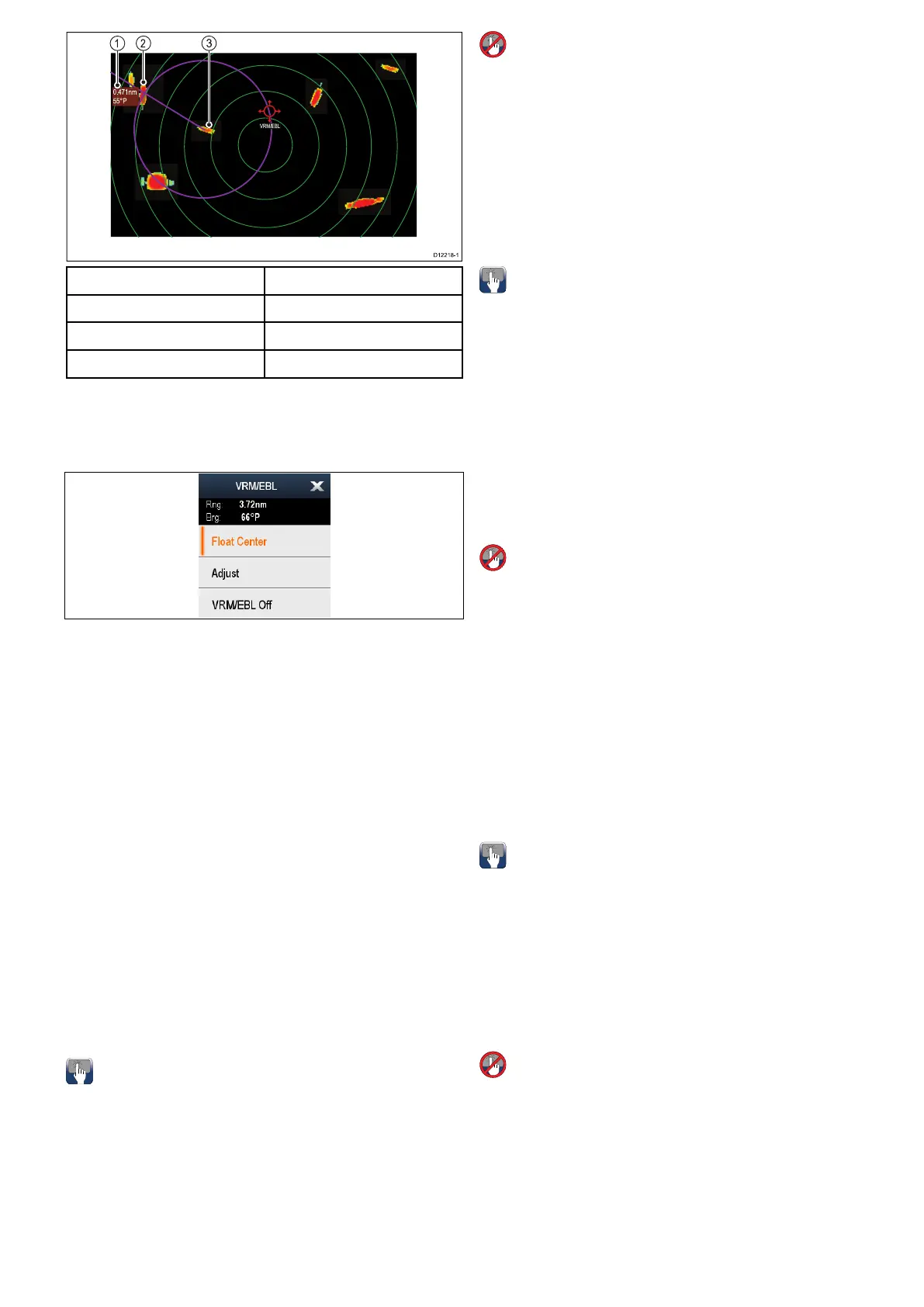
ItemDescription
1Rangeandbearing
2Target1
3Target2
VRM/EBLcontextmenu
TheVRM/EBLfunctionincludesacontextmenu
whichprovidespositionaldataandmenuitems.
Thecontextmenuprovidespositionaldataofthe
VRM/EBLinrelationtoyourvessel:
•Range
•Bearing
Thecontextmenualsoprovidethefollowingmenu
items:
•FloatCentre
•Adjust
•VRM/EBLOff
Accessingthecontextmenu
Youcanaccessthecontextmenubyfollowingthe
stepsbelow.
1.Non-touchscreenandHybridT ouchdisplays:
i.Selectingalocation,objectortargeton-screen
andpressingtheOkbutton.
2.HybridTouchandTouchonlydisplays:
i.Selectinganobjectortargeton-screen.
ii.Selectingandholdingonalocationon-screen.
CreatingaVRM/EBLontheradardisplay
TocreateaVRM/EBLonatouchscreenmultifunction
displayfollowthestepsbelow:
Fromtheradarapplication:
1.Selectandholdonthescreen.
Theradarcontextmenuisdisplayed.
2.SelectPlaceVRM/EBL.
3.Selecttherequiredlocation/target.
TheVRM/EBLisnowsetattheselectedlocation.
CreatingaVRM/EBLontheradardisplay
Fromtheradarapplication:
1.Selectatargetorlocationonscreen.
2.PresstheOkbutton.
Theradarcontextmenuisdisplayed.
3.SelectPlaceVRM/EBL.
4.UsingtheJoystickadjusttheVRM/EBLtothe
requiredbearingandrange.
5.PresstheOkbuttontosavethesetting.
CreatingaoatingVRM/EBLontheradar
display
TooataVRM/EBLonatouchscreenmultifunction
displayfollowthestepsbelow:
FromtheradarapplicationwithaVRM/EBLalready
created:
1.PressandholdontheVRM/EBL.
TheVRM/EBLcontextmenuisdisplayed.
2.SelectFloatCenter.
3.Selectthedesiredlocationforthecenterposition.
TheVRM/EBLisplacedatthenewlocation.
CreatingaoatingVRM/EBLontheradar
display
FromtheradarapplicationwithaVRM/EBLalready
created:
1.PositionthecursorovertheVRM/EBL.
2.PresstheOkbutton.
Theradarcontextmenuisdisplayed.
3.UsetheRotaryControltoselectFloatCenter.
4.PresstheOkbutton.
5.UsingtheJoystick,movethecenterpositionof
thecircletothedesiredposition.
6.PresstheOkbuttontoconrmthenewposition.
UnoatingaVRM/EBLontheradar
display
Tore-centeraVRM/EBLonatouchscreen
multifunctiondisplayfollowthestepsbelow:
Fromtheradarapplication:
1.PositionthecursorovertheVRM/EBL.
TheRadarcontextmenuisdisplayed.
2.SelectCenter.
UnoatingaVRM/EBLontheradar
display
Fromtheradarapplication:
1.PositionthecursorovertheVRM/EBL.
2.PresstheOkbutton.
TheVRM/EBLcontextmenuisdisplayed.
3.SelectCenter.
Radarapplication
303



 To Next Page