Switchpanelconguration
Theswitchpanelapplicationmustbecongured.
ACongurationlecanbeobtainedfromthesystem
supplier.
Loadingacongurationle
Theswitchpanelapplicationwillonlybeavailable
whenavalidcongurationlehasbeenloaded.
1.Obtainthecongurationlefromthesystem
supplier.
2.Savethecongurationletotherootdirectoryof
yourmemorycard.
3.Insertthememorycardintothecardreaderon
yourmultifunctiondisplay.
4.FromthehomescreenselectSet-up.
5.SelectSystemSettings.
6.SelectExternalDevices.
7.SelectSwitchPanelSet-up.
8.SelectInstallCongFile.
9.Ifpromptedselectthememorycardslotthat
containsyourcongurationle.
Thelebrowserisopened.
10.Selectthecongurationle.
11.SelectOK.
YoucannowaddtheSwitchpanelapplicationfrom
theCustomizemenuonthehomescreen.
Note:Ifyourmultifunctiondisplayonlyhas1card
slotthenstep9isskipped.
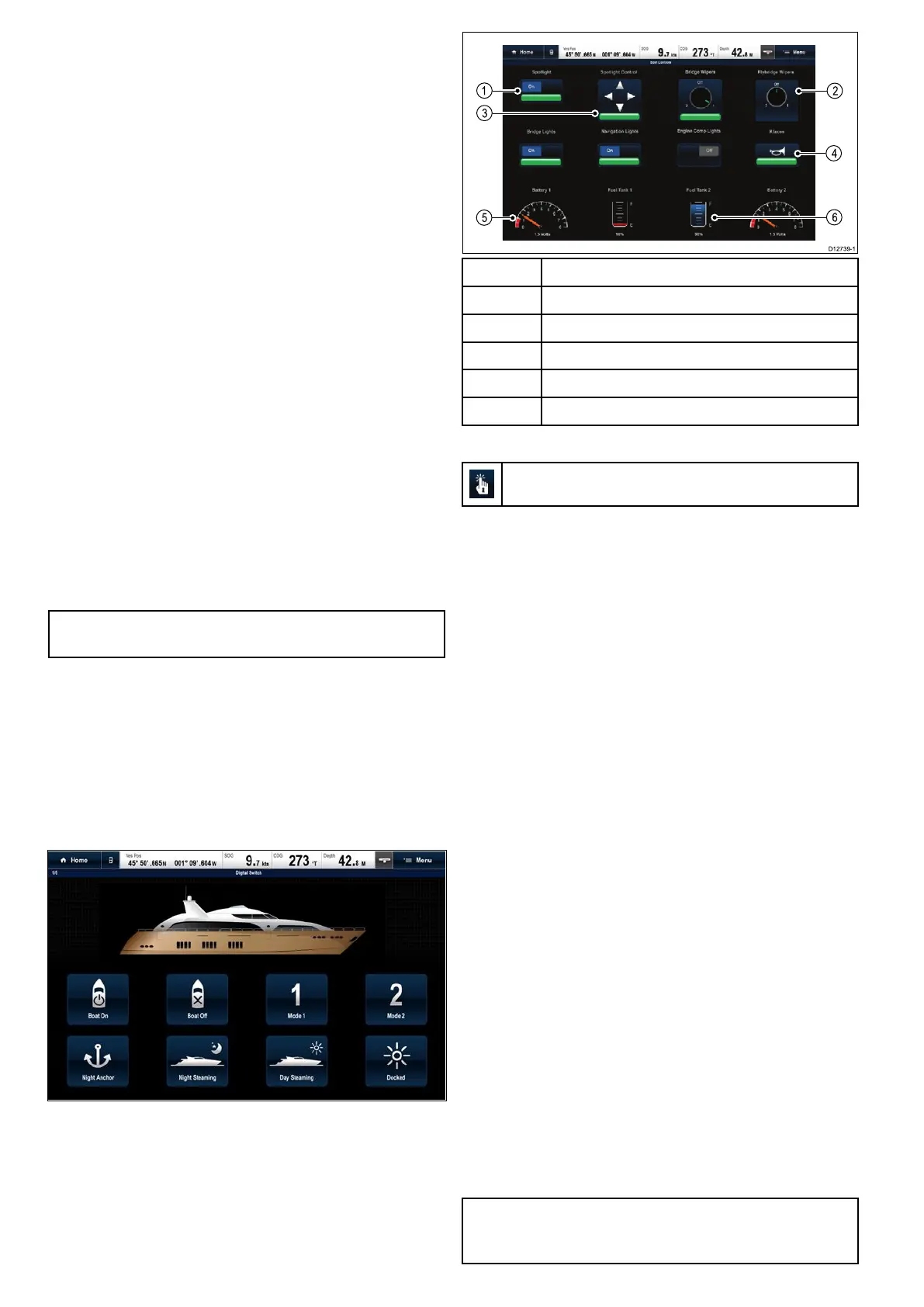
Switchpaneloverview
Theswitchpanelapplicationisusedtomonitorand
controlcompatiblevesselcontrolandmonitoring
systems.Thepagesandpagelayoutsandvessel
schematicsareconguredatinstallationandare
uniqueforeachvessel.Theimagesbeloware
examples.
Example1—Switchpanelmodepage
IfconguredaModepageprovidescontrolsto
switchbetweenpre-conguredmodes.
Intheexampleaboveselectingamodeiconwill
placethesystemintotheselectedmode.
Youcancyclethroughavailablepagestomonitoror
controlswitchesandconguredgroupsofswitches.
Example2—Vesselcontrolspage
1Toggleswitch.
2
Rotary(multi-state)switch.
3Positioncontrolswitch.
4Momentaryswitch.
5
Dataitem(dialgauge).
6
Dataitem(tanklevel).
UsingtheswitchesonaTouchscreen
ThisonlyappliestoHybridTouchdisplays.
Fromtheswitchpanelapplication:
1.Toggleswitch—Selecttheswitchtoswitchon
oroff.
2.Rotarycontrol—Selectingtherotarycontrol
willcyclethroughitsavailablestates.
3.PositionControl—Selectandholdona
directiontomove.
4.Momentaryswitch—Selecttheswitchto
activate.
5.Dimmerswitch—Selectandthendragthe
controltoadjustthevalue.
Usingtheswitches
Fromtheswitchpanelapplication:
1.UsetheJoysticktohighlighttherelevantswitch.
2.Toggleswitch—PressOktoswitchonoroff.
3.Rotarycontrol—PressingOkwillcyclethrough
itsavailablestates.
4.PositionControl—PressOkandusethe
Joysticktomovedirection.
5.Momentaryswitch—PressOktoactivate.
6.Dimmerswitch—PressOkontheswitchand
usetheRotaryControltoadjustthevalue,then
selectbacktoexitadjustmode.
Resettingatrippedcircuit
Whenacircuitistrippedapop-upmessagewillbe
displayedon-screenprovidingdetailsofthetripped
circuitandoptions,thecircuitwillalsobeidentied
astrippedintheswitchpanelpages.
1.Withatrippedcircuitpop-upmessagedisplayed
selectReset.toresetthetrippedcircuit,or
2.Selecttheswitchonaswitchpanelpagetoreset
thetrippedswitch.
Note:Performingmultipleresetsriskscausing
damagetoyoursystemsoifatrippersistscheck
themaincircuits.
452aSeries/cSeries/eSeries



 To Next Page