CHAPTER 8 : OPERATION 8 - 15
TRYTON 112 CNC
Note :
To change or
modify any
parameter,
the bar feeder
must be in
STOP mode.
Note :
The
parameters in
italics are
optional
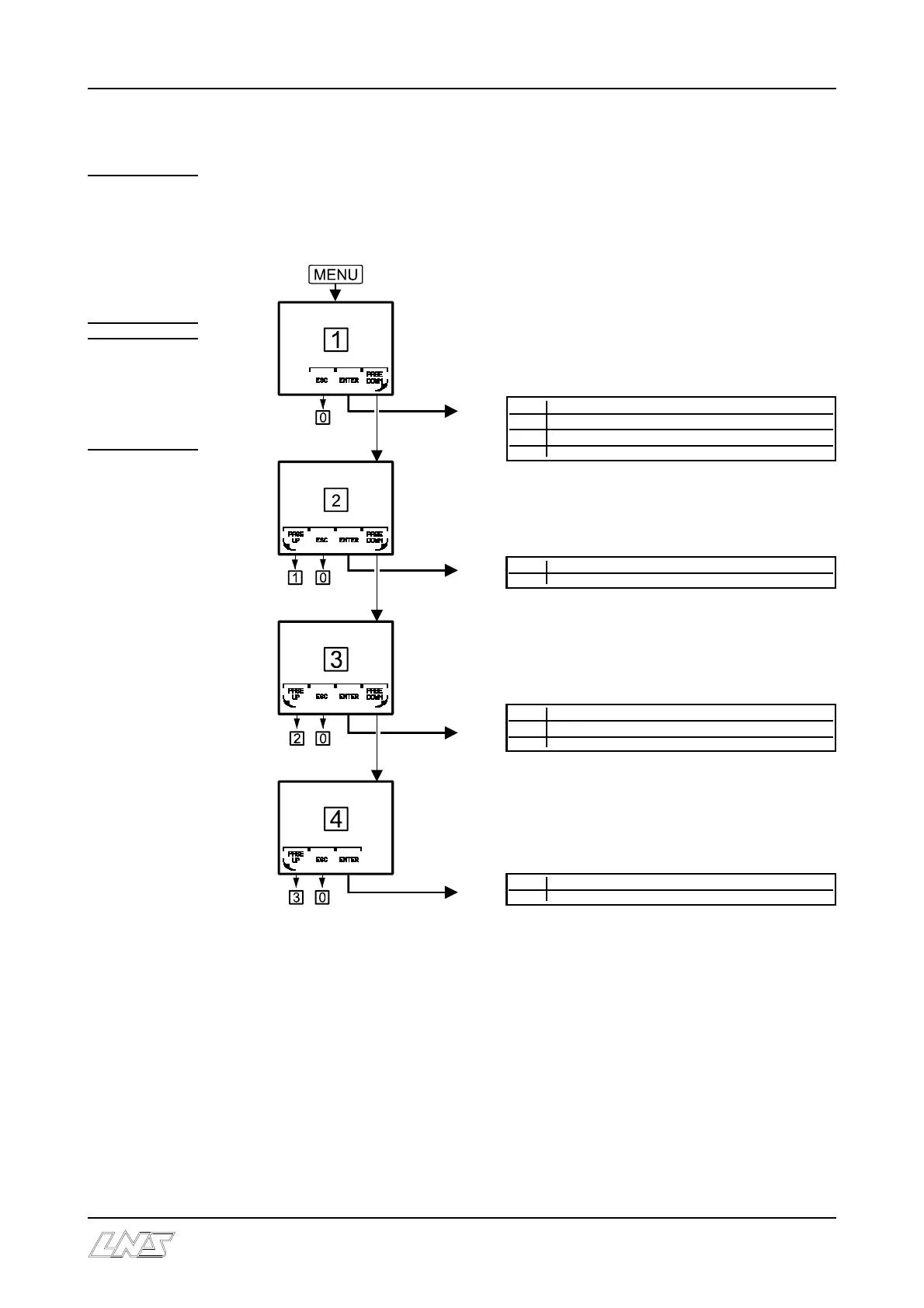
5.2 Access to the functions
The functions are structured as follows :
By pressing the MENU key it is possible to
visualize the values of the settings, regardless
of the position of the bar feed system
(automatic sequence, manual sequence, etc.)
1 Parameters related to start-up
1.1 Collet changeover
1.2 Diameter changeover
1.3 Clamping mode by pulling / pushing
2 Settings for positioning
3.1 Position of the cut-off (Top Cut)
3 Various functions and parameters
3.1 Language selection
3.2 Automatic cycle emulation (Dry Run)
4 Service parameters
4.1 Password
Depending on the sequence at which the bar feed system is positioned, certain functions
may not be accessible, and therefore, not displayed
To exit the setting functions and return to the work display, press MENU or STOP key.
For data collection values as well as to navigate in the various menus, please see point
1.1, Display (meaning of the icons).













 To Next Page