Using your Edger...Usual procedure
3-35
LTO
3.2.3.2.3 DRILLING PLAN
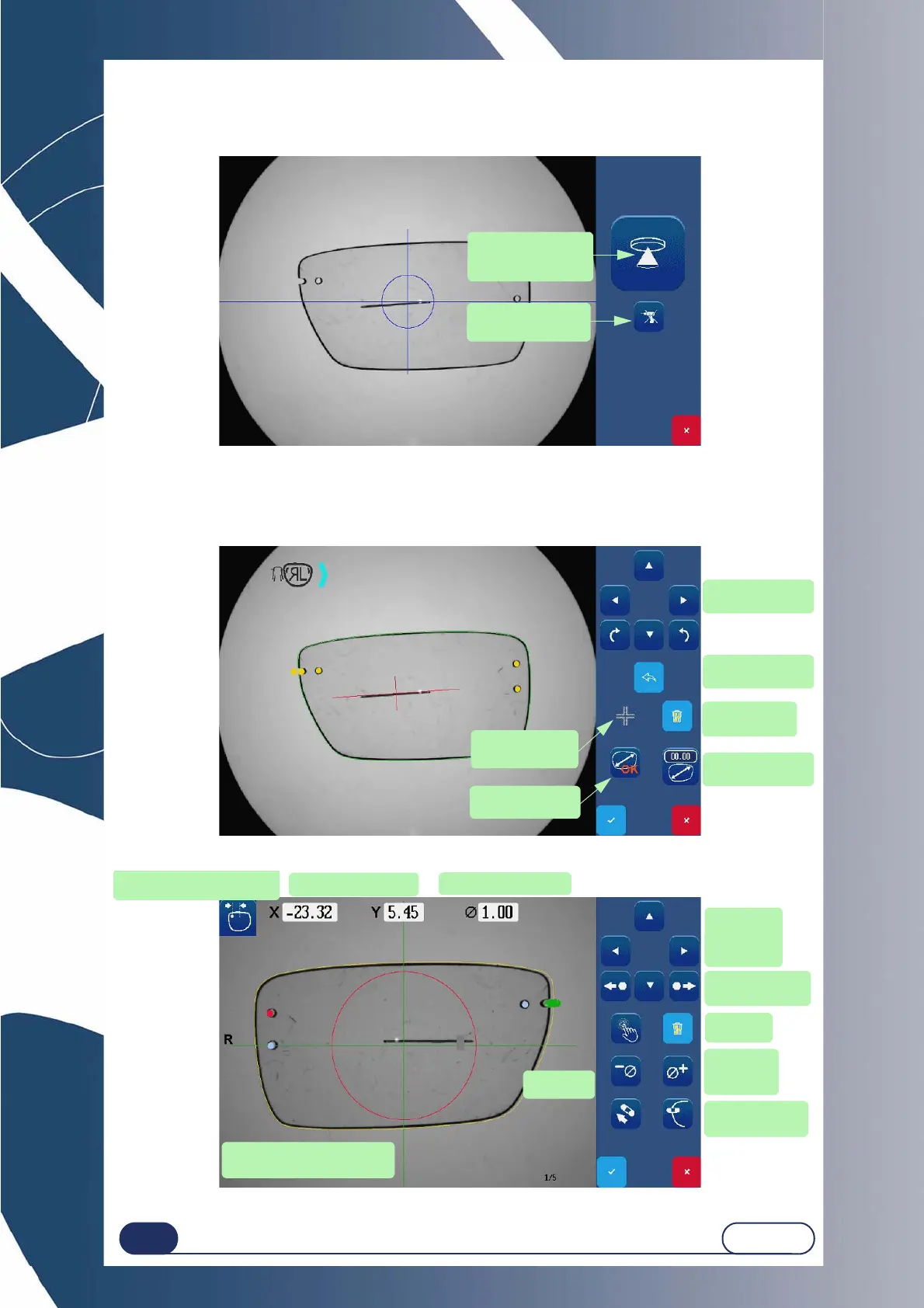
You have the possibility to choose automatic detection of holes present on your lens.
Screen 3-7 : Measurement launch screen.
Once the measurement is completed, you then automatically access the screen enabling:
Application of an oversize.
The visualization of the axis treatment image.
Screen 3-8 : Oversize application and axis treatment screen.
Screen 3-9 : Parameter definition screen (drilling plan)
Measurement with
detection of drilling
holes
Measurement wi-
thout drilling holes
Eliminating
the holes
Visualize the axis
treatment image
Scrolling through
oversizes
Manually enter
an oversize
Return to pre-
vious screen
Browsing arrows
Browsing ar-
rows for the
selected hole
Drill an elongated
hole
Selecting a
hole
Remove a
hole
Hole coordinates
Drilling diameter
Red spot: Common hole
Red circle: Prohibited area
Position of the hole with res-
pect to the center of the lens
Previous/next
hole
Change
the diame-
ter value



 To Next Page