91
Appendix A - Cleaning and Maintenance
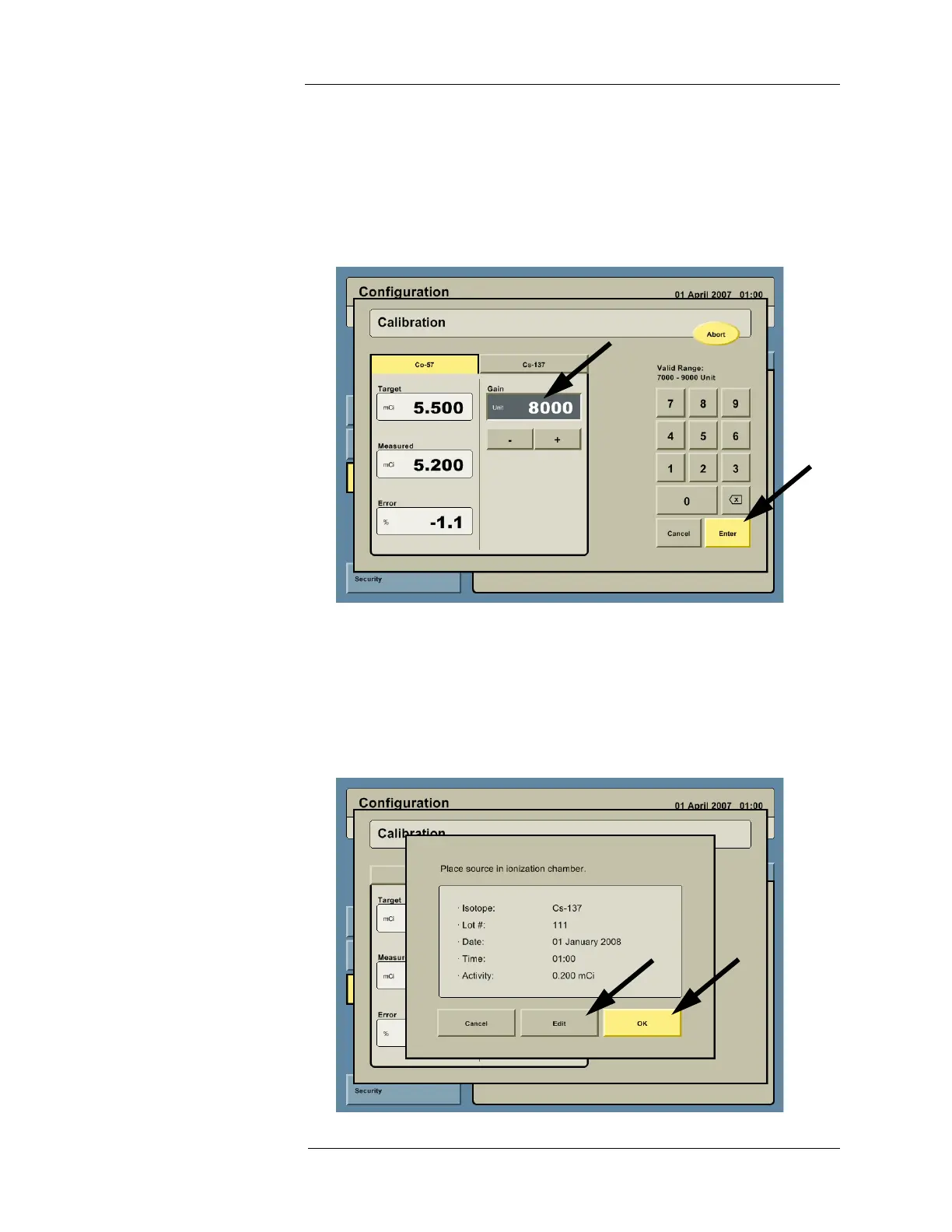
6. The Intego™ PET Infusion System measures the source and displays a status window for
the
57
Co. Adjust the gain to achieve an error less than 1% by clicking in the GAIN cell and
entering the desired value using the keypad or by pressing the + and - buttons. The
system will re-measure the source. Continue to adjust the gain until an acceptable (<1%)
error is achieved.
NOTE: MEDRAD recommends using the factory calibration gain located on the Dose
Calibrator certificate as the initial gain value.
7. Remove the
57
Co source.
8. Press the Cs-137 tab.
9. The Intego™ PET Infusion System then displays a dialog box prompting the user to insert
the
137
Cs source into the Dose Calibrator. Using the Calibration Source Holder, insert the
137
Cs source into the Dose Calibrator. Confirm the assay information listed for the second
source is correct. Press the EDIT button to make changes. Once the information is
correct, press the OK button.



 To Next Page