35
3 - System Configuration
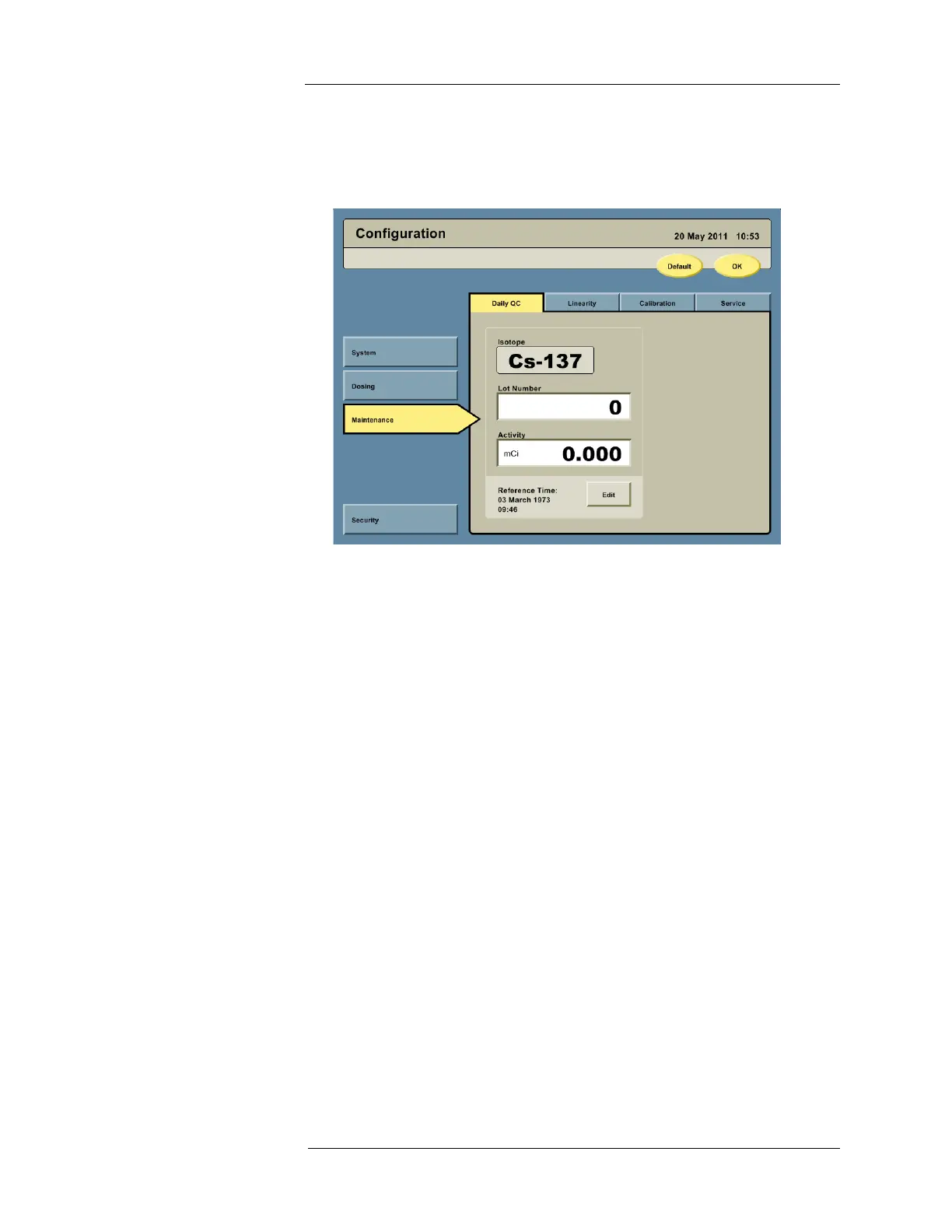
Maintenance Settings 1. On the left side of the Configuration screen, press the MAINTENANCE button to access
the maintenance options. Daily QC, Linearity, Calibration, and Service tabs will be
displayed along the top.
2. Press the Daily QC tab to access the Daily QC configuration options.
a. Press the Lot Number field and enter the lot number of the
137
Cs calibration source
to be used for Daily QC.
b. Press the Activity field and enter the activity of the
137
Cs calibration source to be
used for Daily QC.
c. Press the EDIT button to enter the assay date and time.
d. Press the Calendar icon next to the Reference Date and enter the assay date of the
137
Cs calibration source to be used for Daily QC.
NOTE: When reading the date from the
137
Cs calibration source assay information, be
cognizant of the format. Some formats are dd/mm/yy and others are mm/dd/yy.
e. Press the Reference Time field and enter the assay time of the
137
Cs calibration
source to be used for daily QC. If a time is not included with the assay information,
enter 12:00.
NOTE: Pressing the Linearity and Calibration tabs will access these configuration
screens. Descriptions on how to perform linearity testing, pinch valve, and
yearly calibration are provided in the Cleaning and Maintenance Appendix.



 To Next Page