39
4 - Daily Setup
4 - Daily Setup
WARNING: Patient injury could result from using improper components. Use
only components and options provided by MEDRAD designed for Intego™ PET
Infusion System.
WARNING: Explosion hazard. DO NOT use the Intego™ PET Infusion System
when flammable gases are present. Patient injury could result from using the
system in the presence of flammable gases (such as anesthetics).
WARNING: Trip hazard. Injury may occur. Do not operate Drive System if the power
cable is plugged into an AC outlet.
WARNING: No modification of this equipment is allowed.
WARNING: Do not use the Intego™ PET Infusion System in an oxygen rich
environment (Environment in which the concentration of oxygen is greater than 25%
for ambient pressures up to 110kpa).
Placing the System into
Clinical Mode
1. Power On the Intego™ PET Infusion System.
NOTE: If the Device Lock feature has been enabled, the Intego™ PET Infusion System
will prompt the user to enter the Security Code. Press ENTER when complete.
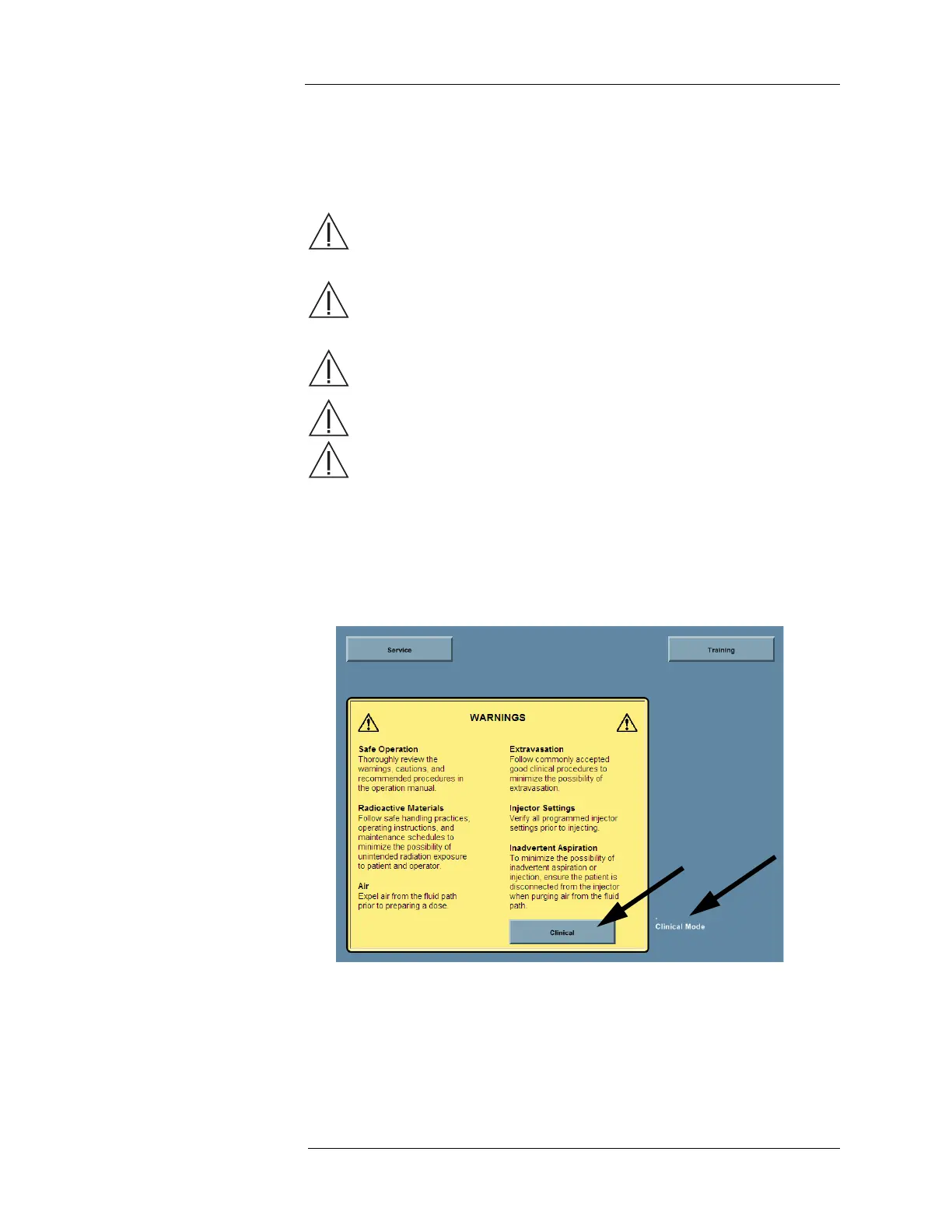
2. The Introduction screen appears. Press the CLINICAL button.
NOTE: The screen displays the current mode in the lower right corner of the
Introduction screen.



 To Next Page