Medrad™ Intego™
PET Infusion System
92
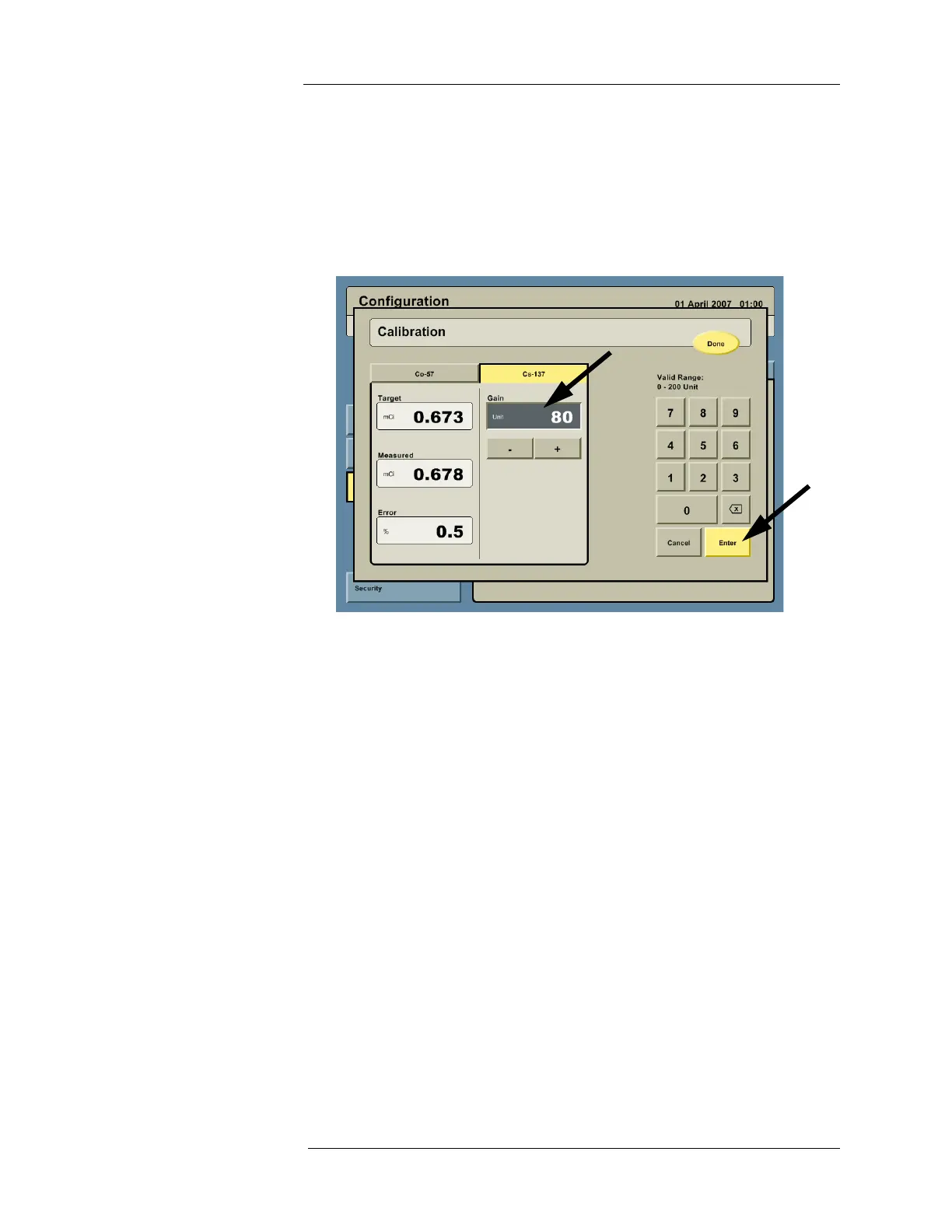
10. The Intego™ PET Infusion System measures the source and displays a status window for
the
137
Cs source. Adjust the gain to achieve an error less than 1% by clicking in the GAIN
field and entering the desired value using the keypad or by pressing the + and - buttons.
The system will re-measure the source. Continue to adjust the gain until an acceptable
(<1%) error is achieved.
NOTE: MEDRAD recommends using the factory calibration gain located on the Dose
Calibrator certificate as the initial gain value.
11. If gain adjustments were made on either source, the user must re-measure both sources
by performing the previous steps until no gain adjustments are needed to achieve errors
of less than 1% for both sources.
12. Once no gain adjustments are needed on either source, press DONE to complete and exit
the calibration.
Geometry Check Acceptable geometry testing was demonstrated for the Intego Dose Calibrator in accordance
with IEC61145: Calibration and Usage of Dose Chamber Systems for Assay of Radionuclides,
and NRC Information Notice No. 93-10: Dose Calibrator Quality Control, Section 4.
The test report indicates that the licensee need not repeat geometry testing due to the
following:
• The intended use of the Intego Dose Calibrator is for a single isotope:
18
F.
• The location of the isotope in the Dose Calibrator is fixed based on the design of the
Intego SAS.



 To Next Page