Medrad™ Intego™
PET Infusion System
32
a. Configure the default dose by pressing the Default Dose field and entering the
desired value via the keypad.
NOTE: If a vial schedule is entered using the Schedule screen, the Default Dose will be
overridden with the schedule value. For more information on when the Default
Dose is used and how a user may override it, refer to the "Patient Infusion"
section.
b. Configure the Intego™ PET Infusion System to use Personalized Dosing by default
by pressing the Default Setting ON button.
c. Configure the Intego™ PET Infusion System to use Manual Dosing by default by
pressing the Default Setting OFF button.
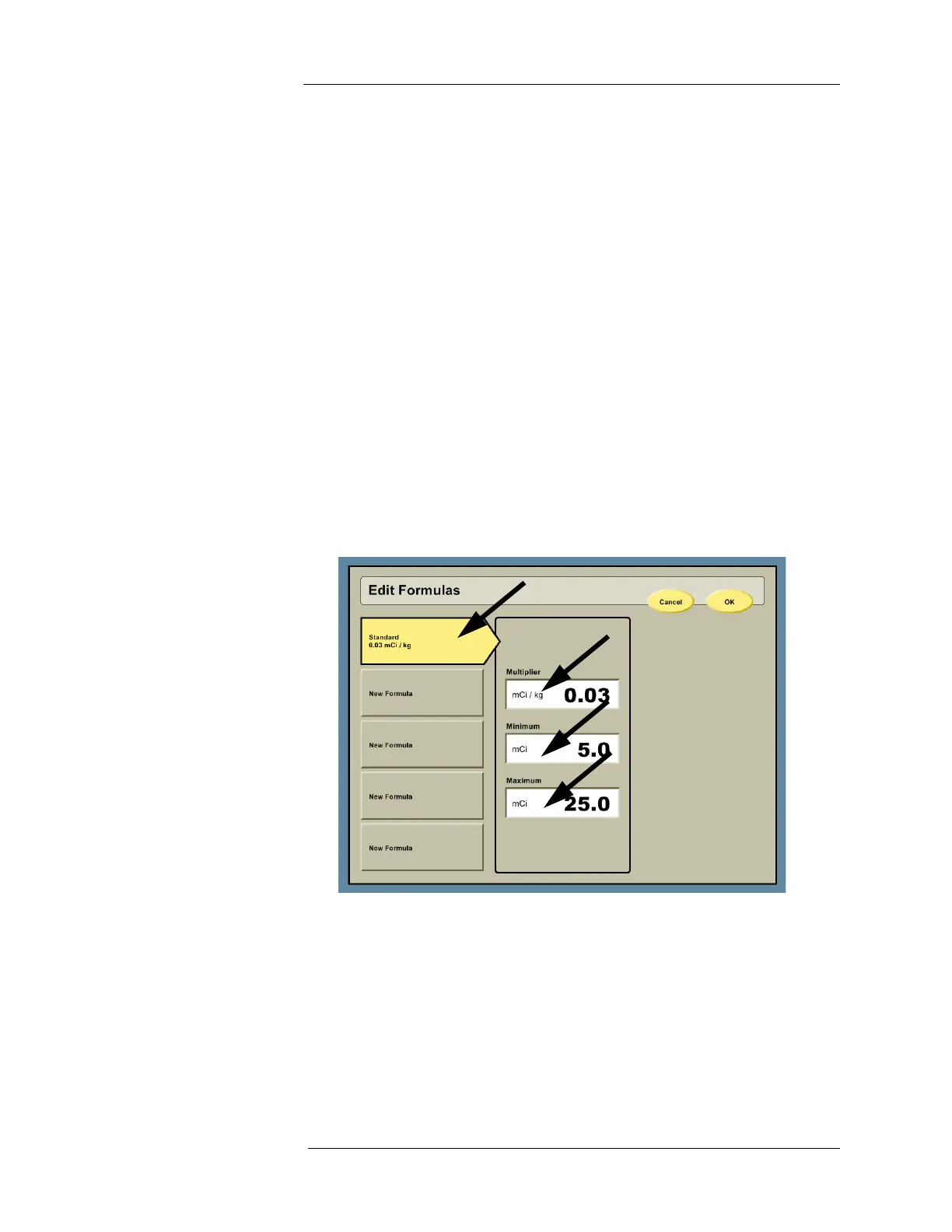
d. Up to five Personalized Dosing formulas can be entered by pressing the EDIT
FORMULAS button.
i. Press the Multiplier field to enter the RP activity per unit weight and then press
ENTER on the numeric keypad.
ii. Press the Minimum field to enter the minimum RP activity that can be prepared
regardless of the patient weight and then press ENTER on the numeric keypad.
iii. Press the Maximum field to enter the maximum RP activity that can be prepared
regardless of the patient weight and then press ENTER on the numeric keypad.
iv. Press the OK button.
NOTE: If more than one formula is created, a formula name must be entered when
entering the data. Press a NEW FORMULA button and enter the formula name
via the keypad.
NOTE: At least one formula must be entered to use the Personalized Dosing.



 To Next Page