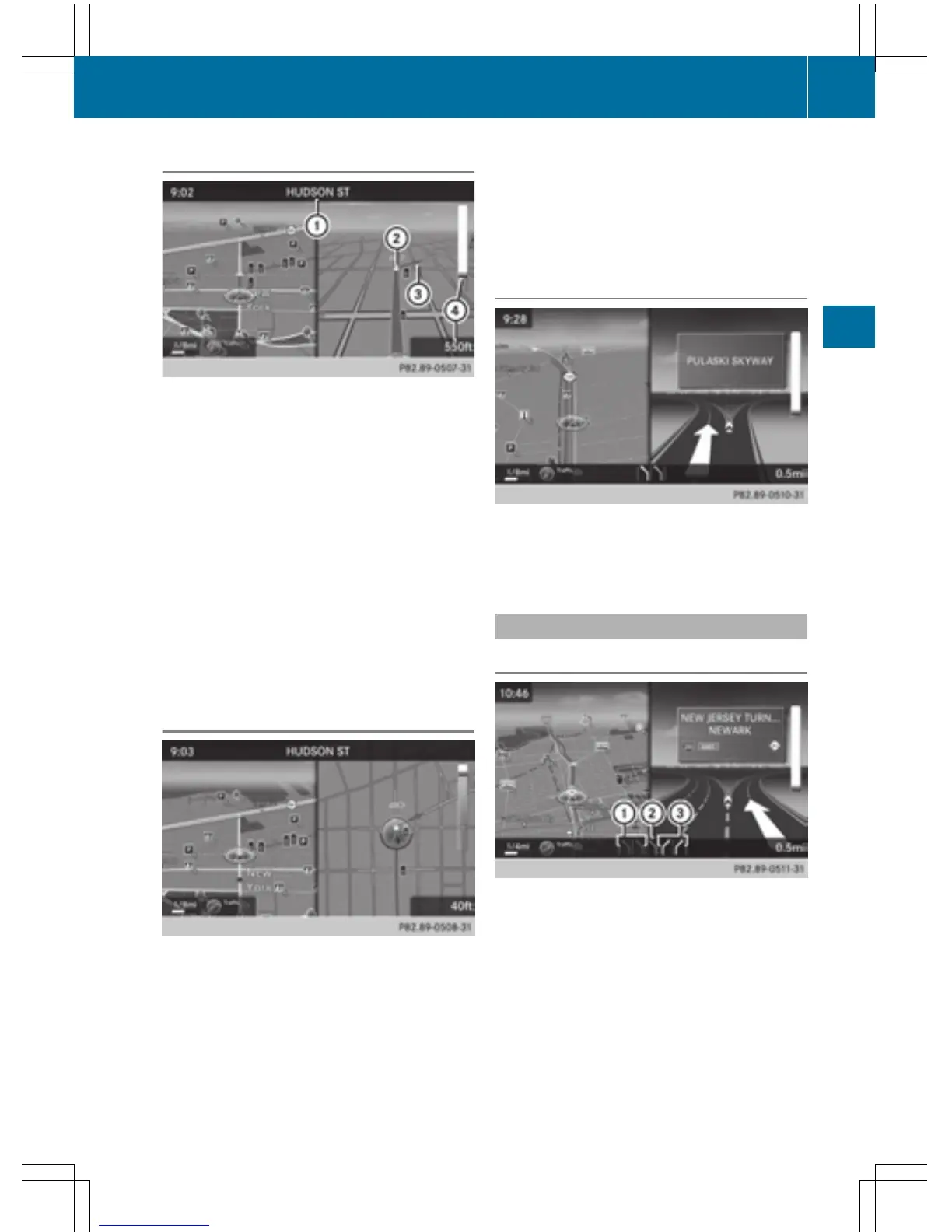
Announcement phase
:
Next road or direction
;
Point at which the change of direction
takes place (white dot)
=
Change of direction (turn right here)
?
Distance to the next change of direction
COMAND announces the imminent change of
direction. The change of direction is
announced ahead of time, such as with the
announcement "Turn right in 200 meters".
The display is now split into two sectors. The
map is shown on the left side of the display,
and a detailed image of the intersection or a
3D image of the imminent change of direction
is shown on the right side of the display.
Change-of-direction phase
COMAND announces an imminent change of
direction. The change of direction is
announced ahead of time, e.g. with the
announcement "Now turn right".
The display is split in two like in the announce-
ment phase.
The change of direction is performed when
the light-color bar on the right drops down to
0 ft and the current vehicle position symbol
has reached the white change-of-direction
point.
When the change of direction is completed,
the map will appear in full screen mode again.
Display on highways
The image shows an example of route guid-
ance at a highway intersection when driving
on a highway.
Lane recommendations
Display on multi-lane roads
:
Lanes not recommended (dark gray)
;
Possible lane (light gray)
=
Recommended lanes (white)
If the digital map contains the relevant data,
COMAND can display lane recommendations
on multi-lane roads for the next change of
direction.
Lane not recommended :: you will not be
able to complete the next change of direction
if you stay in this lane.
Route guidance
85
Navigation
Z



 To Next Page