3-CONTROLSANDINSTRUMENTS
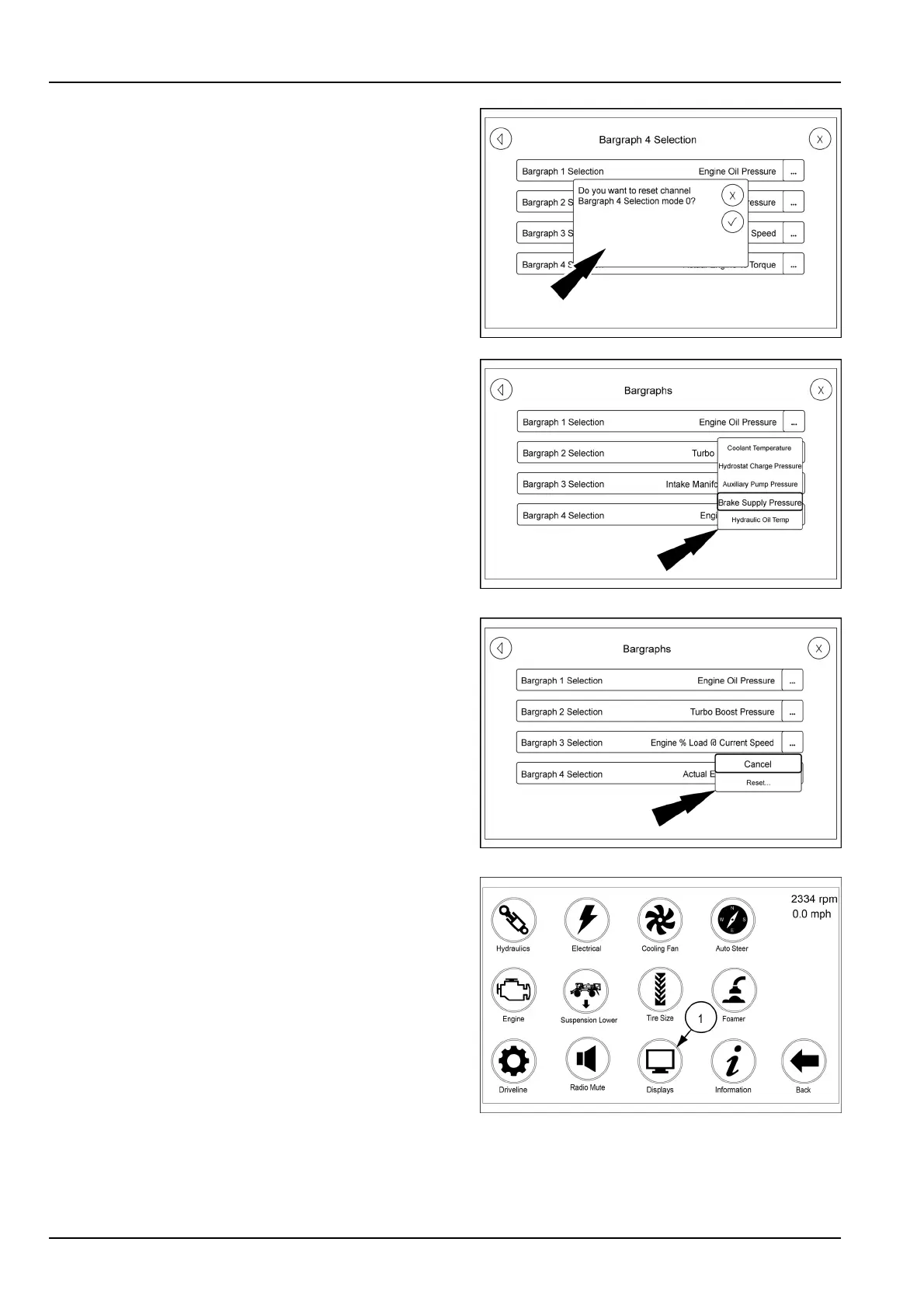
Pressthedesiredmonitoringgaugeselectionfromthelist.
Thechangeconrmationscreendisplays.
NOTE:Inordertodisplayalloftheselectablemonitor-
inggaugesavailable,scrolldownthroughtheselectable
gaugeslistbyswipingthelist.
RAIL17SP00111AA5
RAIL17SP00113AA6
PressResettoconrmyourselection,orpressCancelto
leavetheselectionasis.
The"Bargraphs"selectionscreendisappearsand,the
A-postmainpagedisplayswiththechosenmonitoring
gaugedisplayed.
RAIL17SP00112AA7
Themonitoringgaugeselectionmayalsobeaccom-
plishedbyusingthearmrestdisplay
Accessthesecondpageofthearmrestdisplayhome
pageandpresstheDisplaysbutton(1).
The"Bargraphs"selectionscreenappears.
RAIL18SP00743FA8
3-58



 To Next Page