3-CONTROLSANDINSTRUMENTS
Producticonsandscreens
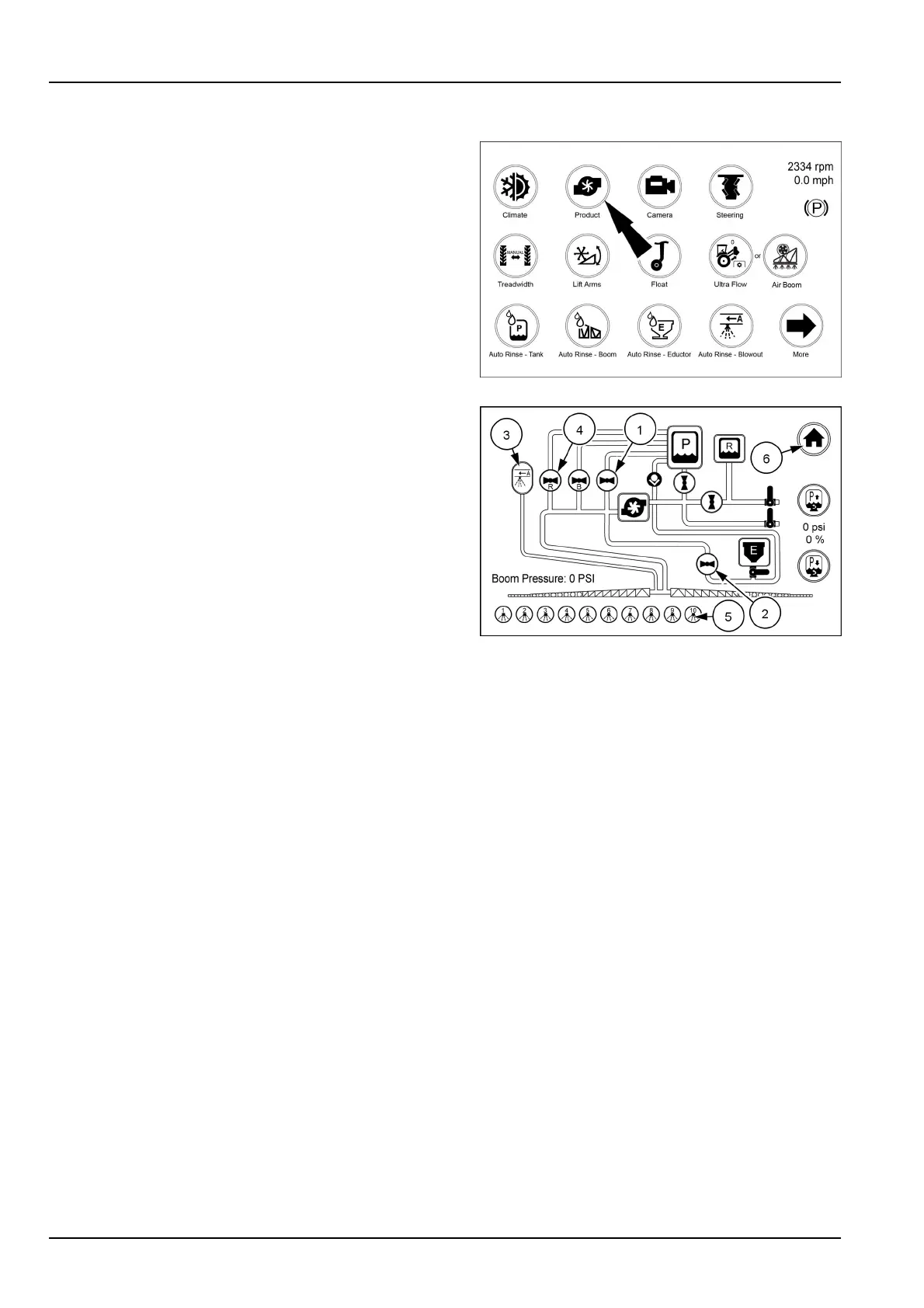
Fromthearmrestrsthomedisplaytouchtheproducticon
tobringuptheproductscreen.
RAIL18SP00742FA1
Fromthisscreenyoucanadjustthespargepressureup
ordownasneededbytouchingthespargeupicon(1)or
spargedownicon(2)topreventfoamingintheproduct
tankandtokeepthechemicalinsuspension.Thesparge
valveicon(1)willrotateasthespargeisincreasedor
decreased.Youcanturntheappropriatevalvesonoroff
bytouchingtheappropriateiconsuchaseductorvalve(2)
orboomblowout(3).
Whenavalveisopen,theiconwillturngreenandbe
parallelwiththeowinthatline.Whenavalveisclosed
(4)itwillturnredandbeperpendiculartotheowinthat
line.
Inthelowerpartofthescreenyoucanturnboomsections
(5)onoroff.Simplytouchtheappropriateicon.
Youcanalsoturntheboomblowoutvalve(3)onandoff
fromthisscreen.
Onceallthesettingsarecomplete,touchthe“Home”icon
(6)toreturntothehomepage.
RAIL17SP00183AA2
3-64



 To Next Page