6-WORKINGOPERATIONS
Agitatingtheproducttank
Productcircuiticonandscreens
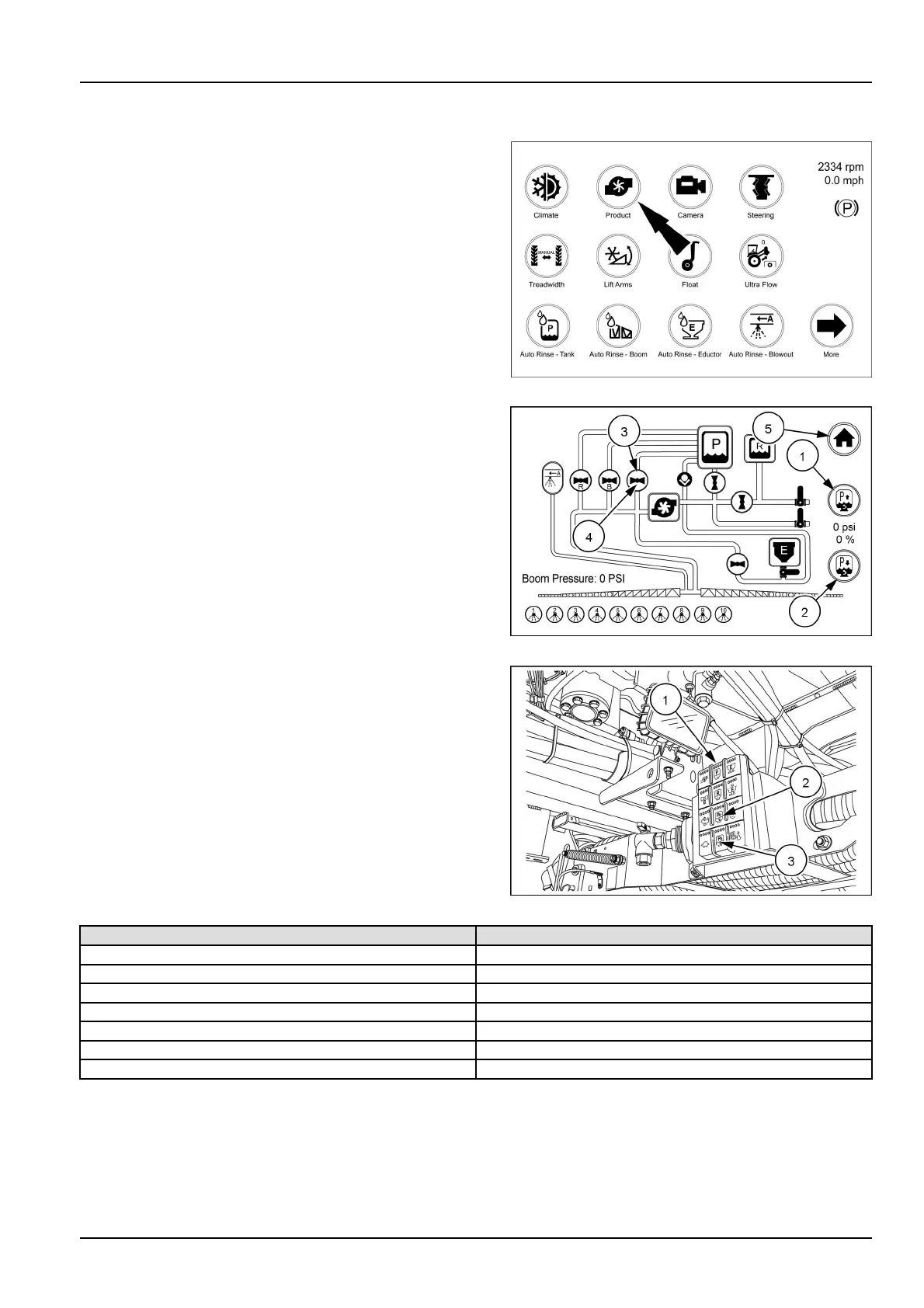
Fromthearmrestrsthomedisplaytouchtheproducticon
tobringuptheproductscreen.
RAIL18SP00852FA1
Fromthisscreenyoucanadjustthespargepressureup
ordownasneededbytouchingthespargeupicon(1)or
spargedownicon(2)topreventfoamingintheproduct
tankandtokeepthechemicalinsuspension.Youcan
alsoadjustthespargebytouchingthespargevalveicon
(3)toopenorclosethevalve.
Whenavalveisopen,theiconwillturngreenandbe
parallelwiththeowinthatline.Whenavalveisclosed
(4)itwillturnredandbeperpendiculartotheowinthat
line.
Onceallthesettingsarecomplete,touchthe“Home”icon
(5)toreturntothehomepage.
RAIL17SP00183AA2
Thespargecanalsobeadjustedupordownbyusing
theremotekeypad(1)mountedtothesideofthefast
llsnorkelatthefrontoftheframe.T ouchthesparge
increasebutton(2)toincreasethespargepressure.As
thespargeincreasesthefourlightsatthetopofthebutton
willilluminateinsequencetoshowincreaseinpressure.
refertothetableforthesepercentages.Theselightswill
correspondwiththepercentageonthescreen.
Touchthespargedecreasebutton(3)todecreasethe
spargepressure.Asthespargedecreasesthefourlights
atthetopofthebuttonwillilluminateinsequencetoshow
decreaseinpressure.Theselightswillcorrespondwith
thepercentageonthescreen.
RAIL17SP00859AA3
Lightcolorcombination
Percentageofsparge
Red
0–6%
RedandYellow
7–23%
Yellow
24–41%
YellowandGreen42–58%
Green59–77%
GreenandBlue78–99%
Blue
100%
6-41



 To Next Page