105
M
ANAGING CALLS DND AND CALL FORWARD
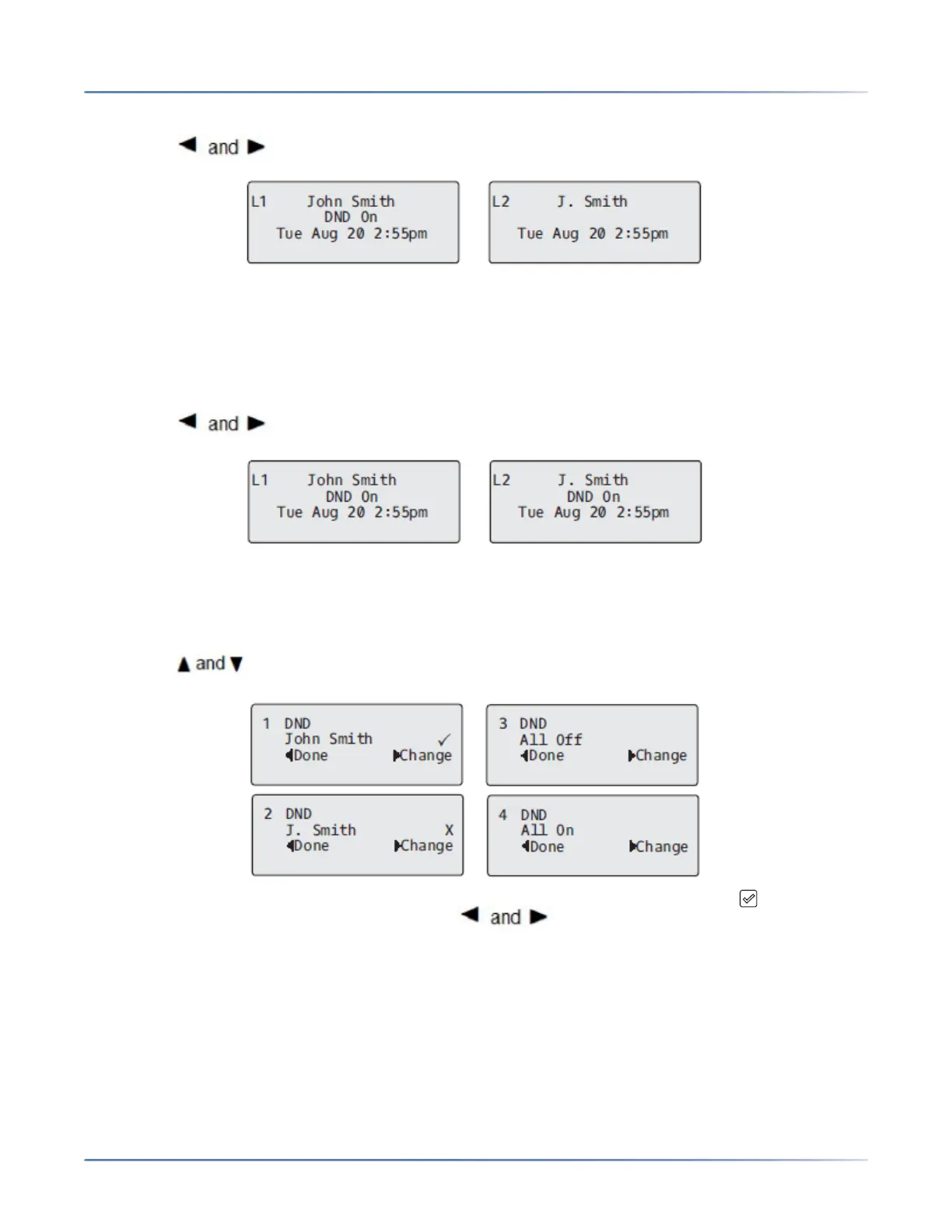
DND in Account Mode IP Phone UI
1. Use the navigation keys to scroll through each account.
2. With the account in focus on the IP phone UI, press the DND key to turn on/off DND for the account.
In the above example, two accounts are configured on the phone. Only account 1 has DND enabled while
account 2 has DND disabled.
DND in Phone Mode (Default) IP Phone UI
1. Press the DND key to turn on/off DND for all accounts on the phone.
2. Use the navigation keys to scroll through each account.
In the above example, enabling DND for account 1 also enables DND for account 2.
DND in Custom Mode IP Phone UI
1. Press the DNDkey on the phone. The screen displays a list of the accounts on the phone and allows
you to enable/disable a specific account or all accounts.
2. Use the navigation keys to scroll through the accounts.
In the above example, account 1 has DND enabled as indicated by a check mark ( ). Account 2
has DND disabled as indicated by an X. Items allow you to disable or enable DND on all
accounts, respectively.
3. Use the 4 Change key to enable or disable DND for a specific account or to enable/disable DND for
all accounts.
After making the change, press 3 Done and then # Confirm to save the change. Pressing 0 Cancel
cancels the attempted change.



 To Next Page