23
P
HONE STATUS PHONE STATUS THROUGH THE MITEL WEB UI
• Hardware Information
• Firmware Information
• SIP Status
SIP Account Status
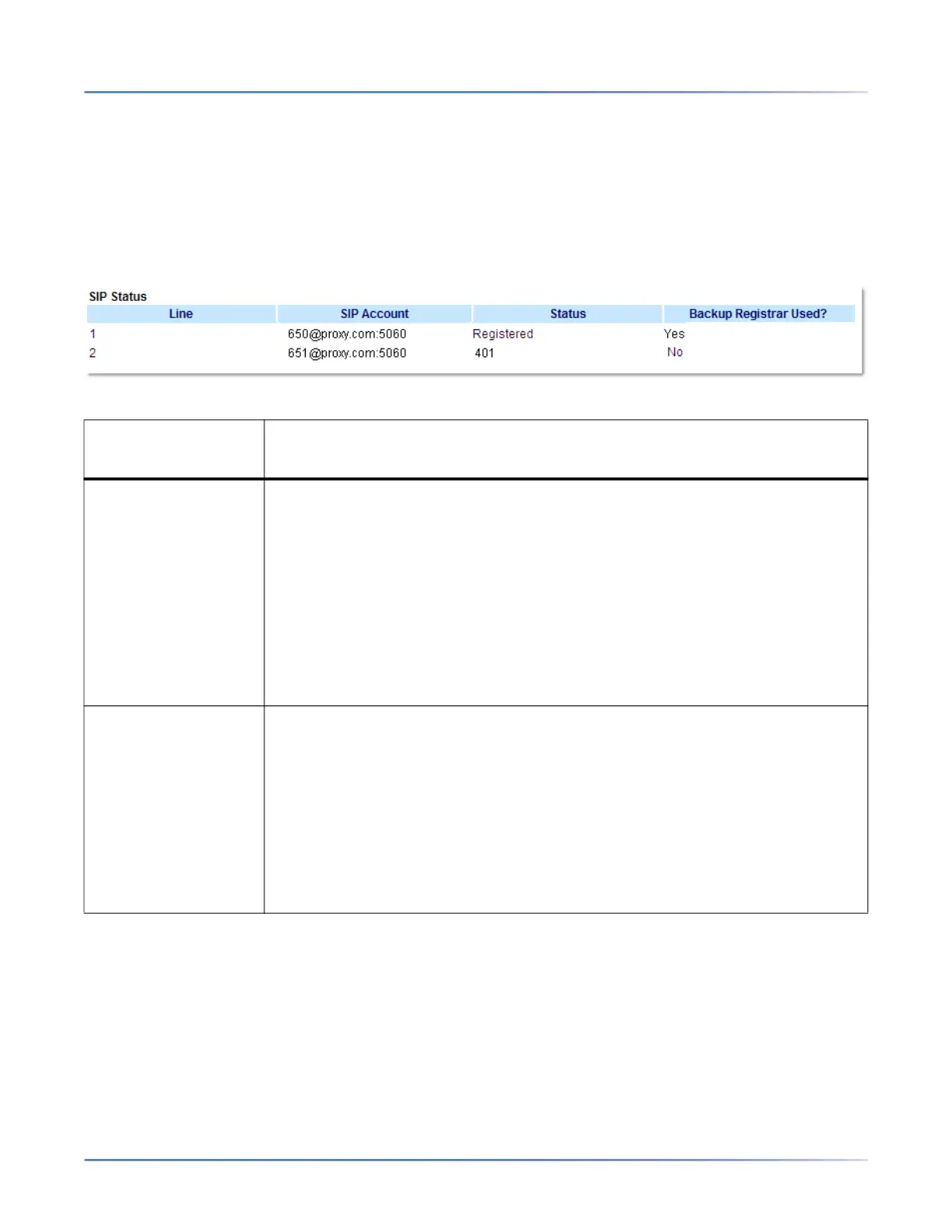
The IP phones show the SIP registration status on the IP phone’s Status screen in the Mitel Web UI.
The following table describes the status conditions that can display for the account.
STATUS
CONDITION DESCRIPTION
Registered Displays this status on accounts that HAVE been registered with the SIPproxy
server.
Example:
Line > SIP Account > Status > Backup Registrar Used?
1 > 650@proxy.com:5060 > Registered > Yes
where:
• Account Number is 1
• SIP Account is 650@proxy.com on port 5060
• Status is Registered
• Backup registrar is used (Yes)
SIP Error Number Displays on accounts when registration fails with the SIP proxy server.
Example:
Line > SIP Account > Status > Backup Registrar Used?
2 > 651@proxy.com:5060 > 401 > No
where:
• Account Number is 4
• SIP Account is 651@proxy.com on port 5060
• Status is 401 - Unregistered if SIP registration fails
• Backup registrar is used (No)



 To Next Page