128
MANAGING CALLS DND AND CALL FORWARD
You can also use the following keys if required:
– All Off: Disables all CFWD states for the current account in focus
– All On: Enables all CFWD states for the current account in focus
NOTE: In Phone mode, the initial configuration you set for an account applies to all the accounts
on the phone.
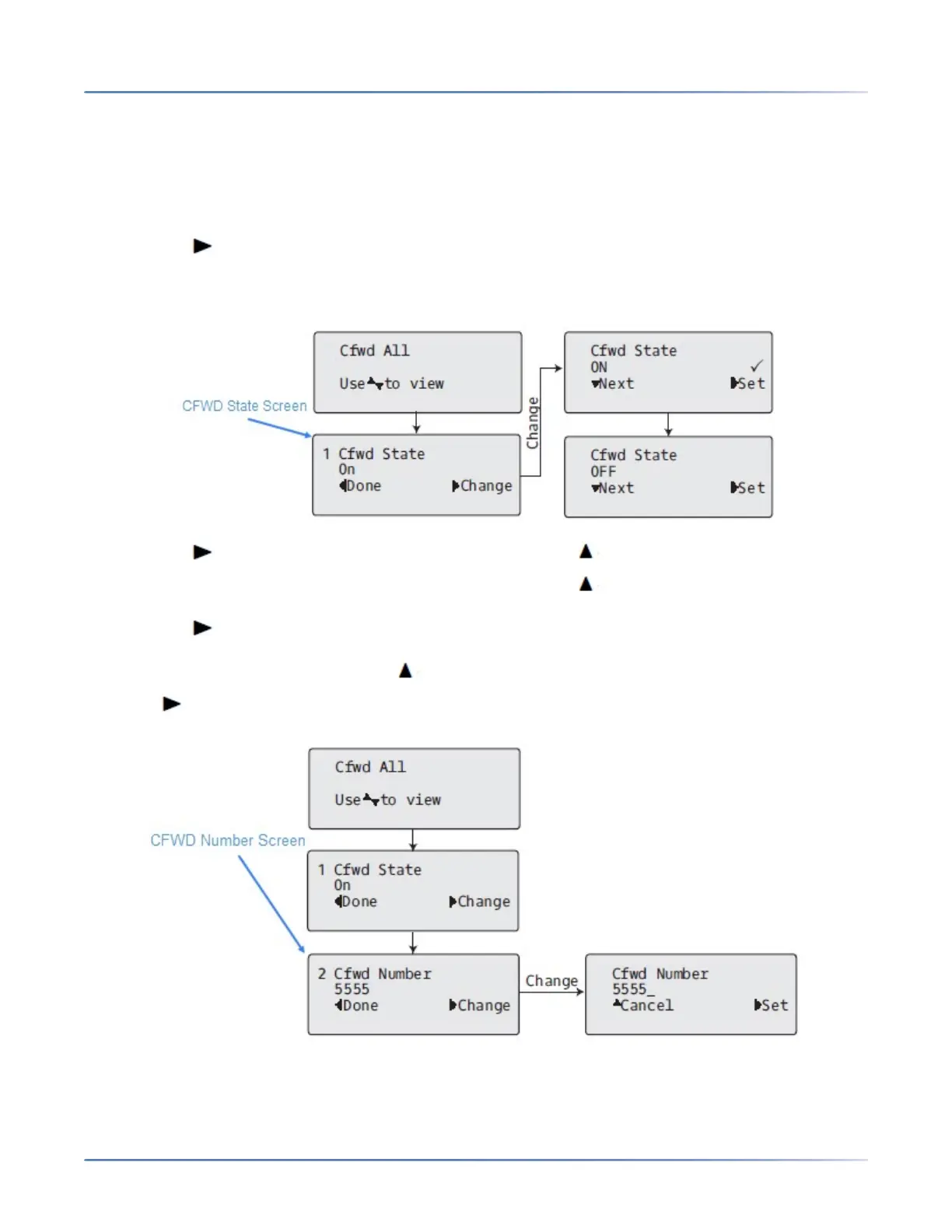
4. Press the Change key for the mode you selected in Step 2. Scroll to the CFWD State screen.
This screen displays the current state of the mode you selected. In the following example, the CFWD
All state is ON.
5. Press the Change key in the CFWD State screen. Press Next to toggle the state of the
CFWD state ON or OFF. In the example in Step 4, you press Next to change the option to Off.
6. Press the Set key to save the change.
7. In the CFWD State screen, press the navigation key to scroll to the CFWD Number screen and
press Change.
8. Enter a phone number to apply to the current state in focus. When the phone is in the state you spec-
ified, and a call comes into the phone, it forwards the call to the number you specify.



 To Next Page