72
LINE KEYS AND PROGRAMMABLE KEYS SPEEDDIAL/MWI
CONFIGURING A SPEEDDIAL/CONF KEY
MITEL WEB UI
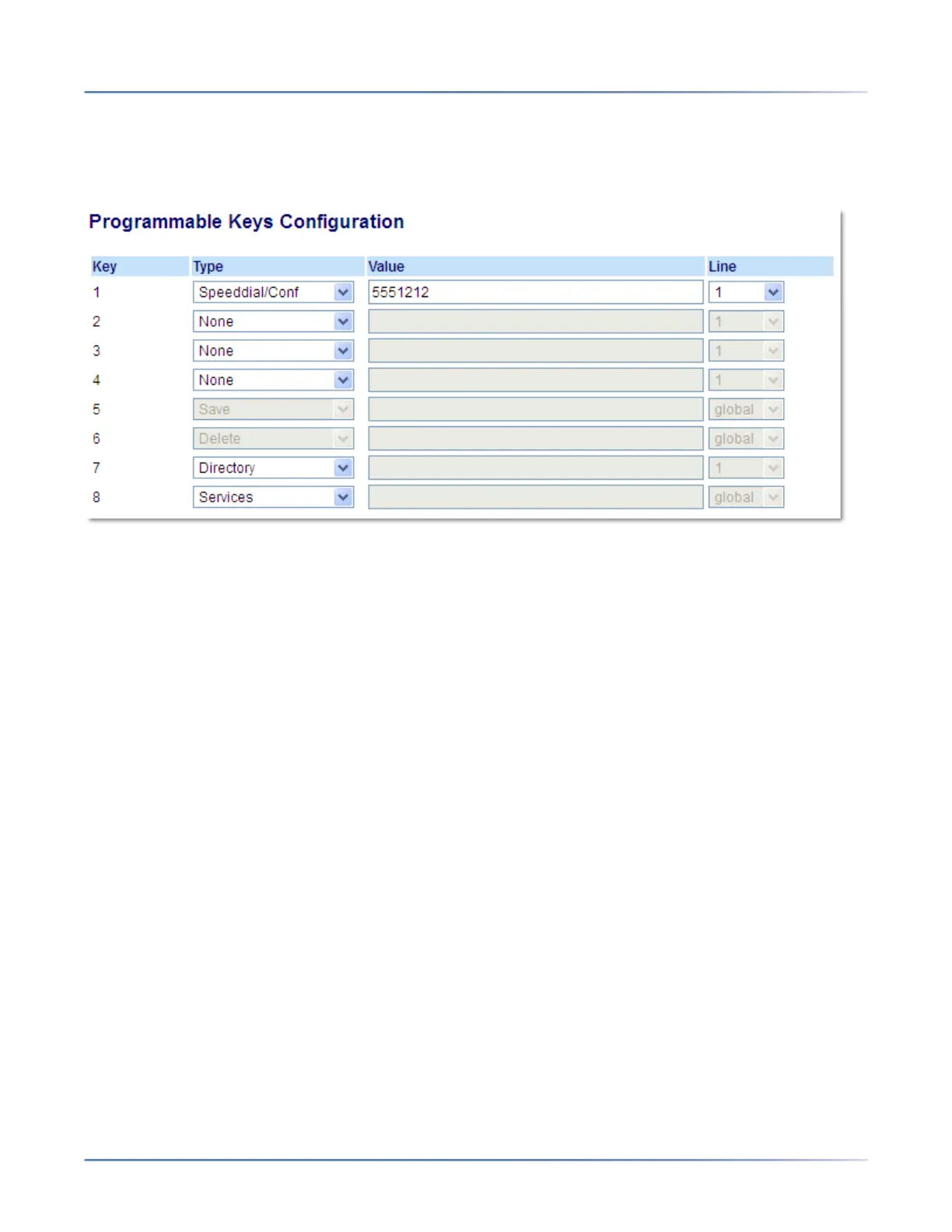
1. Click on Operation > Programmable Keys.
Programmable Keys
2. Select from Key 1 through Key 8.
3. In the Type field, select Speeddial/Conf.
4. In the Value field, enter the number or the extension to add to the conference (for example, 5551212).
5. In the Line field, select the line for which you want to use the key functionality.
6. Click Save Settings.
SPEEDDIAL/MWI
The 6910 supports multiple voicemail registration by using the Speeddial/MWI key. This feature can be
useful in scenarios where you need to monitor the voicemail accounts of your team members or you need
access to your manager’s voicemail messages.
By configuring a key as “Speeddial/MWI” and defining call and voicemail URIs, you can monitor and listen
to pending messages on multiple voicemail accounts. When new messages are pending on a monitored
voicemail account the corresponding Speeddial/MWI key’s LED will illuminate.
When you press the configured key, the phone will send an INVITE to the configured call URI whereby
you will be able to listen to the new messages. The Speeddial/MWI key can be configured through the
Mitel Web UI.



 To Next Page