10/128
T25 System Manual Part 2: Overview of Application Scenarios
© MOBOTIX AG • Security-Vision-Systems • Made in Germany
www.mobotix.com • sales@mobotix.com
1 OVERVIEW OF APPLICATION SCENARIOS
1.1 Standard Scenario
1.1.1 Description
The standard application scenario for the MOBOTIX IP Video Door Station is the simple
one-party scenario (for example, a single-family home or doctor’s oce). This scenario
involves one building or apartment with a door that is secured using the T25 system. At
the door, visitors can ring the doorbell for one party (meaning one or more occupants).
Hardware and Functions in the Standard Scenario:
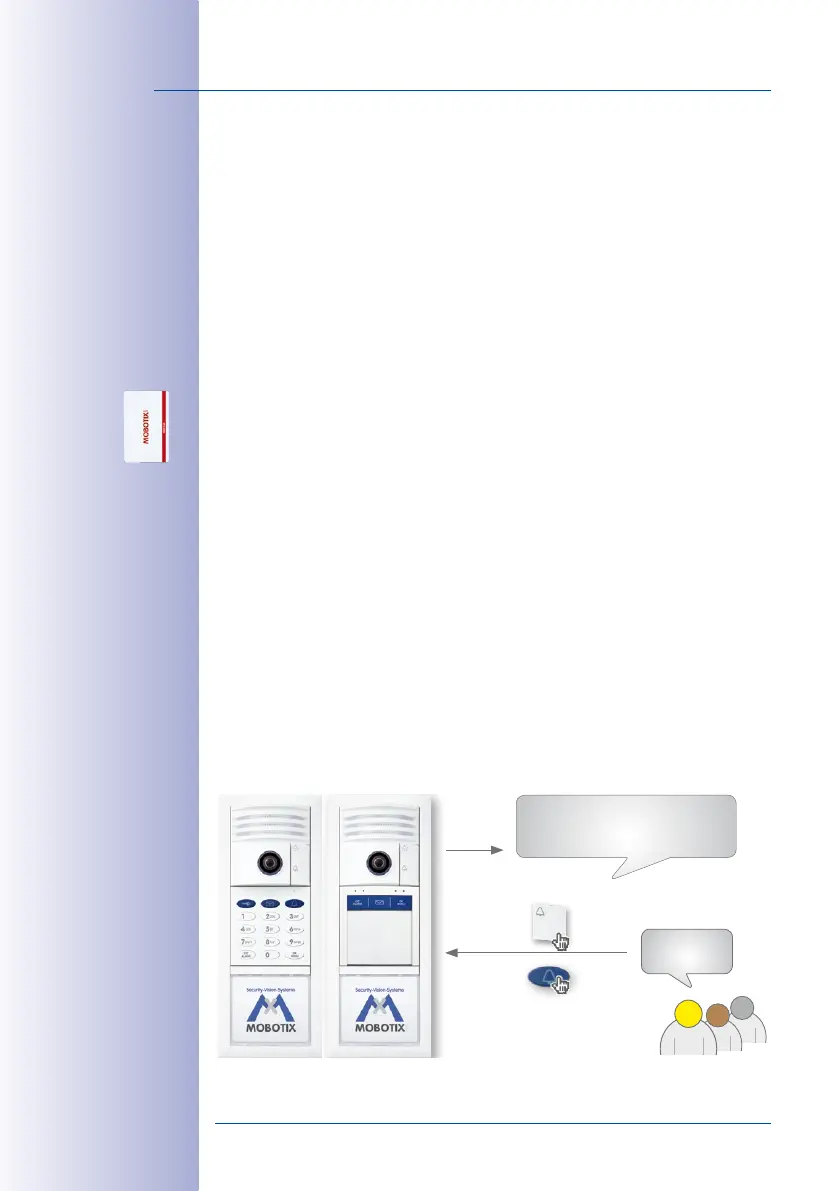
• Outdoor station: One T25 IP Video Door Station with KeypadRFID or BellRFID and
multiple transponder cards (blue user cards for day-to-day use, red admin card for
system administration)
•
Remote station in the house: Grandstream video phone &/or computer with MxEasy.
• Additional doorbell in the house: MX-DoorMaster (with connected door switch and
door lock switch)
Visitors can press a bell button on either the camera, the KeypadRFID or the BellRFID to ring
the doorbell of the building or a specific apartment. The video phone and the MX-DoorMaster
then call the house phone or MxEasy.
The homeowner picks up the receiver in order to speak to the visitor. The live image of
the door camera is displayed in the color display on the video phone. The homeowner
can then press a button on the video phone to activate the electric door opener and, for
example, switch on the light in the stairwell.
If the homeowner does not respond to the doorbell, and the voice mailbox function is
activated, visitors can leave a message at the door – just as they would on a telephone
answering machine. The homeowner can listen to these messages at the door station or
at a video phone in the house.
Admin card
Welcome Message:
Please leave a message.
To leave a message, press and hold
the blue letter button.
Message:
Please call me
back. John!
Smith Family



 To Next Page