51/128
Step3: Configure the System Using a Video Phone
© MOBOTIX AG • Security-Vision-Systems • Made in Germany
www.mobotix.com • sales@mobotix.com
2.4.3 Changing the Super PIN at the Video Phone
We recommend changing the Super PIN for security reasons (protection against manipula-
tion or unauthorized access to the door station)
• if your door station does not have a KeypadRFID and therefore a Super PIN has not
been entered yet,
• if you suspect that unauthorized persons may know your current Super PIN, or
• if you have taken over an existing door station that is still set up with the previous
owner’s Super PIN.
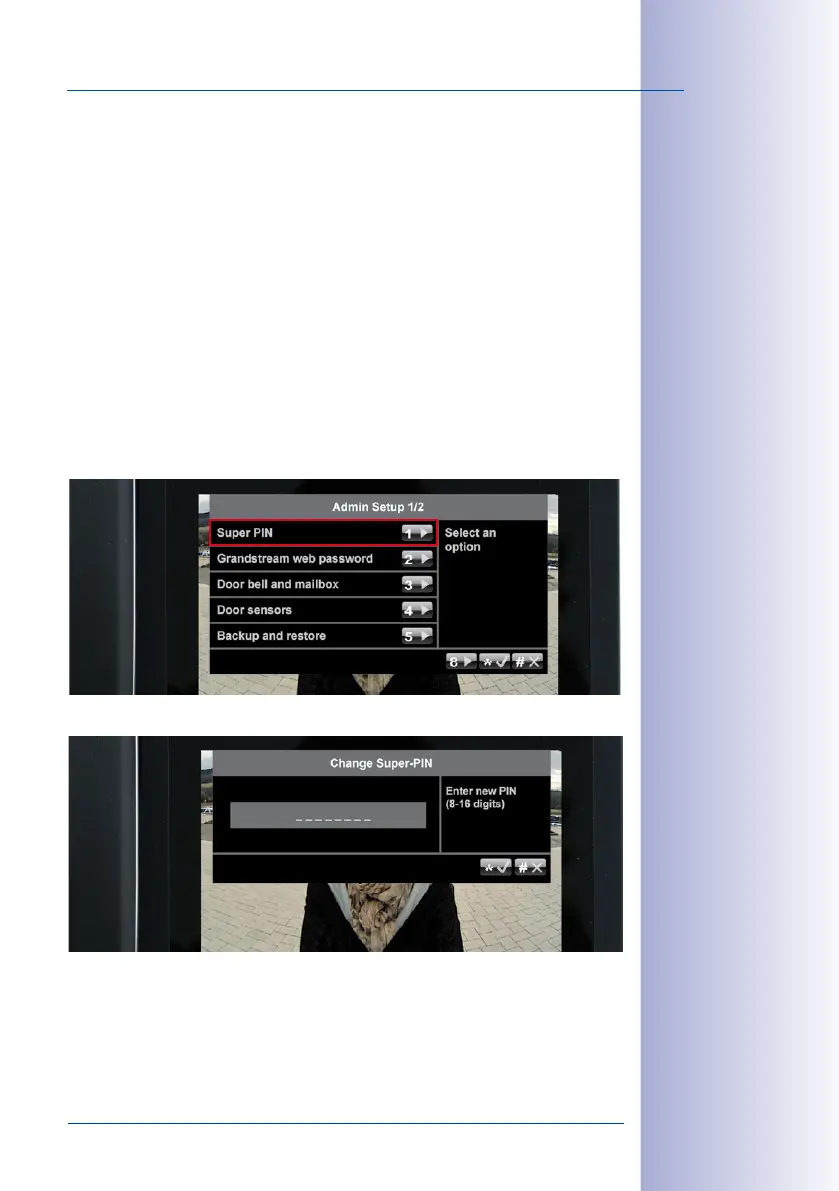
Change the Super PIN:
1.
Select a new, secure 8- to 16-digit Super PIN. Refer to the information at the beginning
of
Section 2.2.1, «Entering the Super PIN at a KeypadRFID Module»
or
Section 2.3.1,
«Entering the Super PIN at a BellRFID Module»
, respectively.
2. On the Admin Setup menu, press 1 to select the Super PIN menu item.
3. Enter your new Super PIN and press the “*“ button to confirm.
4. Enter your new Super PIN again and confirm once more by pressing the “*“ button.
After you have changed your Super PIN, or pressed the “#“ button to cancel, you are
returned to the Admin Setup menu. Proceed to
Section 2.4.4, «Setting the Door Status
Display»
to continue with the initial setup.



 To Next Page