29/128
Step1: Perform the Auto Configuration
© MOBOTIX AG • Security-Vision-Systems • Made in Germany
www.mobotix.com • sales@mobotix.com
2.1.4 Functional Test Part 1
Once all the Grandstream video phones to be used have been detected in the network
and integrated via the Auto Configuration process, you should carry out a four-stage
functional test.
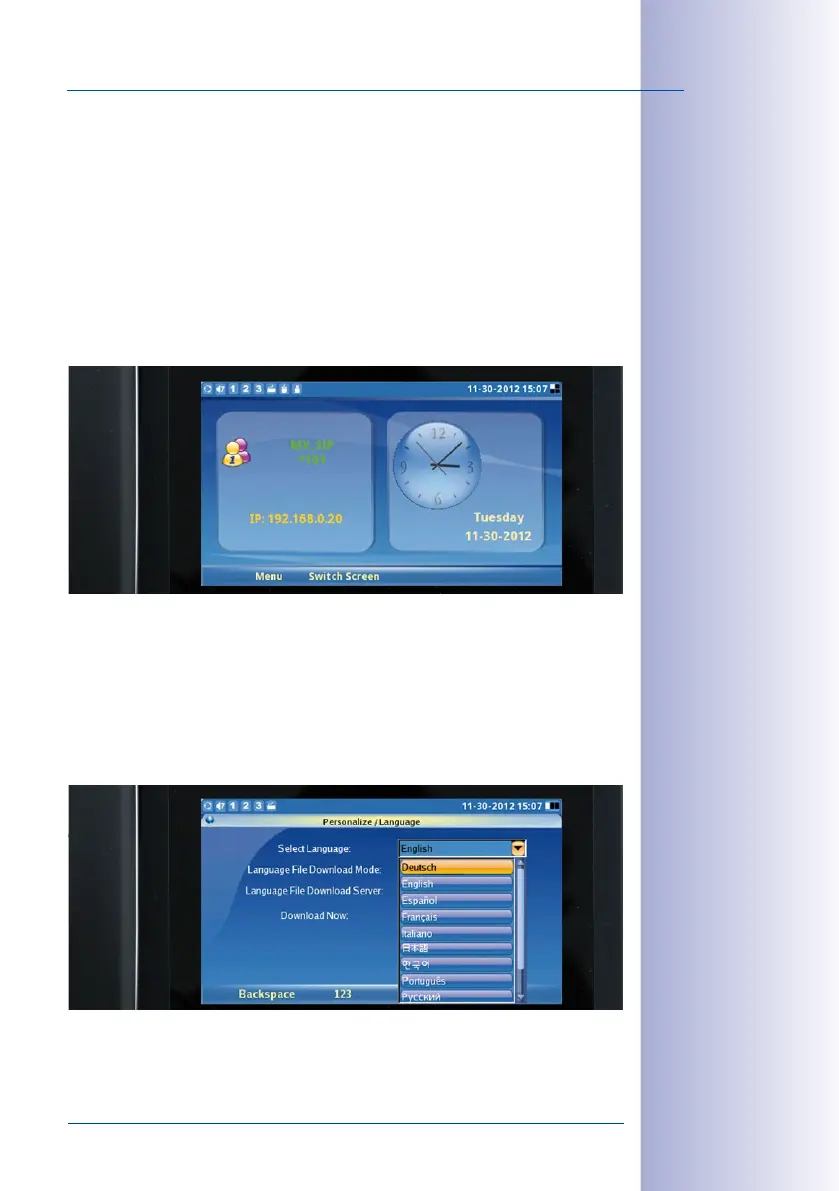
1. Check the Start Display of the Video Phones
The T25 is the SIP server and has VoIP profiles for all the Grandstream video phones
detected in the network. The video phones are assigned a sequential quick dial number
beginning with *101 (*101, *102, *103 and so on). The new quick dial number and IP address
of the telephone are shown on the left side of the display.
The system time supplied by the T25 is shown on the right side of the display. This system
time is valid for all the video phones and door stations. The T25 is normally factory-set to
CET (Central European Time). Otherwise, you can manually set the time zone, time and
date on the KeypadRFID (see
Section 2.2.4
).
The menu language of both the video phone and the time and date are factory-set to
English. You can change the language on the Grandstream menu (Menu> Personalize>
Language> Select Language). :
Menu> Personalize> Language> Select Language
Menu > Personalize >
Language > Select
Language



 To Next Page