116/128
T25 System Manual Part 2: Restoring the System
© MOBOTIX AG • Security-Vision-Systems • Made in Germany
www.mobotix.com • sales@mobotix.com
6 RESTORING THE SYSTEM
6.1 Error Messages and Rebooting
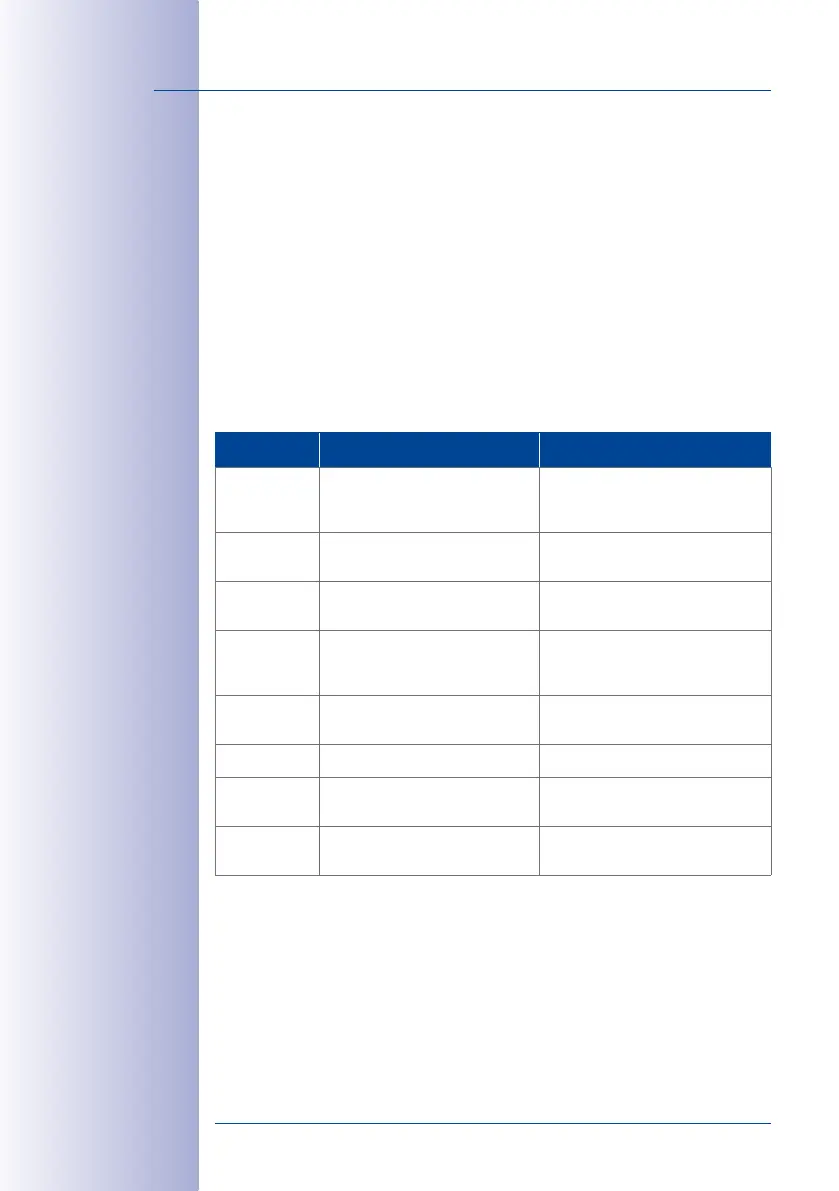
If any errors are encountered during the initial operation, they are announced as a numeri
-
cal code via the door station’s loudspeaker. The table below outlines possible reasons
for errors and troubleshooting solutions. If none addresses your issues, please contact
the MOBOTIX support team.
How to Reboot the System:
Disconnect the door station from the power supply for approx. 30 seconds (for example,
by removing the network plug) and then repeat the operating steps you tried to carry out
previously (e.g. initiate the initial setup process).
Error code Error Solution
1 The door station’s internal battery
is empty
Ensure the door station is charged
continuously for at least one hour and
then reboot the system
2 Auto Configuration is deactivated Activate Auto Configuration (via video
phone. See Section 2.4)
3 Internal error Reboot system. If this does not resolve
the issue, contact MOBOTIX support
4 Error during number entry (e.g.,
Super PIN)– number too short or
too long
Repeat your entry
5 Processing error– card could not
be read
Repeat your entry
6 Card is not an admin card Use an admin card
8 Connection to card was interrupted–
card could not be set up completely
Repeat your entry and hold the card up
to the KeypadRFID longer
9 or higher Communication error (for example,
loose connection)
Check cabling. Reboot system or initi
-
ate the initial setup process again



 To Next Page