52/128
T25 System Manual Part 2: Initial Setup without a Computer
© MOBOTIX AG • Security-Vision-Systems • Made in Germany
www.mobotix.com • sales@mobotix.com
2.4.4 Setting the Door Status Display
To ensure that the status of the entrance door is displayed on the video phone,
• A door contact (door opened/closed) and a door lock switch (door lock locked/
unlocked) must be connected to the MX-DoorMaster or the KeypadRFID (see the
T25 System Manual Part 1
)
•
And the installed door sensor connection options must be set correctly on the Admin
Setup menu.
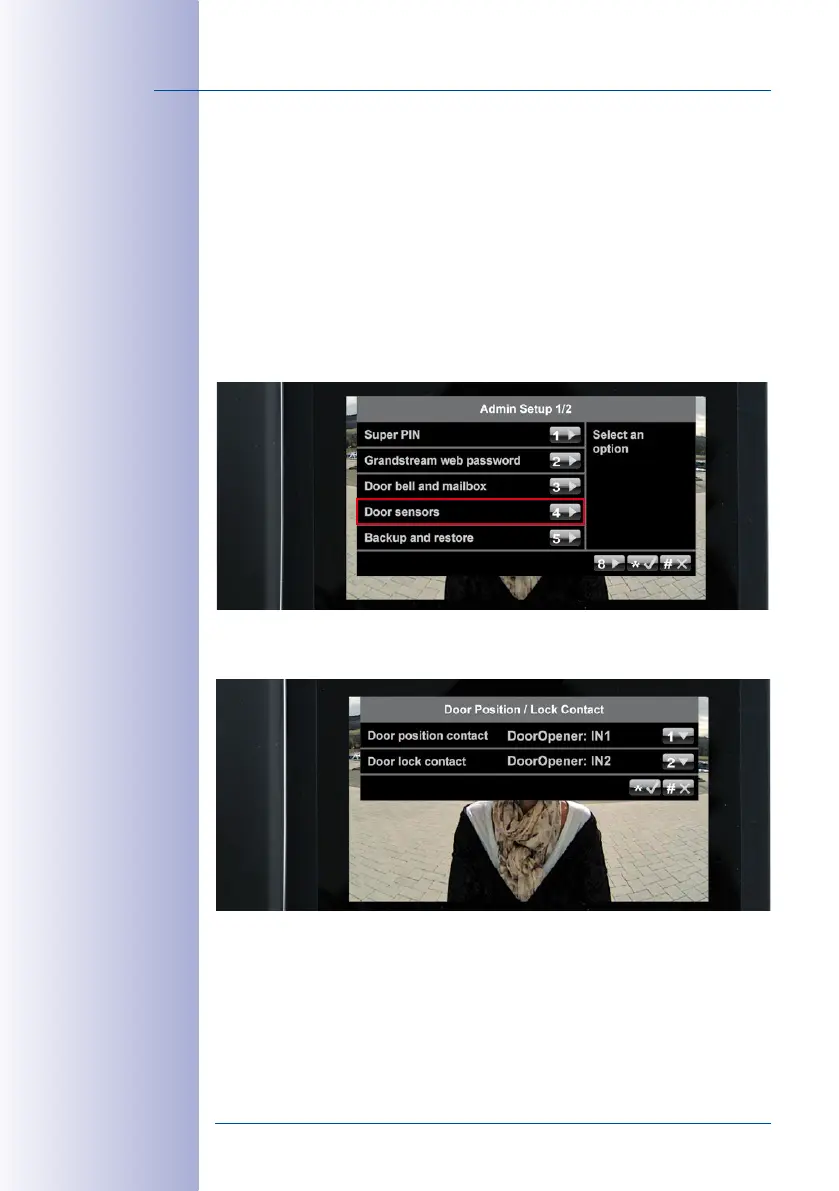
Set Door Status Display:
1. On the Admin Setup menu, press 4 to select the Door sensors menu item.
2. Select the required connection option for the door contact and door lock switch by
repeatedly pressing 1 and 2, respectively.
3.
Confirm your selection or cancel (“*/#“ button). You are still on the Admin Setup menu.
Proceed to
Section 2.4.5, «Activating Video Recording»
to continue with the initial setup.



 To Next Page