87/128
Managing Transponders
© MOBOTIX AG • Security-Vision-Systems • Made in Germany
www.mobotix.com • sales@mobotix.com
4.1.2 Deleting Individual User Cards
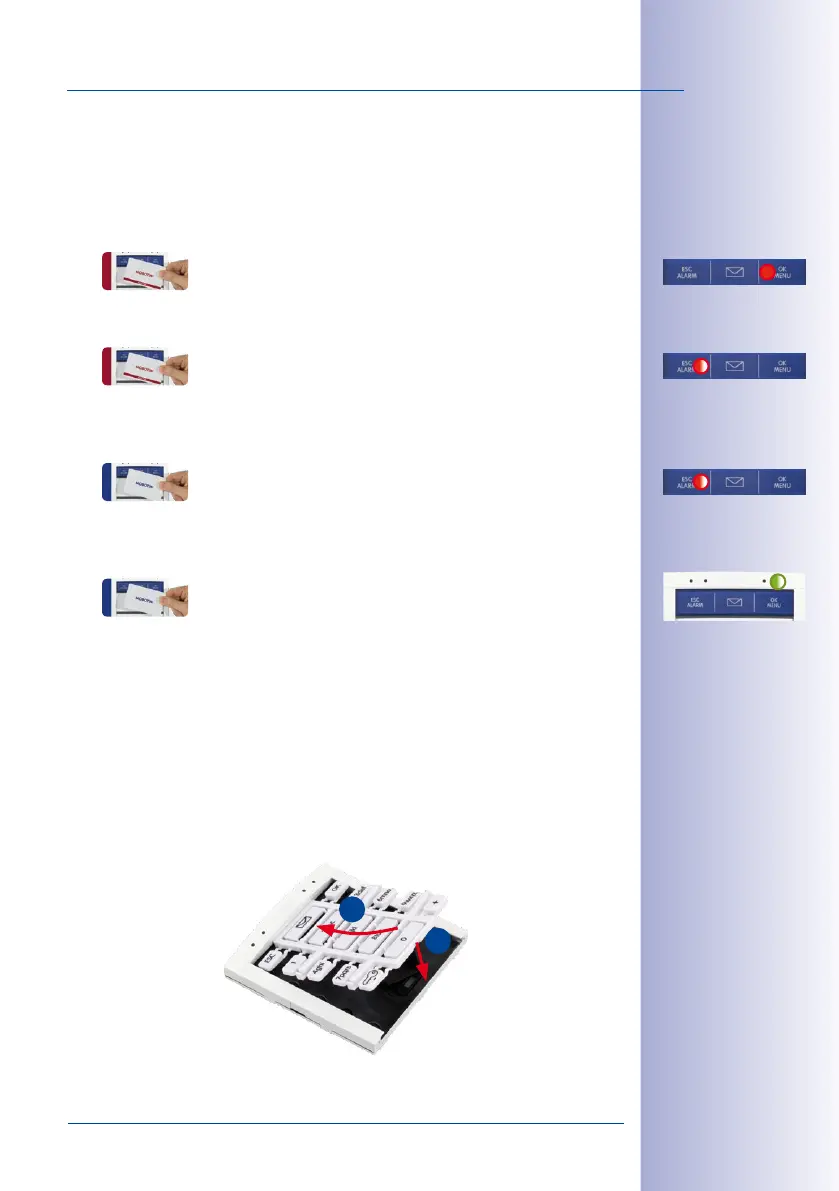
In order to delete a user card, proceed as follows:
1. Hold a trained admin card in front of the BellRFID module. The OK/MENU button at
the top right position lights up red.
2. Again hold the admin card ti the module (the ESC/ALARM button flashes red).
3. Hold the user card you would like to delete in front of the BellRFID module. The
module acknowledges this action by one short flash of the ESC/ALARM button.
4. Again hold the user card you would like to delete in front of the BellRFID module. The
feedback LED of the module briefly lights up green.
4.1.3 Deleting All Cards of a User
By means of the red admin card, you can use the BellRFID module to delete all transponders
of a specific user (i.e., all blue user cards with the same person number) in one step. The
invalid transponders can be re-trained at any door station later on.
1. Disconnect the power supply of the door station, remove the BellRFID module from
the frame and slide the bell buttons out of the module (see
T25 System Manual Part 1,
Section «Exchanging, Removing and modifying Modules»
).
2. Slide the keypad insert into the module, restore the power supply and wait until the
door station has started.
Note that you cannot
use the admin card
to delete itself!
1
2



 To Next Page