117/128
Backing up and Restoring
© MOBOTIX AG • Security-Vision-Systems • Made in Germany
www.mobotix.com • sales@mobotix.com
6.2 Backing up and Restoring
MOBOTIX provides functions for you to store a backup of the door station’s system con-
figuration via a Grandstream video phone, as well as to restore the original settings in
case the configuration has been accidentally changed.
6.2.1 Backing up the System
Follow the instructions outlined in
Section 2.5.3, «Saving the System Configuration»
.
6.2.2 Restoring the System
This function lets you restore the last version of the system configuration you backed up.
Proceed as Follows:
1. Using a Grandstream video phone, open the Admin Setup menu as described in
Section 2.4.2
. You will need the Super PIN for this.
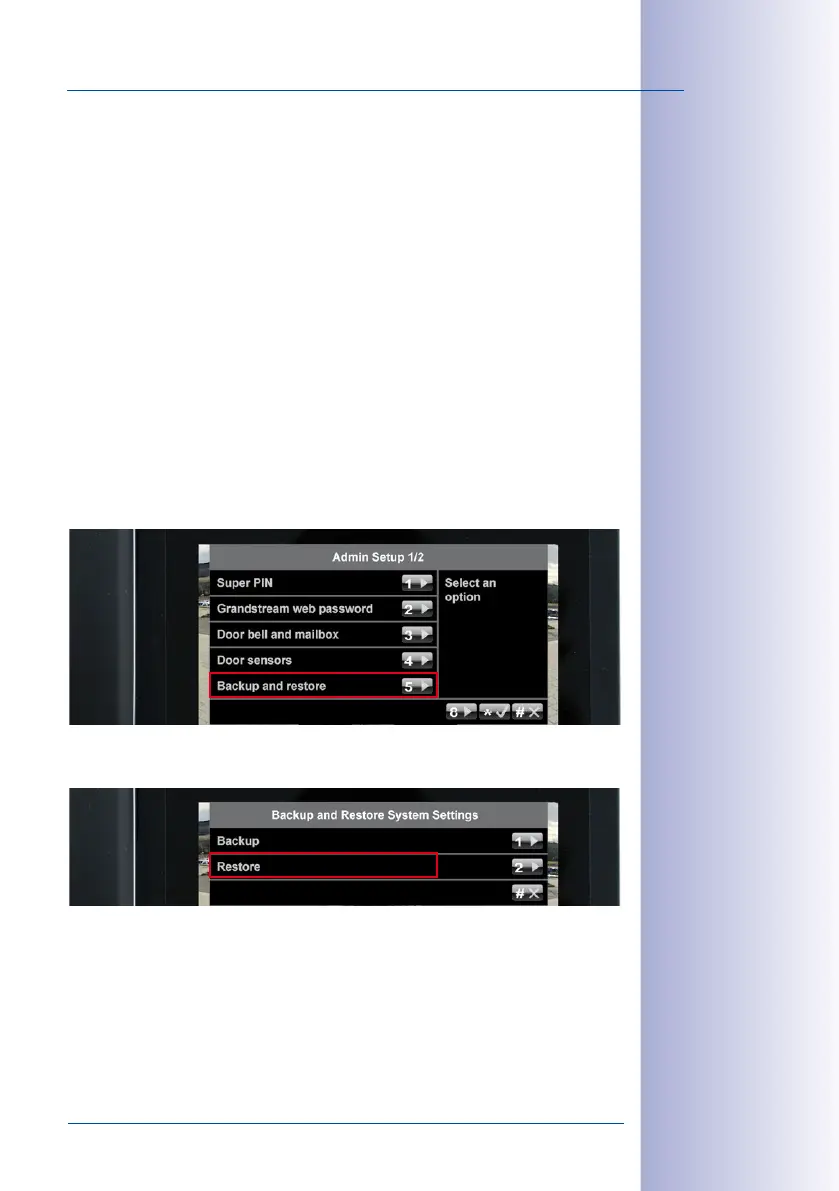
2. Open the first page (1/2) of the Admin Setup menu and press 5 to select the “Backup
and restore” menu item.
3. Now press 2 to restore the settings. The date and time of the last backup are shown
on the display. Press the “*” button to confirm.
4. The system restore process is now running. Do not hang up the receiver until the blue
start screen appears on the video phone. After this, the door station is operational again.
A special system restore procedure is required after exchanging modules. It is described
in
Section 6.2.3
to
Section 6.2.8
.



 To Next Page