89/128
Managing Transponders
© MOBOTIX AG • Security-Vision-Systems • Made in Germany
www.mobotix.com • sales@mobotix.com
4.1.4 Deleting All Cards (Admin and User)
If one or more user cards have been lost, it can make sense to delete all cards (user and
admin) and to train the remaining cards again later on:
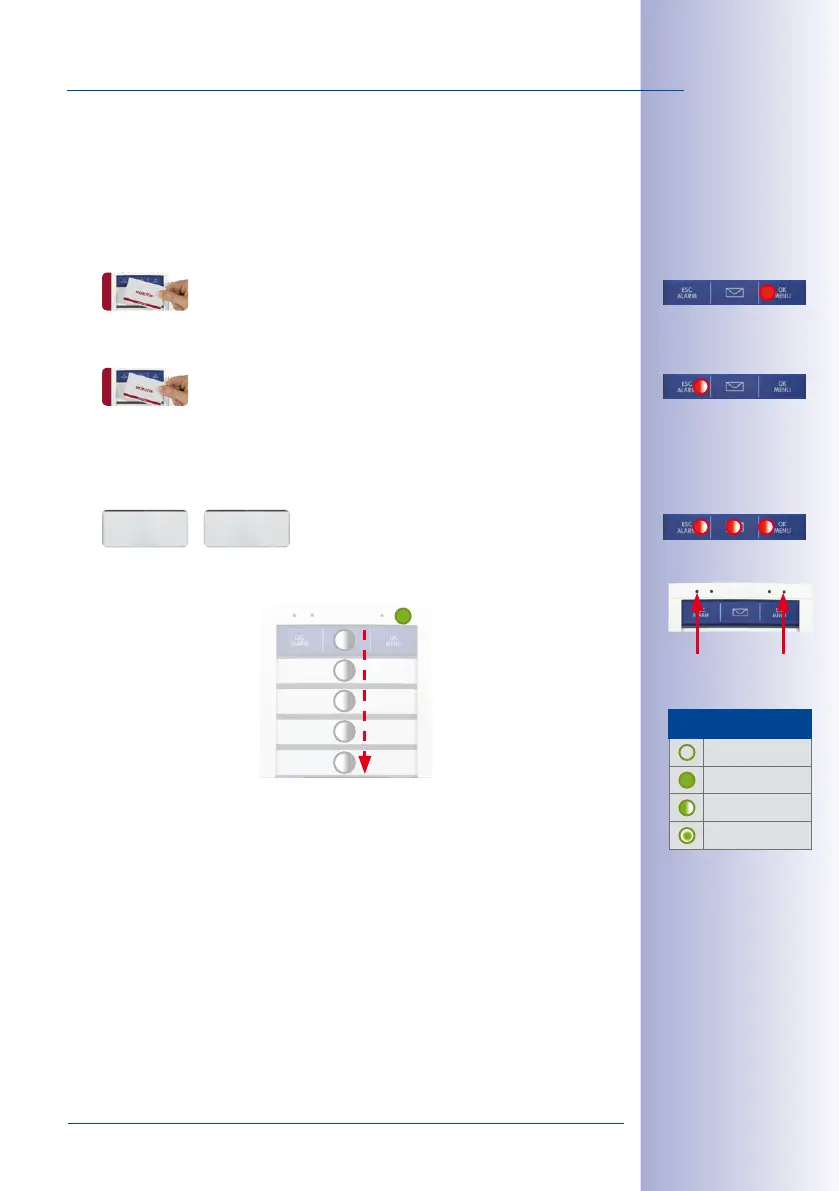
1. Hold a trained admin card in front of the BellRFID module. The OK/MENU button at
the top right position lights up red.
2. Again hold the admin card ti the module (the ESC/ALARM button flashes red).
3. Now press and hold any bell button until the three LEDs at the top start flashing red
and the other LEDs are flashing white. Confirm the deletion by again pressing and
holding the same bell button.
The LEDs light up in a sequence to confirm that all cards have been deleted and the
feedback LED of the module briefly lights up green.
The system prompts you to hold an untrained admin card to the module (
Section 2.3.4,
«Training the Admin Card»
). To train the user cards, proceed as described in
Section 4.1.1,
«Adding User Cards»
.
Walter Mattes Walter Mattes
Kurt Mellert
Joe Weller
Serafin Sourdogan
Walter Mattes
4
5
3
2
1
LED Seaeunce
Status LED
Feedback
LED
LED Patterns
O
Lights up
Blinking
Flashing



 To Next Page