60/128
T25 System Manual Part 2: Initial Setup without a Computer
© MOBOTIX AG • Security-Vision-Systems • Made in Germany
www.mobotix.com • sales@mobotix.com
2.5.3 Saving the System Configuration
The initial setup and protection steps for the system are now complete. MOBOTIX recommends
saving your current system configuration,
• so as to be able to easily reset inadvertent or unwanted changes made to the
system configuration,
•
and easily integrate a new door station module (T25-CamCore, KeypadRFID/BellRFID,
MX-DoorMaster) after replacement without having to run through the initial setup
process again.
The system restore procedure is described in
Chapter 6
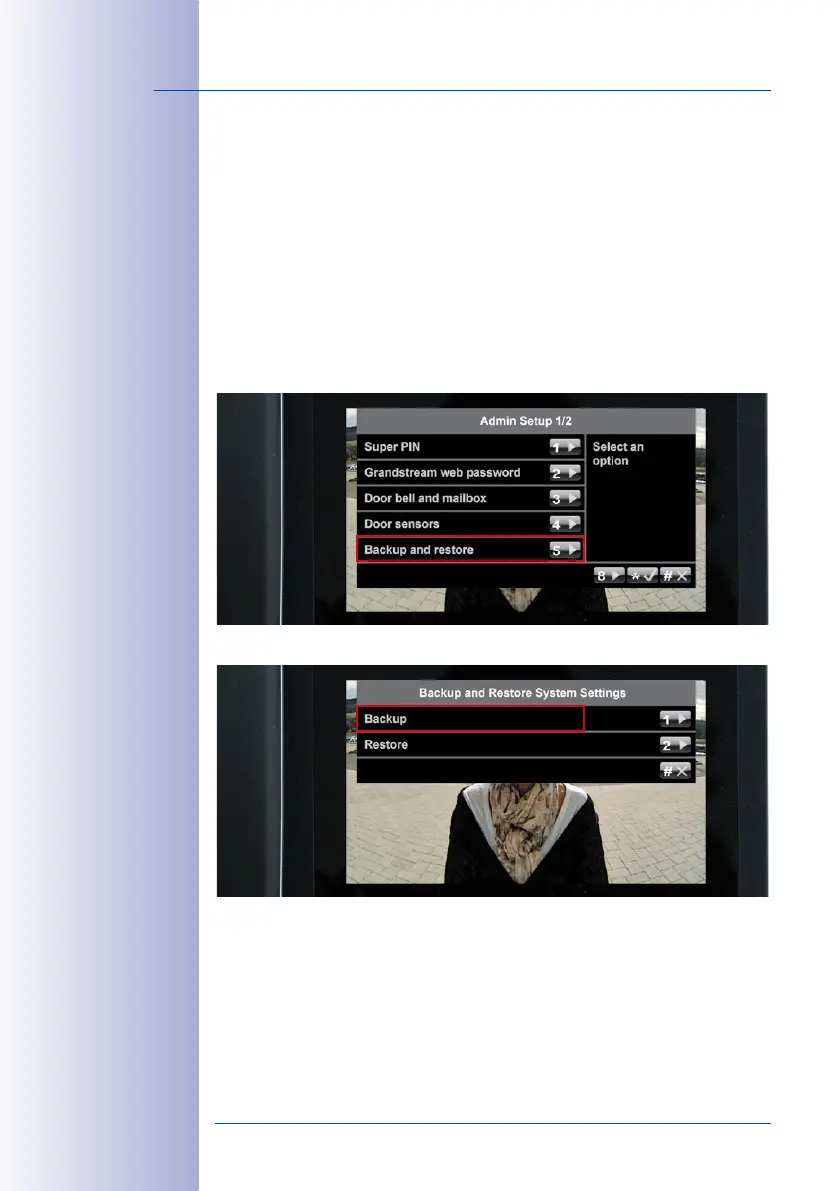
. To save your current system
configuration, open the first page (1/2) of the Admin Setup menu and press 5 to select
the Backup and restore option.
Now press 1 to save your settings. Press the “*“ button to confirm and exit the menu.



 To Next Page