47/128
Step3: Configure the System Using a Video Phone
© MOBOTIX AG • Security-Vision-Systems • Made in Germany
www.mobotix.com • sales@mobotix.com
2.4 Step3: Configure the System Using a Video Phone
These settings are specified on the remote station menu of a connected video phone.
These settings apply throughout the system and only need to be specified on one remote
station, even if several video phones are in use.
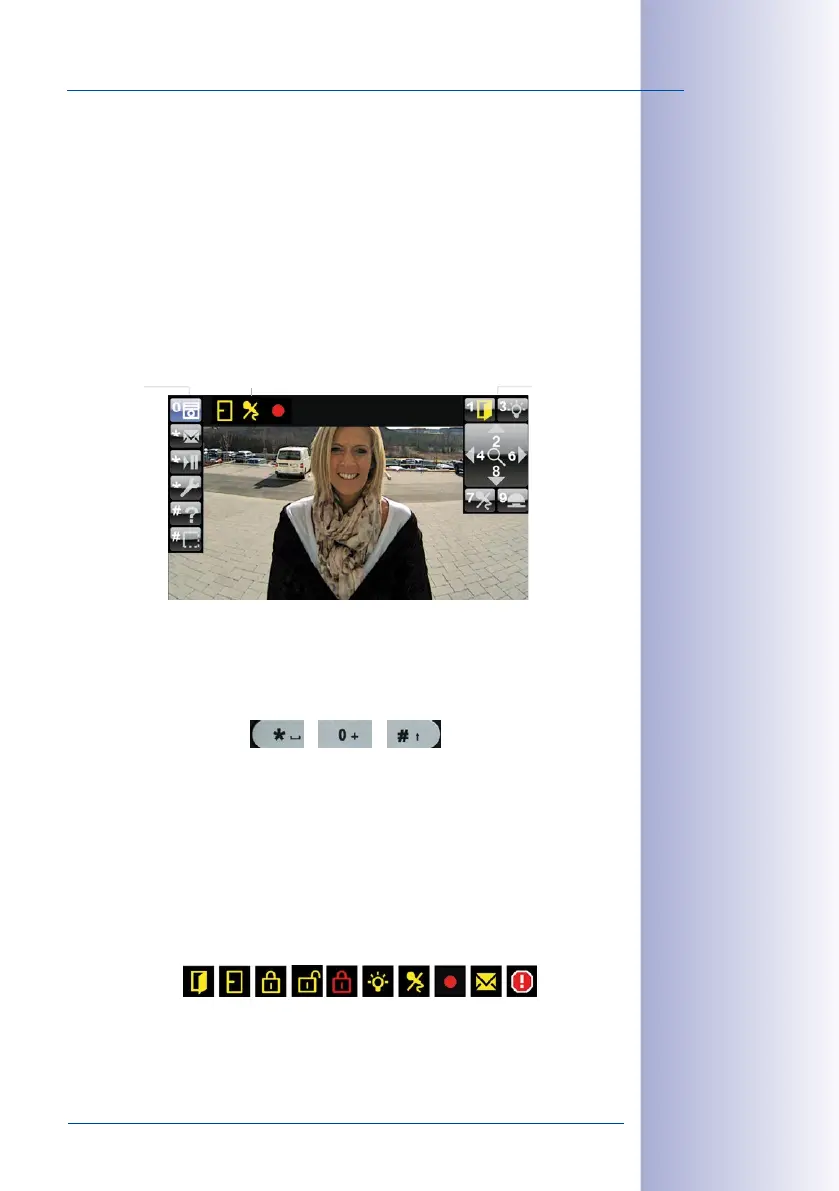
Remote Station Start View:
Once connection between a video phone and the T25 has been established (for example,
by picking up the receiver), the live camera image appears with the remote station menu
and following start view:
Main Menu Items (On The Left)
You select items on the main menu using the lower three buttons (*, 0, #) of the KeypadRFID
on the telephone.
Submenu Items (on the Right)
Displays the subfuntions belonging to the main menu item that has been selected. To
select a subfunction, press the number button that is displayed (for example, press 1 to
operate the door opener).
Status Display (at the Top)
Icons are used to display the current door station statuses (for example, door opened/
closed/locked, telephone microphone disabled and so on).
Submenu:
• Open door/
switch on light
•
• Mute/record
Status displayMain menu:
• Start view
• Voice mailbox
• Player
• Setup
• Help
• Show/
hide menu



 To Next Page