18/128
T25 System Manual Part 2: Overview of Application Scenarios
© MOBOTIX AG • Security-Vision-Systems • Made in Germany
www.mobotix.com • sales@mobotix.com
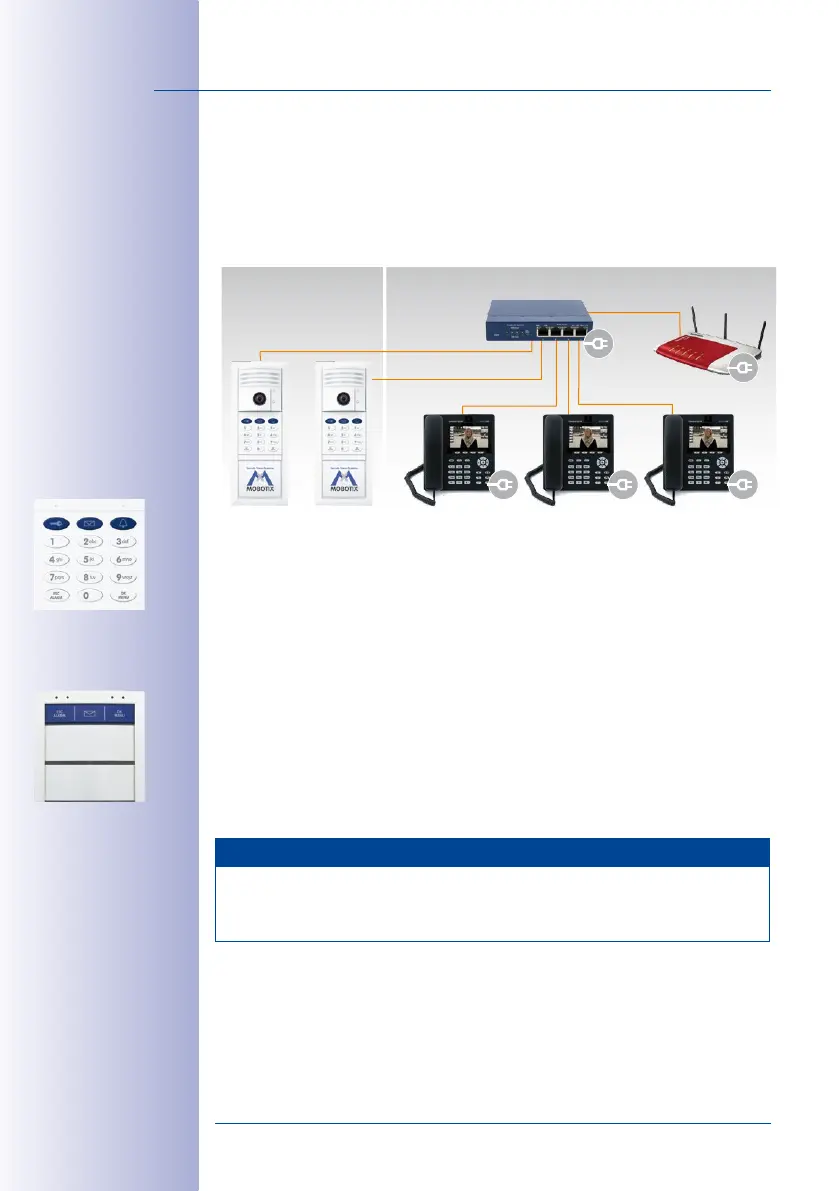
1.2.3 Multiple Door Stations
You can also use multiple networked door stations to secure the main and side entrances
of a house. To do so, select one of the door cameras as the master T25. This camera will
be in charge of the Auto Configuration for all door stations and remote stations.
For initial setup, carry out the Auto Configuration for the selected T25 device (and for this
device only) once you have set up the network and ensured that all system components
are supplied with power (see
Section 2.1, «Step1: Perform the Auto Configuration»
).
Next, you must set up each access module (by entering a Super PIN and adding cards; see
Section 2.2, «Step2: Set Up the KeypadRFID Access Module»
or
Section 2.3, «Step2: Set
Up the BellRFID Access Module»
, respectively). The numbers for each door station (Super
PIN, personal number, transponder number and contact number) should be identical to
the numbers for the master T25 device. We recommend using the same admin card to
set up all of the door stations of the building.
Note
In order to erase cards that have been set up on multiple KeypadRFID or BellRFID modules
from the system (for example, if it is lost or stolen or if the user has moved away), the
card must be erased at every one of these access modules.
Outdoors Indoors
Master door
station (*201)
VoIP video phone
(*102)
VoIP video phone
(*101)
DSL router
(DHCP server)
Door station
(*202)
PoE switch
VoIP video phone
(*103)
KeypadRFID
access module
BellRFID access
module with bell
button set F2



 To Next Page