90/128
T25 System Manual Part 2: BellRFID Access Configuration
© MOBOTIX AG • Security-Vision-Systems • Made in Germany
www.mobotix.com • sales@mobotix.com
4.2 Changing the Super PIN at the BellRFID Module
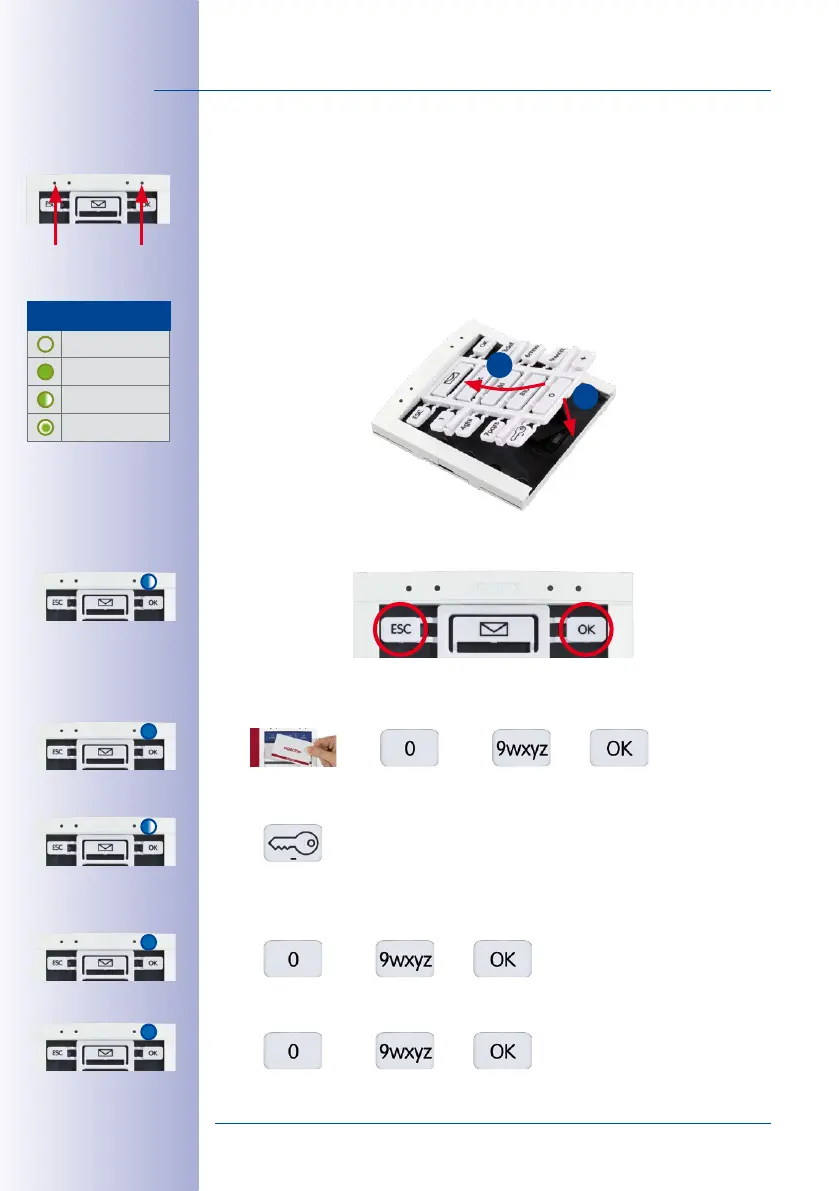
If you want to change the Super PIN of the IP Video Door Station, proceed as follows:
1. Disconnect the power supply of the door station, remove the BellRFID module from
the frame and slide the bell buttons out of the module (see
T25 System Manual Part 1,
Section «Exchanging, Removing and modifying Modules»
).
2. Slide the keypad insert into the module, restore the power supply and wait until the
door station has started.
3. Press the ESC and OK buttons at the same time. The feedback LED of the module
briefly lights up blue.
4. Hold a trained admin card in front of the BellRFID module or enter the Super PIN and
press OK. The feedback LED lights up blue.
5. Press the key button of the keypad insert; the feedback LED is flashing blue.
6. Now enter the
current
Super PIN and press the OK button. The feedback LED of the
module lights up blue.
7. Enter the
new
Super PIN and press the OK button. The feedback LED lights up blue.
Status LED
Feedback
LED
LED Patterns
O
Lights up
Blinking
Flashing
1
2



 To Next Page