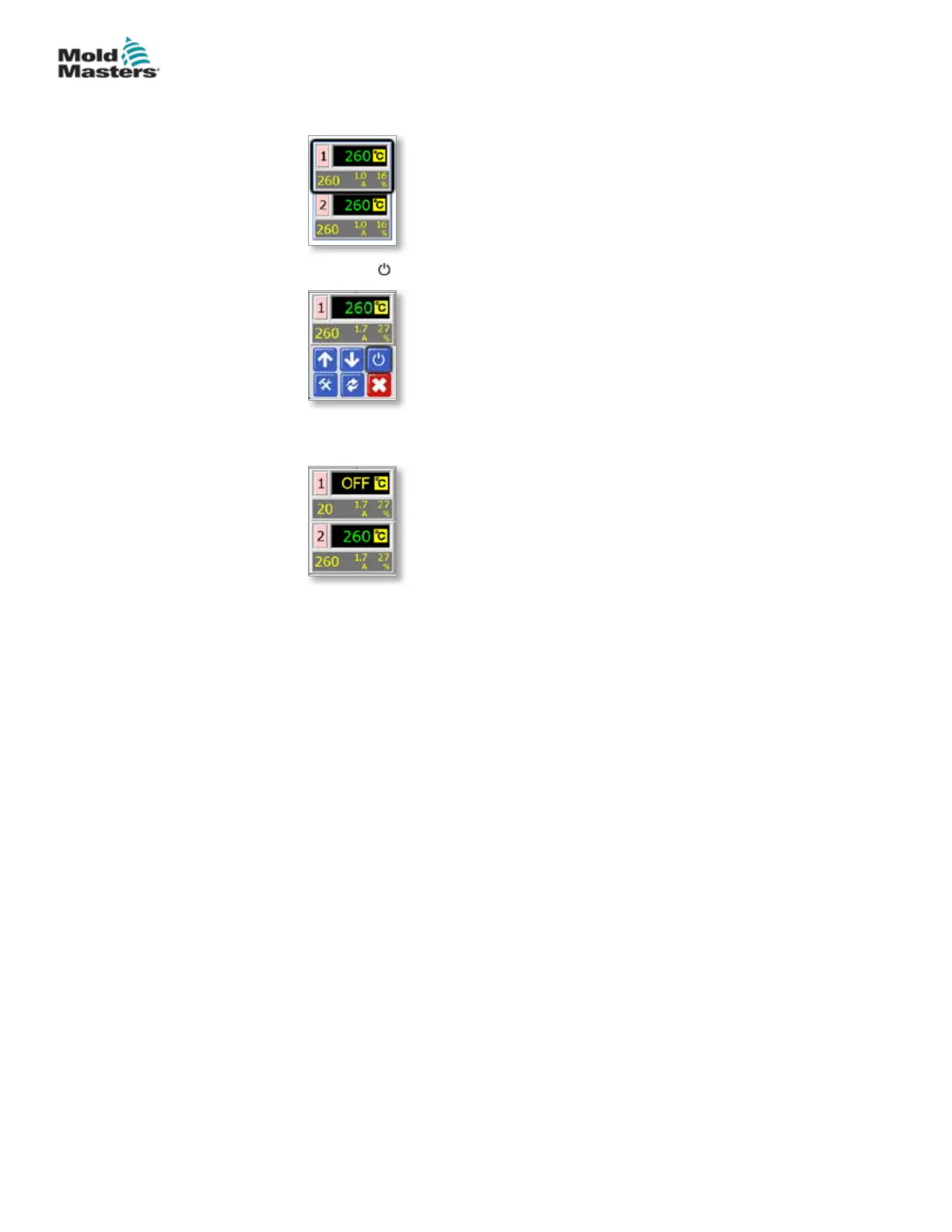
4.6.4 Switch Off Individual Zones
1. To switch o any single zone choose that zone to show the initial menu.
2. Choose [ ] to switch o that zone.
3. See that zone now displays “OFF”.
Repeat the same steps to switch back on again.
4.7 Controller Cabinet
For MT Series Controller:
The power supply to the control cabinet is via a strain relief cable gland plug
wired in either 5-wire star or 4-wire delta conguration. Please check your
specications for details of which supply conguration has been used.
Connections to the tool as standard are either by a mixed power and
thermocouple cable, or individual power cable(s) and individual thermocouple
cable(s).
Mold-Masters standard wiring details are shown in “Section 9 - Wiring
Details”.
For MT-02-02 Controller:
The power supply to the control cabinet is via a strain relief cable gland plug
provided for single phase conguration. A mains connector should be tted
that is suitable for the region where the controller is used. Connection to
the tool is made with a non-detachable loom tted with a Harting HAN10E
connector.
Typical wiring details are shown in “Section 9 - Wiring Details”.
An alarm output option is available for extending the alarm or for inhibiting the
injection process.
4-4
© 2020 Mold-Masters (2007) Limited. All Rights Reserved.
OVERVIEW
MT Controller User Manual



 To Next Page